Author: SectoJoy

  • What is Epoch Time? A Complete Guide to Unix Timestamps and the 2038 Problem

    What is Epoch Time? A Complete Guide to Unix Timestamps and the 2038 Problem

    The Crash That Came 32 Years Early

    In May 2006, AOL’s server infrastructure ground to a halt. The cause was not a hack or a traffic spike. The software had a “billion-second timeout” setting for database requests. When the system added one billion seconds to the current date in 2006, the total exceeded the maximum value of a 32-bit signed integer — the same limit that will trigger the Year 2038 problem. AOL hit the wall 32 years ahead of schedule, and millions of users lost service.

    This was not a hypothetical scenario. It was a preview of what happens when a number runs out of room.

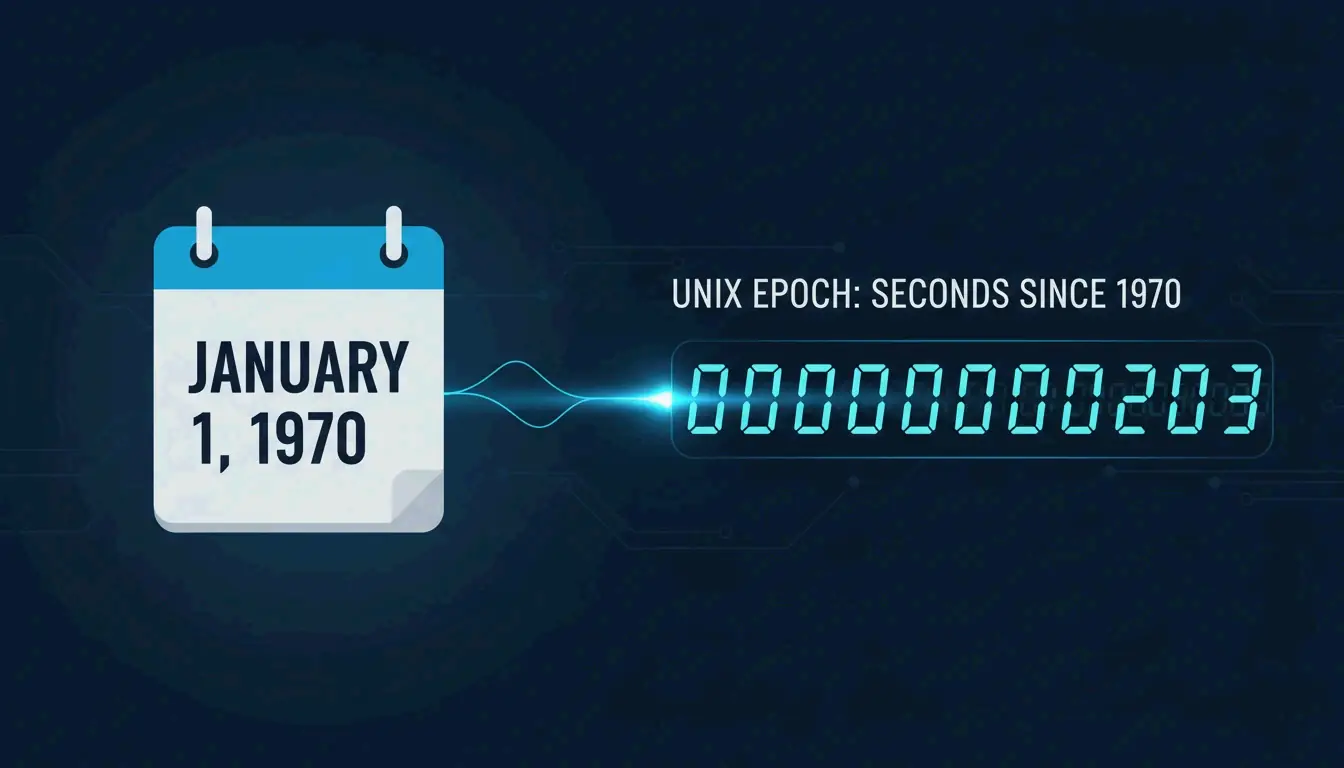
    Epoch time — also called Unix time — is a system that tracks time by counting the total seconds elapsed since January 1, 1970, at 00:00:00 UTC. As of May 2026, it remains the standard way to synchronize data across global databases, APIs, and modern coding environments.

    What Is Epoch Time? The Linear Counter That Runs the World

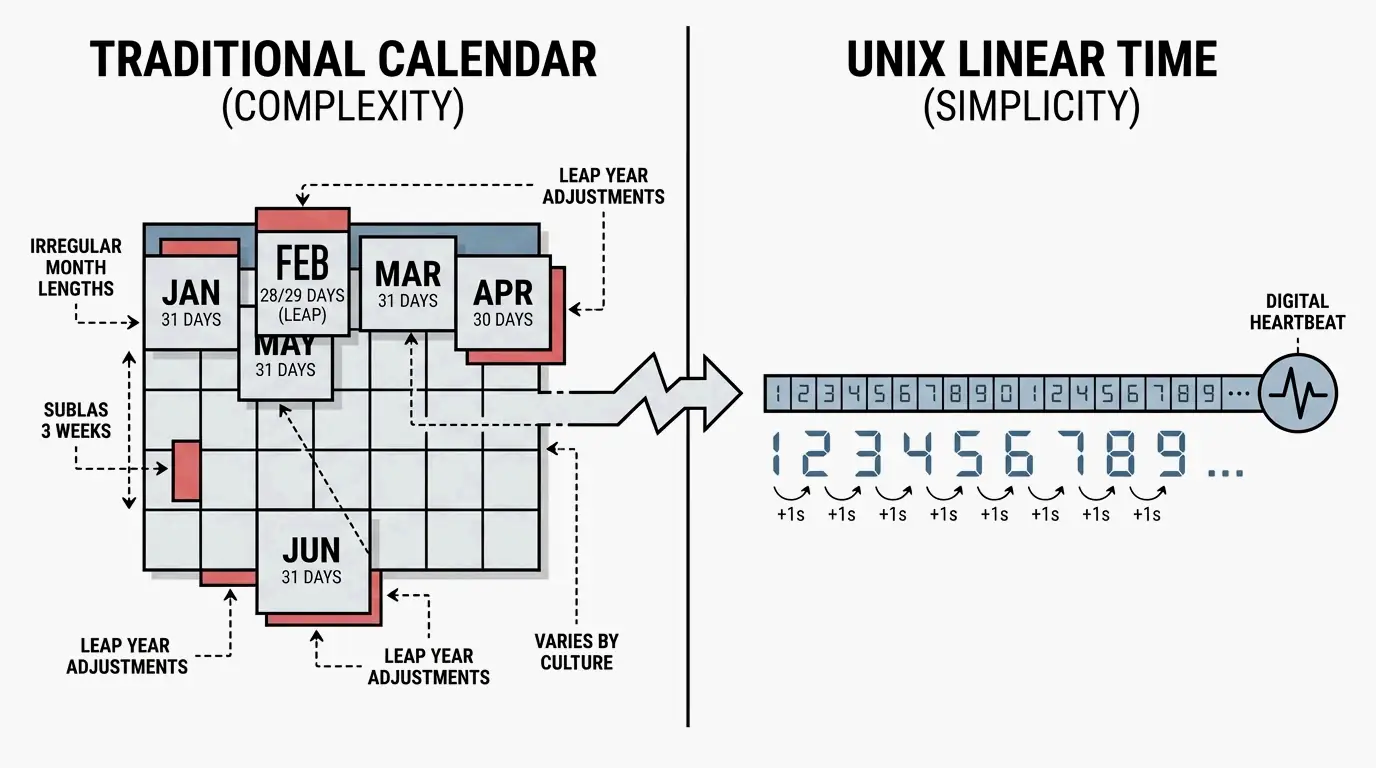
    Think of epoch time as a simple, linear counter. Computer systems use it to represent any moment in history as a single, large integer. While humans prefer dates with months, leap years, and time zones, computers find integers dramatically easier to sort, compare, and store.

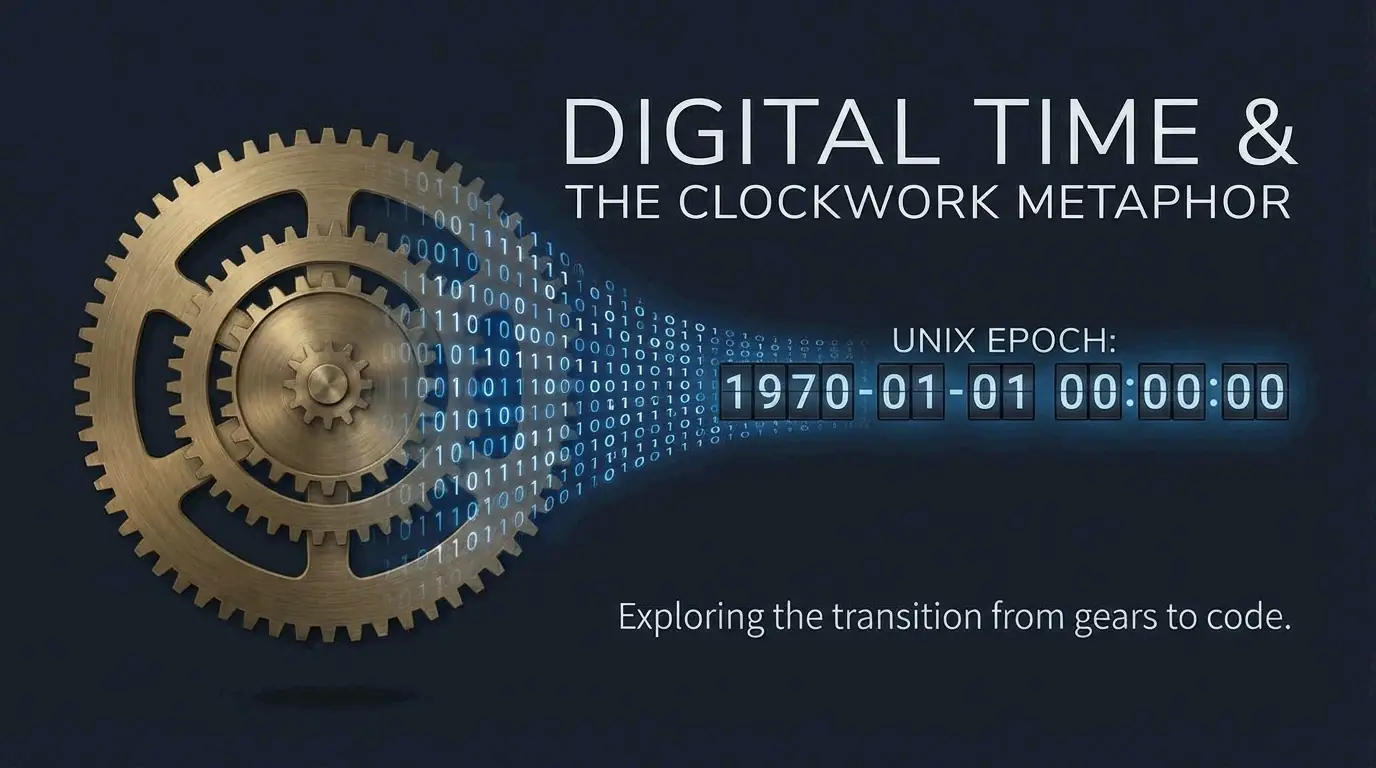
    The foundation is the Unix epoch. According to the POSIX.1 standard, this “starting line” is set at 00:00:00 UTC on January 1, 1970. Every second that ticks by adds one to the counter. On May 6, 2026, the Unix timestamp was approximately 1,778,030,894, as tracked by TimeCal.net.
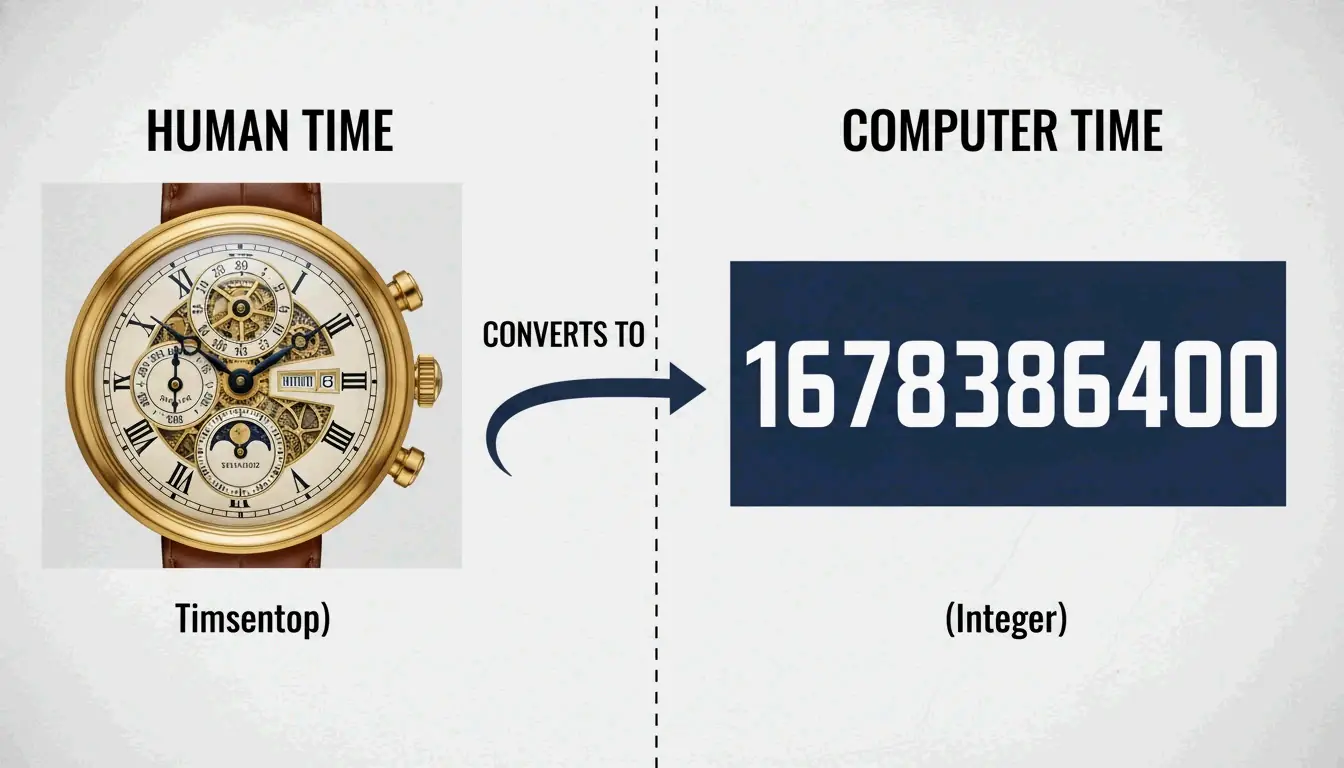
    A simple comparison between human-readable date and the Unix integer

    Since it relies on UTC, epoch time ignores time zones entirely. A single timestamp means the exact same moment in New York, Tokyo, or London. This universal nature makes it the hidden backbone for network protocols, file systems like ext4, and cloud databases.

    Leap Seconds: The POSIX Compromise

    There is one technical quirk. As noted on Wikipedia, Unix time is not a perfect 1:1 map of “atomic time” because it essentially ignores leap seconds. The POSIX.1 standard assumes every day has exactly 86,400 seconds. When UTC adds a leap second, Unix time usually repeats the previous second or “jumps” to stay aligned. This works fine for most applications but may not be precise enough for high-level scientific work requiring sub-second atomic accuracy.

    The Developer’s Cheat Sheet: Converting Epoch Time

    The most common hurdle for developers is turning these long integers into human-readable dates — and the most common bug is mixing up 10-digit vs. 13-digit timestamps.

    As explained by UnixEpoch.net, a 10-digit timestamp counts seconds (standard Unix), while a 13-digit version counts milliseconds. Treat a millisecond timestamp as seconds and your code will think the date is somewhere in the year 55,000.

    Language Quick Reference

    Language Get Current Timestamp Precision Digits
    JavaScript Math.floor(Date.now() / 1000) Seconds (after division) 10
    JavaScript Date.now() Milliseconds 13
    Python int(time.time()) Seconds 10
    Go time.Now().Unix() Seconds 10
    MySQL SELECT UNIX_TIMESTAMP() Seconds 10

    According to PyTutorial, Python’s datetime.datetime.now().timestamp() returns a float where the decimal portion represents microseconds.

    The Digit Length Debugging Rule

    When debugging an API response, check the digit length first. TimeCal.net points out that backend languages like PHP and Go usually stick to 10-digit seconds. Frontend tools and Java often use 13-digit milliseconds for extra detail. Standardizing everything to the time_t data type — the classic C-based integer for time — is the safest way to keep different systems communicating correctly.

    The Year 2038 Problem: The “Epochalypse” Approaches

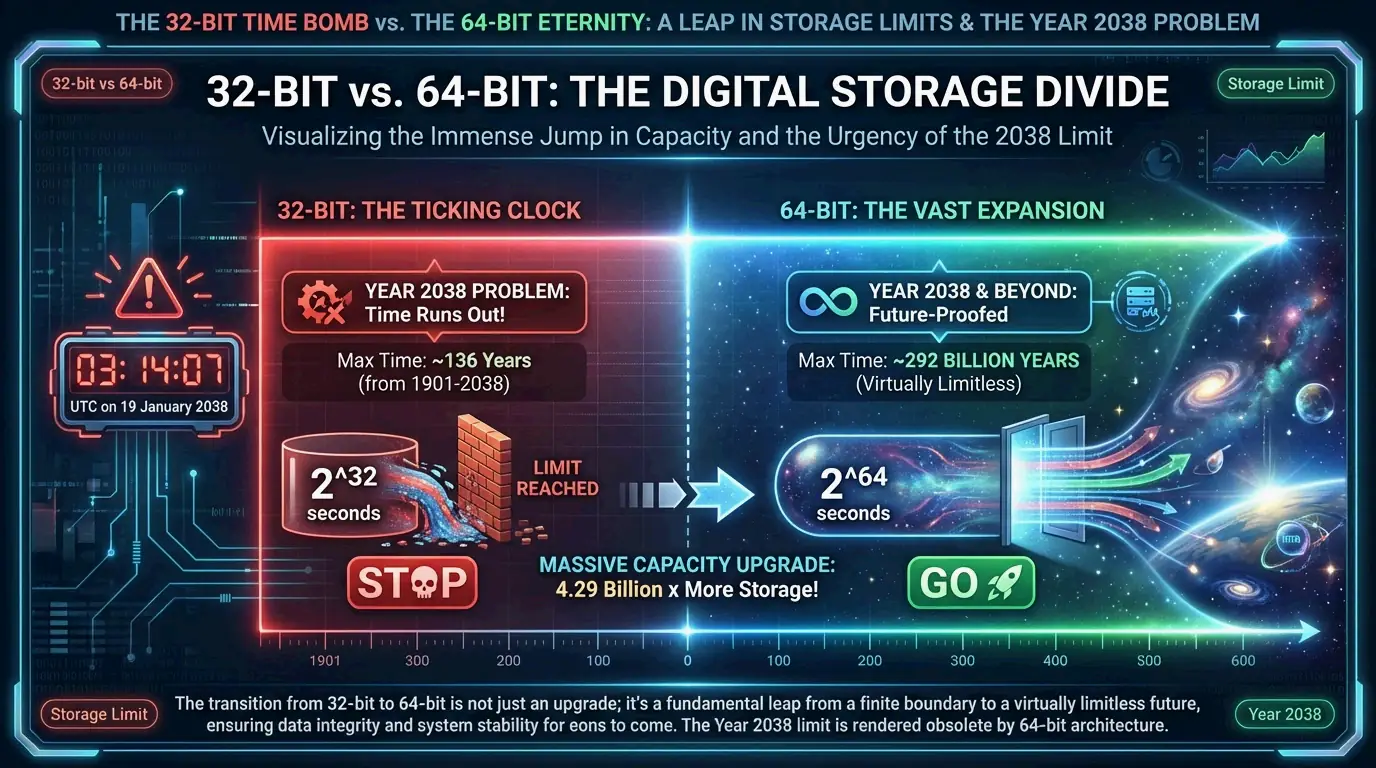
    The Year 2038 problem — sometimes called the Y2K38 superbug or the Epochalypse — is a confirmed, date-certain event. The root cause: systems storing time_t as a signed 32-bit integer can only reach 2,147,483,647. Wikipedia notes that we hit this limit on January 19, 2038, at 03:14:07 UTC. One second later, the counter overflows to a negative number, making affected systems think the date is December 13, 1901.
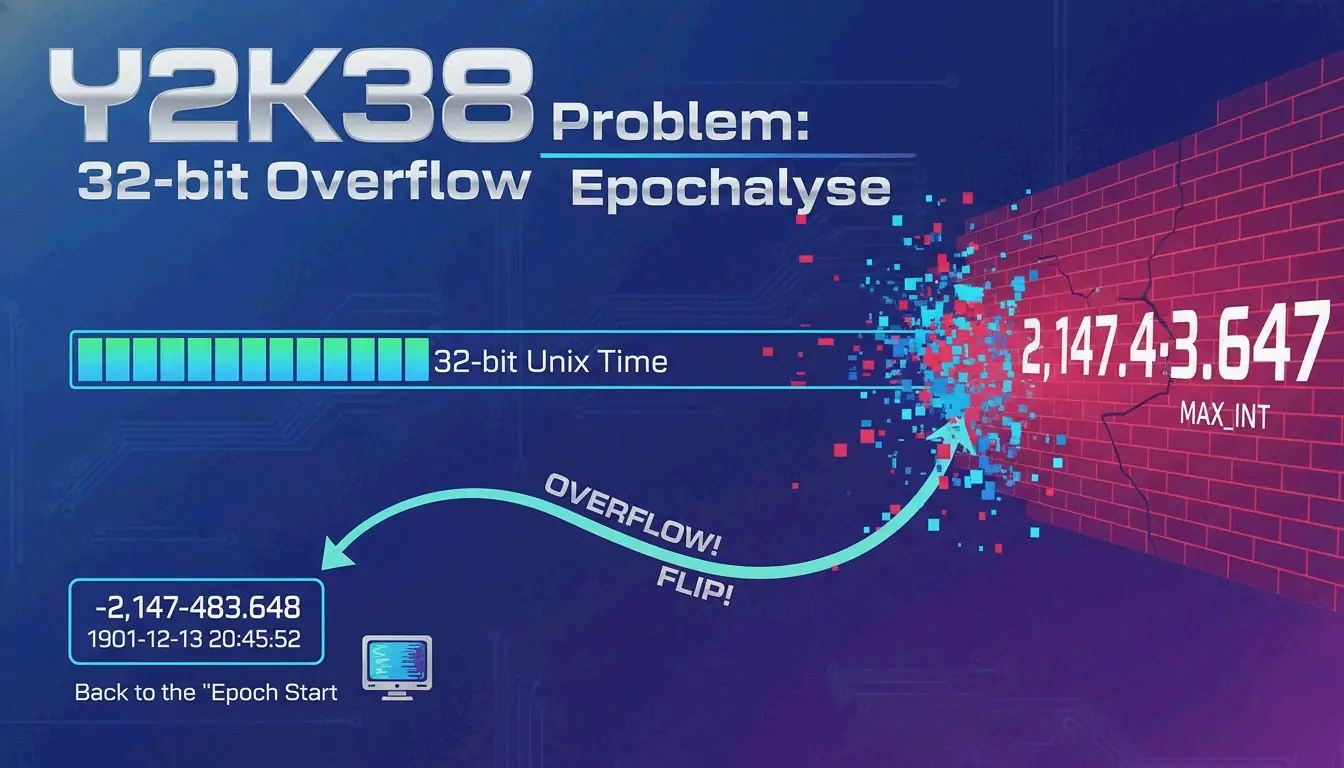
    Visualizing the 32-bit integer overflow at the year 2038

    The AOLserver Preview (2006)

    The AOLserver crash of May 2006 was not theoretical. According to Wikipedia, the software’s billion-second timeout pushed dates past the 2038 limit, triggering the overflow 32 years early. It proved that the problem does not wait for 2038 — any system that performs date arithmetic into the future can hit the wall today.

    The 64-Bit Solution

    Most modern systems have moved to 64-bit integers. The capacity expansion is staggering:

    Integer Size Maximum Value Date Range
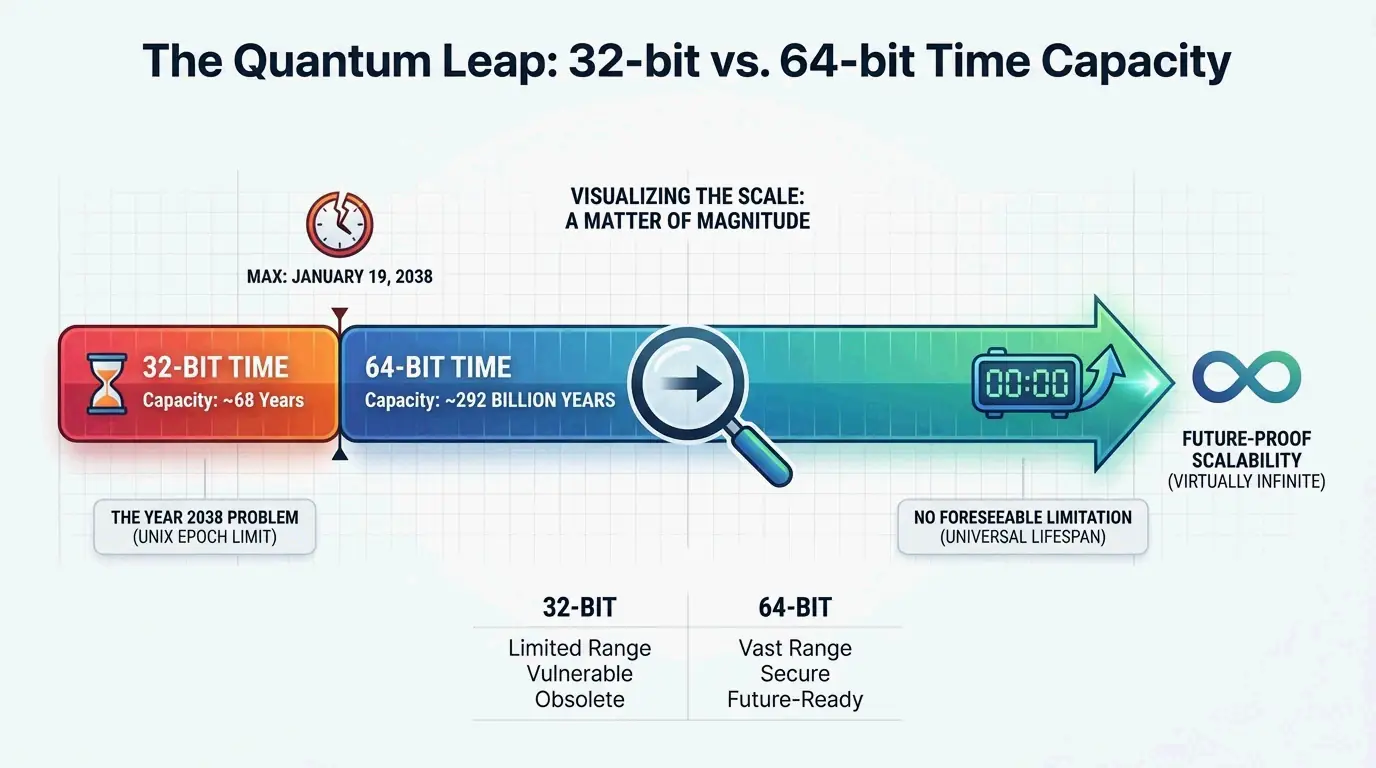
    32-bit signed ~2.1 billion ~68 years (1901-2038)
    64-bit signed ~9.2 quintillion ~292 billion years

    As The Guardian puts it, 292 billion years is more than 20 times the age of the universe — essentially a permanent fix for human timekeeping. The remaining risk lies in embedded systems, legacy databases, and IoT devices that cannot be easily upgraded.

    Leap Seconds: When Your Clock Repeats Itself

    The way Unix time handles leap seconds creates a subtle but real problem for high-precision systems. Because POSIX.1 insists every day has exactly 86,400 seconds, there is no way to represent a “61st second” in a minute.

    When a positive leap second occurs, UTC moves to 23:59:60. A standard Unix clock often just repeats the timestamp for the first second of the next day:

    TAI Time UTC Time Unix Timestamp
    1999-01-01T00:00:31.00 1998-12-31T23:59:60.00 915148800.00
    1999-01-01T00:00:32.00 1999-01-01T00:00:00.00 915148800.00

    As shown in data from Wikipedia, the timestamp 915148800 becomes ambiguous — it refers to two different moments. This “double-counting” can cause glitches in high-frequency trading or scientific logging where the exact order of events is critical.

    FAQ

    What is the difference between 10-digit and 13-digit timestamps?

    A 10-digit timestamp counts seconds since the epoch — the standard for databases and backend languages. A 13-digit timestamp counts milliseconds, the default for JavaScript and Java. To convert milliseconds to seconds, divide by 1,000. Mixing them up is the single most common timestamp bug in production code.

    Can Epoch time represent dates before January 1, 1970?

    Yes. Dates before the epoch are represented as negative numbers. For instance, Wikipedia notes that -31,536,000 represents January 1, 1969 — exactly one year before the epoch started. Modern 64-bit systems handle these negative values without issue.

    Is “The Epoch Times” newspaper related to Unix epoch time?

    No. The Epoch Times is an international media company and newspaper. Unix Epoch time is a technical standard used in computing. They share a name but serve completely different worlds.

    Conclusion

    Epoch time is the invisible engine of digital timekeeping — a straightforward, number-based system that allows everything from Linux servers to web browsers to stay in sync without timezone headaches. The legacy of 32-bit systems is a real and growing risk as 2038 approaches. For developers, now is the time to audit old code, ensure the switch to 64-bit integers is complete, and standardize on consistent timestamp formats across every layer of the stack.

  • Understanding How a Time Stamp Indicates the Date and Time in Digital Systems: From Unix Epoch to ISO 8601

    Understanding How a Time Stamp Indicates the Date and Time in Digital Systems: From Unix Epoch to ISO 8601

    The Quartz Crystal Inside Every Computer

    Inside every smartphone, server, and laptop, a tiny quartz crystal vibrates at a precise frequency. These hardware oscillators turn physical vibrations into digital ticks, and those ticks become the foundation of every timestamp ever generated. According to Merriam-Webster, a digital timestamp is “an indication of the date and time recorded as part of a signal or file, marking exactly when an event occurred.” But the journey from quartz vibration to a human-readable date involves an elegant chain of abstractions that most developers never think about — and that is a problem, because understanding how it works is the key to avoiding the bugs that break production systems.

    Understanding how a time stamp indicates the date and time in digital systems involves tracking elapsed intervals from a fixed reference point. Most systems use the Unix Epoch (seconds since January 1, 1970) or formatted strings like ISO 8601 to ensure precise synchronization across global networks, blockchain ledgers, and modern 64-bit computing environments.

    The Core Logic: How Machines Define Time

    In computing, a timestamp is not a label — it is an operational measurement. While humans rely on descriptive names like “April” or “Tuesday,” digital systems treat time as a continuous linear counter. The foundation is the Epoch, which acts as a universal starting line. Most modern operating systems calculate the current moment by counting the increments that have passed since this reference point.

    To keep everything consistent across different hardware and geographies, the world uses Coordinated Universal Time (UTC). As noted by Wikipedia, UTC is an atomic time scale designed to approximate mean solar time at 0 degrees longitude. By using UTC, computers in different time zones synchronize perfectly. The timestamp remains a constant number, and the “local time” displayed on your screen is calculated only at the final rendering step.

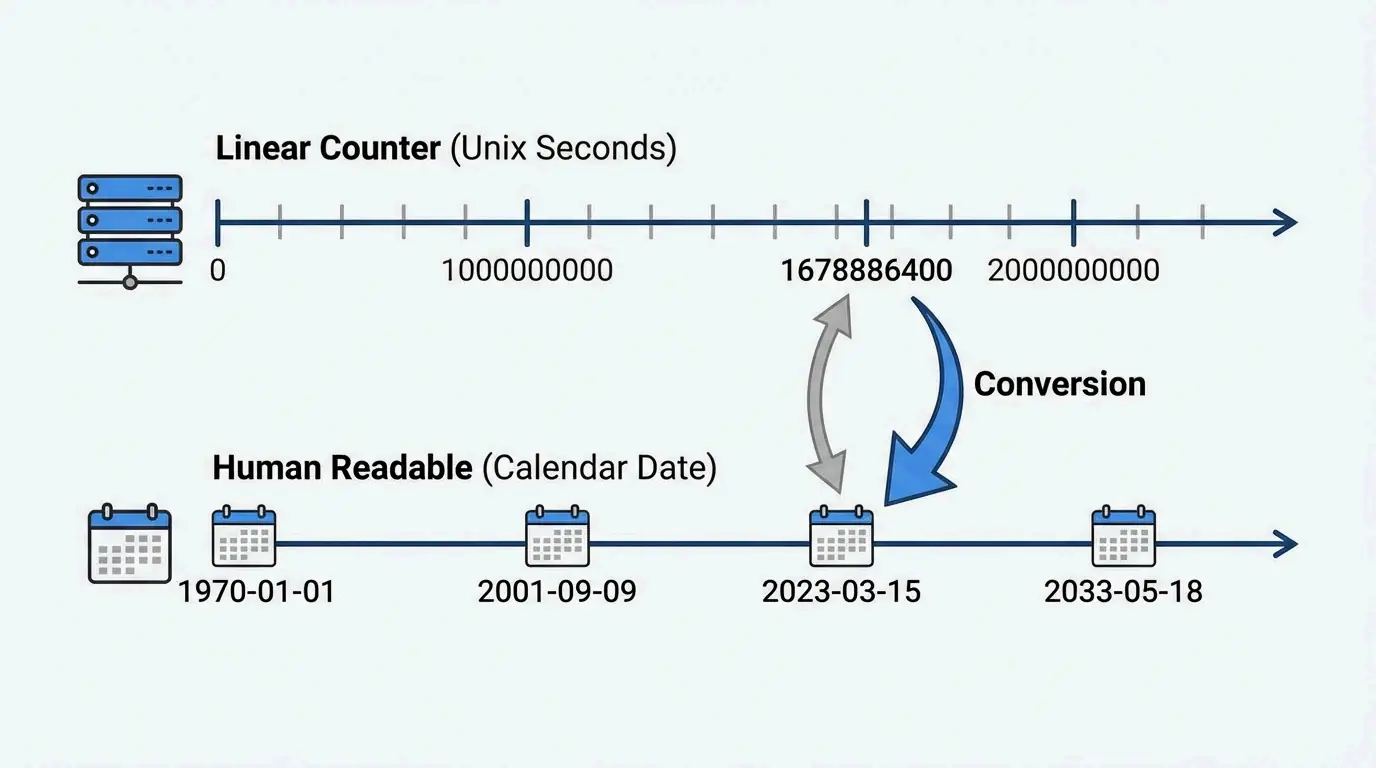
    Human-readable time vs. machine linear time relationship

    The Unix Epoch: Counting Seconds Since 1970

    The most common way computers keep time is Unix time — counting the number of non-leap seconds that have passed since 00:00:00 UTC on Thursday, January 1, 1970. As explained by NIXX/DEV, a Unix timestamp is a single integer with no timezone attached. If two systems record the same event at the exact same moment, they produce the same number. No ambiguity.

    How these numbers are stored depends on the system’s architecture:

    Architecture Integer Size Range Status in 2026
    32-bit signed ~2.1 billion ~68 years from 1970 Being phased out
    64-bit signed ~9.2 quintillion ~292 billion years Industry standard

    The consequences of staying on 32-bit are not theoretical. The Y2K22 Microsoft Exchange bug demonstrated this in January 2022: a 32-bit overflow caused malware-scanning updates to fail because the date format exceeded 2,147,483,647. It was a dress rehearsal for 2038.

    Leap Seconds: The POSIX Compromise

    One technical subtlety of Unix time is how it handles leap seconds. Unlike UTC, which adds leap seconds to keep pace with Earth’s slowing rotation, Unix time assumes every day has exactly 86,400 seconds. According to Wikipedia, this creates a tiny “jump” or repeat in the timestamp during a leap second event. The POSIX standard prioritizes mathematical simplicity over astronomical accuracy — a pragmatic trade-off that has served computing well for over fifty years.

    The 2038 Problem: Where We Stand in 2026

    As of April 2026, the transition from 32-bit to 64-bit time storage is nearly complete in mainstream technology — but gaps remain.

    The Year 2038 Problem occurs because signed 32-bit integers have a maximum value of 2,147,483,648. On January 19, 2038, at 03:14:07 UTC, these systems will hit their limit and wrap around to a negative number, effectively making the date jump back to 1901.

    32-bit vs. 64-bit time storage capacity extreme comparison

    Current transition status:

    • Linux and Windows: Most modern versions have switched to 64-bit time_t structures.
    • The capacity shift: 64-bit integers extend the range to 292 billion years — longer than the age of the universe.
    • Legacy systems: According to Wikipedia, the threat remains real for embedded systems, older IoT devices, and databases using 32-bit fields for historical or future records.

    ISO 8601: Making Timestamps Human-Readable

    Computers love integers. Humans need structured strings. ISO 8601 bridges the gap. According to Wikipedia, it uses the format YYYY-MM-DDThh:mm:ssZ. The “T” separates date from time. The “Z” (Zulu time) indicates UTC with zero offset.

    The format’s killer feature is lexicographic sortability — because the largest unit (year) is on the left, standard string sorting produces chronological order. No date parsing required. This makes ISO 8601 the favorite for cloud computing, APIs, and log aggregation systems.

    Converting Timestamps: The Developer’s Daily Task

    In 2026, standard libraries handle the conversion seamlessly. In JavaScript:

    new Date().toISOString()
    // Output: "2026-04-22T14:30:00.000Z"
    

    According to NIXX/DEV, these tools are essential for checking API responses and reading server logs that store raw epoch values. The workflow is always the same: store as Unix integer, serialize as ISO 8601, display in local time.

    Blockchain: Why Timestamps Cannot Be Faked

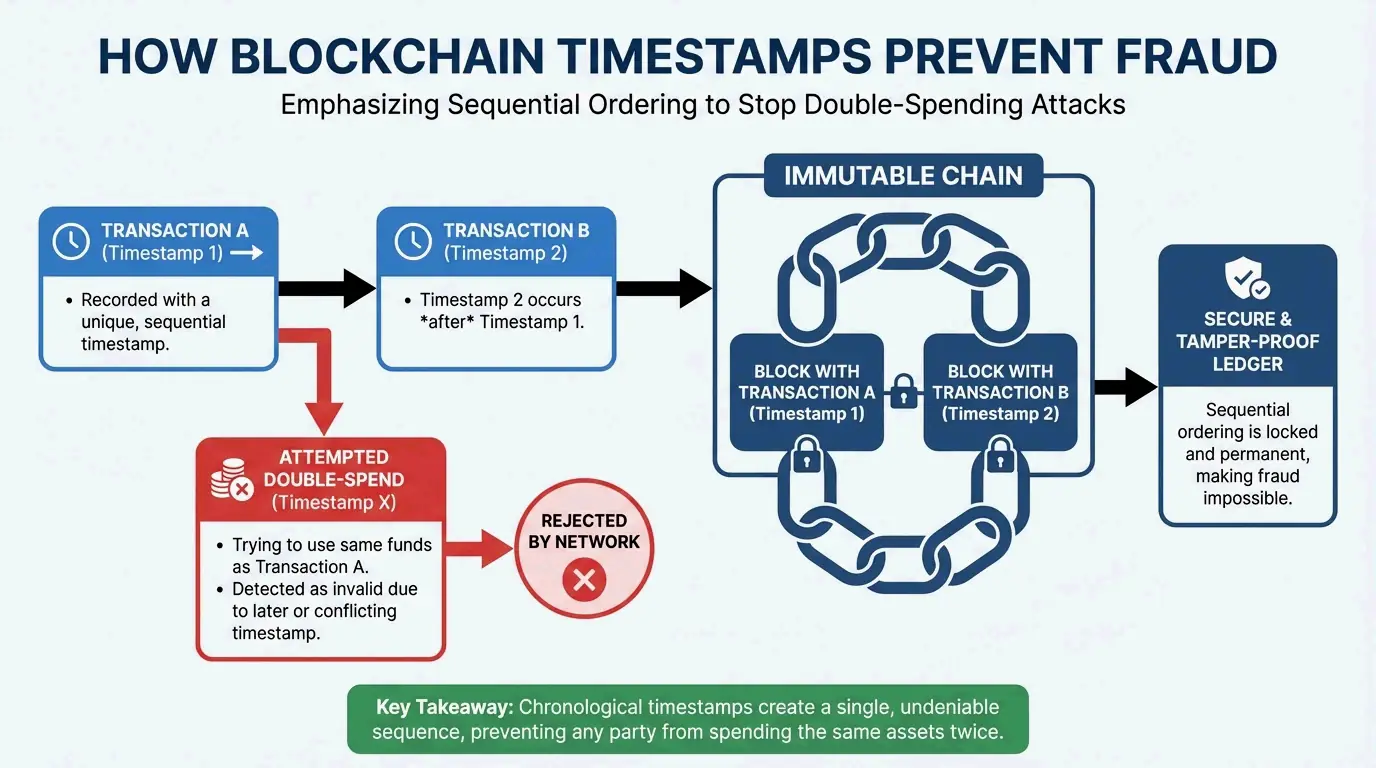
    In decentralized systems, timestamps are a primary defense against fraud. As Finst explains, they ensure all transactions are recorded in the right order, creating a history that anyone can verify but no one can change.

    Satoshi Nakamoto’s Bitcoin design relied on chronological ordering to solve the double-spending problem. As noted by Finst, “Satoshi Nakamoto… described that timestamps are essential for preventing problems like double spending and for establishing a reliable order of transactions.” In Bitcoin, every new block must have a timestamp later than the median of the previous 11 blocks. This keeps the blockchain moving forward and proves which transaction happened first.

    Simplified logic of timestamp-based double-spend prevention

    FAQ

    What is the difference between Unix Epoch time and ISO 8601?

    Unix Epoch time is a raw integer counting seconds since January 1, 1970 — optimized for machine computation and storage. ISO 8601 is a human-readable string format (e.g., 2026-04-22T14:30:00Z) optimized for data exchange, sorting, and display. The best practice is to store as Unix integers and serialize as ISO 8601 for APIs and logs.

    Is the Year 2038 problem still a threat in 2026?

    For mainstream systems (Linux, Windows, macOS), the transition to 64-bit time_t is nearly complete. The remaining threat lies in embedded systems, legacy IoT devices, and older databases that still use 32-bit fields. Organizations should audit their infrastructure for any remaining 32-bit time storage before 2038.

    How do blockchain timestamps prevent double spending?

    Blockchain timestamps create a cryptographically secured chronological order for every transaction. When someone attempts to spend the same digital asset twice, the network compares timestamps — the earlier transaction is accepted, the later one is rejected. Bitcoin’s Median Past Time rule ensures that no block can have a timestamp earlier than the median of the previous 11 blocks, preventing miners from rewriting history.

    Why does UTC matter for timestamps?

    UTC provides an international time standard that stays the same regardless of geographic location. By storing timestamps in UTC, systems across different time zones can synchronize perfectly. Local time conversion happens only at the display layer, preventing the timezone-related bugs that plague systems using local time for storage.

    Conclusion

    Digital timestamps are the invisible glue of the modern world. They translate raw numbers into synchronized reality using standards like the Unix Epoch and ISO 8601. By counting seconds from a fixed starting point, systems maintain the precise, clear records needed for everything from global stock markets to secure blockchains.

    As 2038 approaches, completing the transition to 64-bit integers remains a top infrastructure priority. Developers should audit legacy 32-bit systems now and standardize on ISO 8601 for API data to ensure cross-platform compatibility for decades to come.

  • Epoch Time: Unlocking the Computer Revolution

    Epoch Time: Unlocking the Computer Revolution

    The Party That Celebrated a Billion Seconds

    On September 9, 2001, a group of programmers gathered in Copenhagen, Denmark, to celebrate a number. At exactly 01:46:40 UTC, the Unix timestamp reached 1,000,000,000 — one billion seconds since January 1, 1970. They called it the “Unix Billennium,” and they threw a party for an integer. It was, in its own quiet way, one of the most nerdy and wonderful moments in computing history.

    That number has kept growing ever since. As of 2026, it is well past 1.7 billion, and it will not stop. This is Epoch Time — also called Unix Time — the system that tracks time by counting the total seconds elapsed since January 1, 1970 (UTC). It remains the backbone of global computing, though the industry is now in the final stages of a massive transition to 64-bit systems to address the looming “Year 2038” overflow.

    What Is Epoch Time? The Definition That Changed Computing

    According to Wikipedia, Unix Time measures how many “non-leap seconds” have passed since 00:00:00 UTC on Thursday, January 1, 1970 — a moment known as the Unix Epoch. The choice of that date was mostly convenience. When Unix was being developed at Bell Labs, engineers needed a clean starting point. Before POSIX.1 standardized it, early versions of Unix experimented with other dates like 1971 or 1972. Settling on 1970 gave the world a universal standard.

    As author Douglas Adams famously joked, “Time is an illusion. Lunchtime, doubly so.” In the digital world, that illusion becomes concrete: a single integer that increments once per second, endlessly. By turning time into a number that just keeps going up, Unix Time removed the need for computers to perform complex calendar math for every basic task.

    The Digital Heartbeat: How It Works

    Think of the Unix clock as a “digital heartbeat.” Every day is exactly 86,400 seconds. While human calendars wrestle with months of different lengths and leap years, the Unix timestamp simply adds “1” to its total every single second.

    Linear progression of Unix seconds vs. complex calendar cycles

    This simplicity is why every major programming language uses it. Wikipedia notes that JavaScript’s Date library tracks time in milliseconds since the epoch. Modern file systems like APFS and ext4 use nanoseconds. The concept remains the same — a linear count that ignores the messy human calendar.

    Time Standard Epoch Start Counting Unit
    Unix Time January 1, 1970 Seconds
    JavaScript Date January 1, 1970 Milliseconds
    Windows FILETIME January 1, 1601 100-nanosecond intervals
    GPS Time January 6, 1980 Seconds (continuous, no leap seconds)

    The 2026 Status: Solving the Year 2038 Problem

    By 2026, the tech world is entering the home stretch of a massive infrastructure upgrade. The Year 2038 problem exists because older 32-bit systems can only count so high. The maximum value of a 32-bit signed integer is 2,147,483,647. According to Wikipedia, at exactly 03:14:07 UTC on January 19, 2038, these counters will run out of room and “wrap back” to 1901, crashing everything from bank servers to power grids.

    In 2026, the fix is largely in place. Linux kernel updates and Windows system APIs have moved to 64-bit integers for time_t data types. This is a big deal: without it, any database storing dates past 2038 would simply stop working.

    Why 64-Bit Is the Ultimate Fix

    Attribute 32-bit 64-bit
    Maximum value ~2.1 billion ~9.2 quintillion
    Date range ~68 years ~292 billion years
    Overflow date January 19, 2038 Far beyond the solar system’s lifetime

    A 64-bit integer expands the trackable time range to approximately 292 billion years in either direction — twenty times longer than the universe has existed. Developers have essentially “future-proofed” the digital clock. While 32-bit systems were limited to a 68-year window, 64-bit systems ensure the clock will not overflow for as long as human civilization persists.

    Comparison of 32-bit vs. 64-bit time capacity

    Leap Seconds: The Hidden Complexity

    Even though Unix time is elegant, it has a quirk: it does not account for leap seconds. The POSIX standard mandates that a Unix day must always be 86,400 seconds. But Earth’s rotation is not perfectly consistent, so UTC occasionally adds a leap second to stay aligned with the planet.

    When a leap second occurs, Unix time hits a discontinuity. To stay aligned with UTC, a system might repeat the same second twice or jump backward by one second. This makes Unix time different from International Atomic Time (TAI), which is a pure, uninterrupted count of seconds. Most modern networks use the Network Time Protocol (NTP) to synchronize clocks globally, smoothing over these discontinuities.

    Time Standard Leap Second Handling Behavior
    Unix Time (POSIX) Ignores Repeats or skips seconds
    UTC Observes Adds leap seconds as needed
    TAI (Atomic Time) Ignores Pure continuous count

    From Mechanical Gears to Digital Epochs: A Clockwork History

    The digital epoch is the latest chapter in a long history of timekeeping. The Antikythera mechanism, an ancient Greek device from the first century BCE, is the earliest known “clockwork” computer — used to track astronomical positions. That mechanical brilliance led to the geared clocks of medieval Europe and the pendulum clocks of the 1600s.

    Today, this fascination with timekeeping shows up in unexpected places. The action RPG Clockwork Revolution, developed by InXile Entertainment, is set in a steampunk city called Avalon where time travel is the central mechanic. Players use a device called the Chronometer to rewrite history. Producer Brian Fargo noted that as of August 2025, the team had written 750,000 words of dialogue — a reminder that our obsession with “revolving” time bridges cold engineering and human imagination.

    FAQ

    What is the difference between Unix Time and GPS or Windows FILETIME?

    Unix time counts seconds from January 1, 1970, and intentionally ignores leap seconds to maintain 86,400-second days. GPS time is a continuous count starting from January 6, 1980, that does not ignore leap seconds — it is now several seconds ahead of UTC. Windows FILETIME counts 100-nanosecond intervals from January 1, 1601, offering much finer granularity.

    Why was January 1, 1970, chosen as the Unix Epoch?

    The date was chosen arbitrarily by Unix creators Ken Thompson and Dennis Ritchie during early development in the late 1960s. They needed a convenient, round starting point for their time-tracking system. While early Unix versions experimented with 1971 and 1972, January 1, 1970, eventually became the official POSIX standard.

    How does a 64-bit Unix timestamp prevent the Year 2038 problem?

    The Year 2038 problem occurs because 32-bit signed integers cap at approximately 2.1 billion seconds, which will be reached in January 2038. A 64-bit integer increases capacity exponentially to over 9.2 quintillion, allowing time tracking for over 292 billion years — effectively ensuring the clock will never overflow within the lifespan of our solar system.

    Conclusion

    Epoch Time is more than a string of numbers — it is the universal language of the digital age. From its origin in 1970 to the ongoing 64-bit migration of 2026, Unix time has been a remarkably steady foundation for global computing. Developers should audit older systems for lingering 32-bit variables to ensure readiness for 2038. Meanwhile, the “clockwork” themes we see in culture — from the Antikythera mechanism to modern RPGs — remind us that timekeeping has always been a blend of cold engineering and human imagination.

  • Let Compress Review: Fast Multi-Format Compression for the File-Weight Problem Nobody Plans For

    The 50-Kilobyte Rejection That Changed a Workflow

    A job applicant submits a passport photo to a government portal. The upload fails: “File must be under 50KB.” The original image is 3.2MB. She opens an image editor, resizes it, adjusts quality, exports — 78KB. Tries again. Adjusts quality further — 43KB, but now it looks like a watercolor painting. Twenty minutes lost on a task that should have taken thirty seconds.

    This scenario plays out millions of times daily across government portals, job application systems, marketplace listings, and publisher CMS platforms. File size is rarely the main task, but it routinely becomes the blocking task.

    Let Compress was built for exactly this moment. It is a focused compression toolkit that covers images, documents, media, text, and archive formats — all processed client-side in the browser. The platform does not try to be a general utility directory. It has a clear identity: reduce file size quickly, preserve usability, and keep the process simple.

    The Multi-Format Problem Most Compression Tools Ignore

    Most online compression tools are image-only. That makes sense — images are the most common file-weight bottleneck. But modern workflows are not image-only. A typical project might involve:

    • Screenshots (PNG) for documentation
    • Product photos (JPG/WebP) for e-commerce
    • PDF proposals for client delivery
    • Video assets for social media
    • JSON exports for data handoffs
    • Compressed archives for email attachments

    A single-purpose image compressor does not cover this reality. Let Compress organizes its tools by category, reflecting the actual diversity of file types people need to optimize:

    Category Supported Formats
    Images PNG, JPG, WebP, AVIF, universal image compressor
    Documents PDF compression and optimization
    Media Video and audio compression
    Text Code minification, text compression
    Archives ZIP, RAR, and other archive format handling

    This breadth is important because performance problems do not come from one file format alone. They come from the accumulated weight of mixed assets moving through a workflow.

    The Target-Size Compressor: Built for Real Constraints

    One of Let Compress’s most practical features is its Compress Image to Target Size tool. Instead of blindly reducing quality and hoping for the best, you specify the exact output constraint: 50KB, 100KB, 200KB, or any custom threshold. The tool optimizes around that target, balancing quality and size to hit the number.

    This is designed around how file-size constraints actually work in the real world:

    • Government forms: “Photo must be between 20KB and 50KB”
    • Job portals: “Resume must be under 2MB”
    • Marketplace listings: “Product images must be under 500KB”
    • Email attachments: “Total size must not exceed 25MB”
    • Publisher CMS: “Featured image must be under 200KB”

    These are not suggestions. They are hard limits that block submission. A tool that understands target-size constraints solves the problem in one pass instead of the trial-and-error cycle most users endure.

    Why Compression Is a Biohacking Tool

    The connection between file compression and biohacking is not metaphorical — it is operational. Biohacking, at its core, is about removing waste from systems to improve performance. Compression applies that logic to files.

    Smaller files mean:

    • Faster page loads: Directly impacts Core Web Vitals, SEO rankings, and bounce rates
    • Smoother uploads: Eliminates form-submission failures due to size limits
    • Lighter storage: Reduces cloud storage costs and local disk pressure
    • Better mobile performance: Critical for users on limited bandwidth or metered connections
    • Fewer delivery failures: Email attachments, messaging platforms, and collaboration tools all have size ceilings

    Compression is an invisible performance multiplier. It rarely gets credit because the goal is for nobody to notice it happened — things just work faster and more reliably.

    Privacy: Files That Never Leave Your Machine

    Let Compress states clearly that processing is client-side and that files stay on your device. For a compression tool, this matters more than most users realize.

    When you upload a PDF to an unknown server for compression, you are sending:

    • The full content of that document (which might be a contract, a medical record, a financial statement)
    • The file metadata (creation date, author, revision history)
    • Your IP address and browser fingerprint

    Client-side processing means the file never leaves your browser. The compression runs in JavaScript, locally, using your device’s processing power. No server receives the file. No server stores it. No server can be breached to expose it.

    For anyone working with private PDFs, internal slide decks, unreleased product videos, or raw exports containing sensitive information, this is not a nice-to-have. It is a prerequisite for trust.

    Where Let Compress Is Most Useful

    The platform is a strong fit for:

    • Publishers optimizing images and PDFs before CMS upload
    • Marketers reducing asset size for ads, newsletters, and landing pages
    • Developers shrinking web images for performance work and faster deployments
    • Operations teams handling file-size limits in forms, portals, and internal systems
    • Students and job seekers who need documents under strict upload caps
    • Anyone working with mixed file types who wants one consistent compression destination

    Its appeal comes from versatility without bloat. The site remains centered on one job: make files lighter without making the process annoying.

    The Honest Tradeoff

    The main limitation is shared by most browser compression tools: if you need very precise control over codec parameters, batch automation inside a CI/CD pipeline, or enterprise-scale asset management, you will eventually move to dedicated desktop or server workflows. FFmpeg for video. ImageMagick for batch images. Ghostscript for PDF. These are the right tools for automated, large-scale compression.

    But for day-to-day optimization, that is not the point. Let Compress succeeds because it handles the part of compression work that people face constantly and do not want to over-engineer. Most users do not need to configure codec parameters. They need to get a file under 100KB so they can submit a form.

    The Verdict

    Let Compress is a practical, well-positioned compression platform for the modern web workflow. It covers the file types people actually use, keeps the interaction fast, and makes privacy part of the value proposition rather than an afterthought. That combination gives it more staying power than a basic image-only reducer.

    If you care about performance, cleaner uploads, and lower-friction file handling, Let Compress is worth adding to your toolkit. It treats file size as an efficiency problem that can be solved quickly and directly — which is exactly how good utility software should work.

  • ImageLean Review: The Private Image Workspace That Stays in Your Browser

    The Hidden Data in Every Photo You Share

    In 2012, a researcher downloaded 15,000 publicly shared photos from a popular social platform. Using nothing but the EXIF metadata embedded in each image, he was able to map the exact GPS coordinates of 5,000 users, identify the camera models and timestamps of their devices, and reconstruct daily movement patterns. The photos looked harmless. The metadata told a different story.

    This is the invisible risk that most image tools ignore. You compress an image, you resize it, you convert it — and along the way, you upload it to a server you have never heard of, operated by a company whose privacy policy you will never read. The pixels get processed. The metadata goes along for the ride.

    ImageLean was built with a different premise: your images should never leave your browser. It combines compression, conversion, resizing, EXIF inspection, and metadata cleanup into a single, privacy-first workspace where processing happens entirely client-side. For anyone who handles visual assets regularly, that combination is more than convenient. It changes the trust equation.

    What ImageLean Offers: A Layered Image Workspace

    ImageLean is not a single-purpose compressor pretending to be a toolkit. It organizes its capabilities into clear functional groups:

    Category Tools
    Compression JPG, PNG, GIF, HEIC, WebP compression
    Conversion Image format conversion, bulk conversion
    Editing Resizing, cropping
    Inspection EXIF Viewer, metadata analysis
    Cleanup Watermark removal, metadata stripping

    The breadth matters because image work is rarely one-dimensional. A single asset often needs to be resized for a blog post, converted for platform compatibility, compressed for page speed, and checked for hidden metadata before publishing. ImageLean is designed around that real sequence rather than around one headline feature.

    The EXIF Viewer: Where Privacy Meets Practicality

    The EXIF Viewer is one of the platform’s most distinctive tools. It displays:

    • Camera make, model, and settings (aperture, shutter speed, ISO)
    • Capture date and time with timezone
    • GPS coordinates displayed on a map
    • Software used for editing
    • Thumbnail embedded in the file

    For photographers, this is a quality-control tool. For journalists and researchers, it is a forensic instrument. For privacy-conscious users, it is a warning system — showing exactly what personal information is attached to a photo before it gets shared.

    Why Privacy Is the Real Product

    Many online image tools advertise speed. ImageLean leads with privacy. The homepage and About page both emphasize browser-based processing with no upload, stating clearly that images stay private and secure on your device.

    This is not a minor feature. Image files carry enormous amounts of embedded information:

    • Device fingerprints: Camera model, firmware version, lens type
    • Location data: GPS coordinates accurate to within meters
    • Timestamps: Exact capture time, often more precise than the file creation date
    • Editing history: Software used, modifications made, thumbnail of original

    When you upload an image to a server for compression or conversion, all of that data transfers with it. Most users never realize this. Most utility sites never mention it.

    Client-side processing — where the image never leaves your browser — eliminates this risk entirely. The files are processed by the JavaScript engine running locally on your machine. No server receives the pixels, and no server receives the metadata. For biohackers, researchers, journalists, and anyone handling sensitive visual assets, this is a trust model worth prioritizing.

    Where ImageLean Fits: Practical Use Cases

    ImageLean is designed for users who need frequent, lightweight image operations without opening a full desktop editor:

    • Bloggers preparing screenshots and featured images for publication
    • Indie makers optimizing product assets for faster page loads and better Core Web Vitals
    • Photographers checking metadata before sharing files with clients or publishing online
    • Marketers converting image formats across channels (WebP for web, PNG for print, JPG for email)
    • Researchers and investigators who need fast EXIF inspection for source verification
    • Privacy-conscious users cleaning metadata from personal photos before sharing

    Because the entire toolset lives in the browser, the workflow is seamless: inspect, compress, convert, resize, and clean — all in one place, without changing platforms or opening heavy software.

    Workflow Coherence: The Underrated Advantage

    One of ImageLean’s less obvious strengths is consistency. Many sites that offer multiple image tools feel stitched together, with uneven user interfaces between pages. ImageLean presents as a coherent system. Compression, conversion, editing, and metadata utilities are grouped logically, reducing the mental overhead of finding the next step.

    That coherence matters during repetitive work. Every extra click, every different UI pattern, every separate site adds friction. A unified platform turns image maintenance into a smoother routine, supporting the kind of fast visual operations that happen dozens of times per week in publishing, e-commerce, and product marketing.

    The Honest Limitation

    ImageLean is best understood as a fast image operations layer, not a replacement for professional creative software. If you need deep retouching, complex layer management, advanced masking, or design composition, you will still reach for Photoshop, Figma, or Affinity Photo.

    But that limitation is not a flaw in the product strategy. ImageLean is solving the high-frequency image tasks that slow people down: compress, convert, resize, inspect, clean. These actions are common, necessary, and usually much simpler than the heavyweight tools people default to. Using Photoshop to compress a JPEG is like using a helicopter to cross the street. It works, but it is not the right tool for the job.

    The Verdict

    ImageLean stands out because it understands that image workflows are not only about visual aesthetics. They are also about file size, format compatibility, metadata safety, and processing speed. By combining compression, conversion, resizing, and EXIF visibility inside a privacy-first browser environment, it becomes genuinely more useful than a generic image compressor.

    If you publish online, manage product assets, or care about the hidden data attached to your photos, ImageLean is worth bookmarking. It is a lean, focused toolset that respects both your time and your files — and that is exactly what a modern browser utility should deliver.

  • Do Generator Review: The Browser-Based Utility Hub That Collapses Ten Tabs Into One

    The Invisible Tax of Tab Switching

    Here is a scenario most digital workers know intimately: you need to generate a secure password, so you open a tab. Then you need a QR code for a campaign landing page, so you open another. A random number for a giveaway. A barcode for a product listing. A placeholder business name for a side project. A quick invoice for a freelance client. By noon, you have eight browser tabs open, each with a different utility site, a different interface, and a different trust level.

    That context switching is not free. Every tab change costs attention. Every unfamiliar interface costs seconds. Every site with questionable privacy costs a small amount of mental unease. Individually, these costs are tiny. Accumulated over weeks and months, they become a significant drag on cognitive efficiency.

    Do Generator was built to collapse that scattered workflow into a single browser-based hub. It groups practical generators across categories — daily tools, creation tools, text tools, AI tools, and developer tools — and presents them through a consistent interface with a clear privacy posture. The result is a platform that feels less like a collection of random calculators and more like a utility layer for modern digital work.

    The Tool Stack: What Do Generator Actually Offers

    The homepage highlights a focused but broad set of flagship utilities:

    Category Key Tools
    Daily Tools True Random Number Generator, Password Generator
    Creation Tools Name Generator, Username Generator, Business Name Generator
    Utility Output QR Code Generator, Barcode Generator, Invoice Generator
    Text Tools Various formatting and text manipulation utilities
    Developer Tools Formatting, encoding, and support tools for code workflows

    This selection is not random. Each tool addresses a specific, high-frequency task that interrupts work when you do not have a clean way to handle it. A founder needs naming options. A marketer needs a QR code. A freelancer needs an invoice. A developer needs secure random values. These are the small, repeatable operations that break flow state when they require a dedicated tool hunt.

    The Random Number Generator: Cryptographic Grade, Not Sketchy

    One of the platform’s strongest offerings is its True Random Number Generator. The product page emphasizes cryptographic-grade randomness through the Web Crypto API rather than relying on basic Math.random() pseudo-random shortcuts.

    This distinction matters. Pseudo-random number generators (PRNGs) are deterministic — they produce sequences that can be predicted if you know the seed. The Web Crypto API uses system-level entropy sources (hardware timing, mouse movements, keyboard events) to produce values that are genuinely unpredictable. For testing, giveaways, games, or any context where randomness integrity matters, this is a meaningful quality signal.

    Why a Utility Hub Fits the Biohacker Mindset

    The connection between a utility website and biohacking is not biological — it is operational. Biohacking, at its broadest level, is about removing waste from systems and improving performance. Do Generator applies that logic to digital workflows.

    Every time you can collapse ten small chores into one reliable toolset, you reduce decision fatigue and protect mental energy for deeper work. This is especially relevant for solo operators, creators, and technical generalists who move between admin, content, analysis, and product tasks within a single day.

    The platform is also aligned with a workflow-first philosophy because the tools are direct: land on a page, configure a few fields, get an output. There is minimal ceremony. For people who value speed over software bloat, that simplicity is a feature, not a limitation.

    Privacy and Trust: The Invisible Feature

    Do Generator repeatedly emphasizes privacy, simplicity, and reliability across its homepage and About page. While this messaging does not replace a full security audit, it does signal a coherent product promise.

    For browser utilities, trust is the gating factor. Users are often pasting text, generating credentials, or working with structured information they do not want exposed unnecessarily. The strongest practical trust signal is when a utility can do meaningful work client-side or with minimal input complexity. When a random number generator runs entirely in the browser using the Web Crypto API, your data never leaves your device. That is a meaningful privacy posture for a tool you might use casually and repeatedly.

    From a user experience standpoint, the category layout also supports discoverability. You can move laterally across tools instead of hitting a dead-end page after completing one task. That matters when a platform is trying to become part of your regular workflow rather than a one-time bookmark.

    Where Do Generator Shines

    Do Generator is a strong fit for:

    • Founders who need fast naming, branding, and launch assets without hiring a designer
    • Freelancers who want quick document and code generation helpers for client work
    • Marketers handling QR codes, barcodes, and utility formatting tasks across campaigns
    • Developers looking for lightweight randomization, formatting, and support tools
    • Creators who need quick outputs without installing another application

    Its best use case is not one large, mission-critical process. It is the accumulation of dozens of small, daily wins that would otherwise scatter your attention across the internet.

    The Honest Tradeoff

    A multi-tool platform always faces the same tension: breadth can dilute depth. If you need a highly specialized enterprise workflow, you will eventually outgrow a general utility site. A dedicated finance platform will produce more sophisticated invoices. A full password manager offers more than a password generator. A professional design suite does more than a QR code tool.

    That is not a weakness if you understand the category correctly. Do Generator solves the first 80% of many small jobs quickly, and in practice, that is often the part users actually need. The remaining 20% — enterprise integrations, batch automation, pipeline orchestration — belongs in dedicated software, not a browser utility.

    The Verdict

    Do Generator is a well-executed modern utility website with the right priorities: real tasks, clear organization, and lightweight interaction. It focuses on the friction points that slow people down — password generation, naming, QR output, random data, invoices — and handles them with speed and consistency.

    If your workflow regularly includes any of these small but frequent tasks, Do Generator is worth adding to your toolkit. It does not try to replace your entire software stack. It tries to remove friction from the parts of work that should already be effortless, and it does that well.

  • World Time Zones: A Complete Guide to Global Time Offsets and Records

    World Time Zones: A Complete Guide to Global Time Offsets and Records

    24 Hours, 38 Offsets: How Politics Bent the Clock

    If the world followed pure geography, time zones would be simple: 24 equal slices of 15 degrees longitude each, one hour apart, running from pole to pole. Reality is far messier. According to Wikipedia, the global time spread actually covers 26 hours — from UTC-12:00 to UTC+14:00 — because some Pacific island nations moved their position relative to the International Date Line for economic convenience. Meanwhile, political decisions have created over 38 distinct offsets currently in use, including half-hour and 45-minute increments.

    A world time zone is a geographic region that follows a uniform standard time, primarily defined by its offset from Coordinated Universal Time (UTC). While the globe is theoretically split into 24 zones based on longitude, political boundaries and local decisions have shattered that tidy model.

    UTC: The Reference Point That Is Not a Time Zone

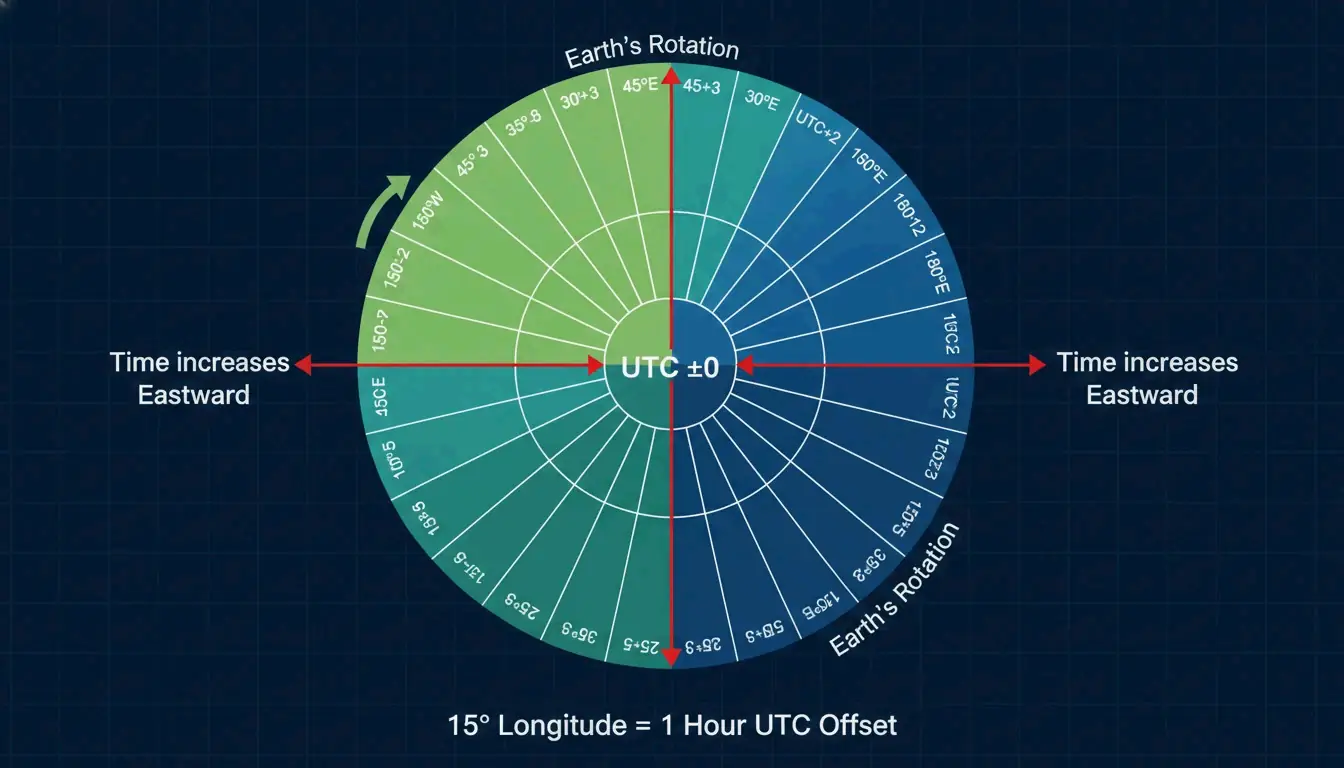
    Coordinated Universal Time (UTC) is the high-precision atomic time standard used to regulate clocks worldwide. It is not a time zone itself — it is the reference point from which every other zone is measured. The math is straightforward: Earth rotates 360 degrees every 24 hours, so each one-hour shift covers approximately 15 degrees of longitude.

    Earth longitude, 15-degree intervals, and UTC offset relationship diagram

    UTC vs. GMT: Why the Distinction Matters

    People often use Greenwich Mean Time (GMT) and UTC interchangeably, but they have different technical roots:

    Standard Basis Precision Usage
    GMT Solar time at the Royal Observatory, London Based on Earth’s rotation Traditional, colloquial
    UTC Atomic clocks (International Bureau of Weights and Measures) Nanosecond accuracy Technology, aviation, Internet

    For your calendar or travel plans, the time is identical. But UTC is what powers global tech infrastructure, Internet protocols, and aviation scheduling. GMT is a historical artifact that happens to land in the same neighborhood.

    The Time Zone Champions: France, Russia, and the United States

    France: 12 (or 13) Time Zones

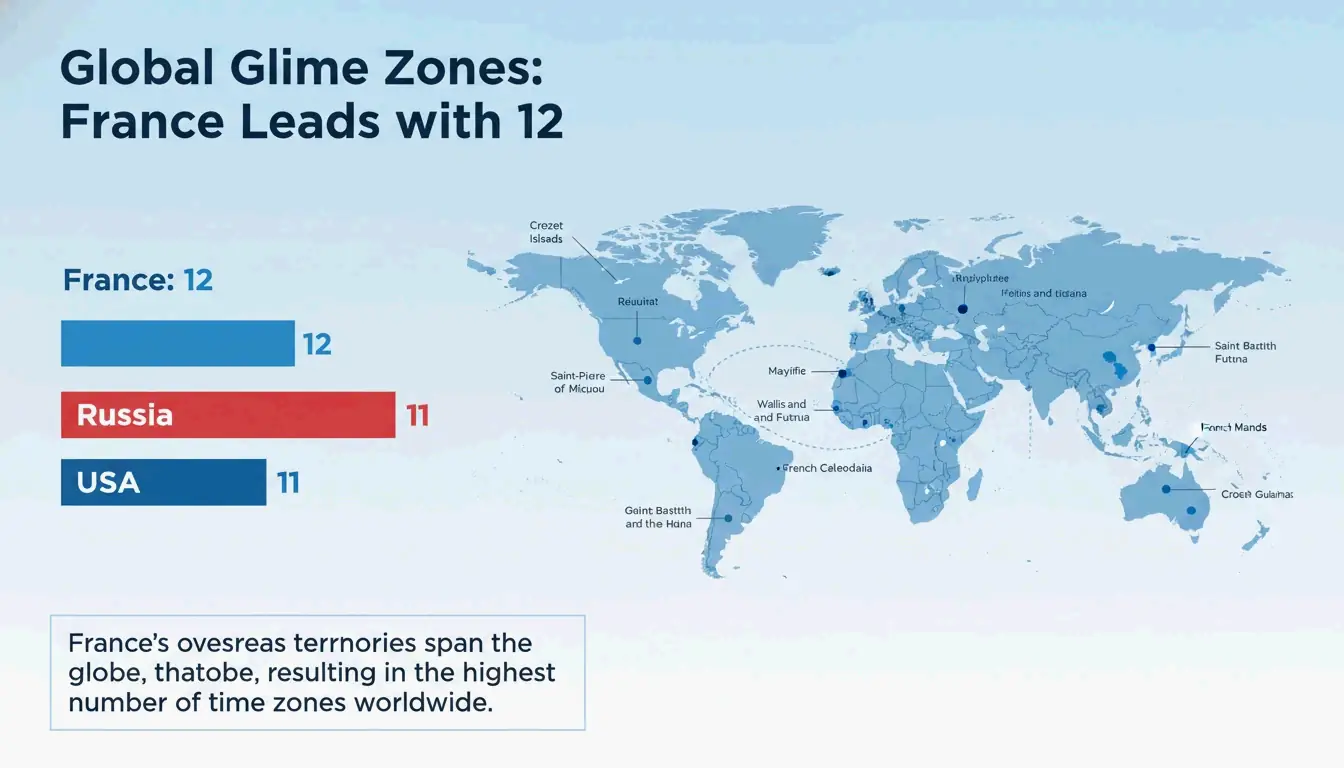
    France holds the world record with 12 standard time zones. According to World Population Review, that number reaches 13 if you include France’s claim in Antarctica (Adelie Land). This is not because mainland France is large — it uses only UTC+1 — but because its overseas departments are scattered across every ocean.

    French territory stretches from the Caribbean (Guadeloupe at UTC-4) to the Indian Ocean (Reunion at UTC+4) and deep into the Pacific. French Polynesia alone uses three different offsets.

    Russia and the United States: 11 Zones Each

    Russia and the United States follow with 11 zones each. Russia’s zones are mostly contiguous, stretching across the world’s largest landmass from Kaliningrad (UTC+2) to Kamchatka (UTC+12). The U.S. total is pushed up by Pacific territories like Guam (UTC+10) and American Samoa (UTC-11), separated from the mainland by thousands of miles of ocean.

    Country Time Zones Notable Range
    France 12 (13 with Antarctica) UTC-10 to UTC+12
    Russia 11 UTC+2 to UTC+12
    United States 11 UTC-11 to UTC+10

    Country time zone count ranking and France overseas territory distribution map

    The Remote Work Danger Zone: When DST Goes Rogue

    Daylight Saving Time (DST) moves clocks forward an hour in summer to extend evening daylight. For individuals, it is a minor inconvenience. For global teams, it is a scheduling minefield — because not every country observes DST, and those that do often switch on different weekends.

    The real Danger Zone occurs during the 2-3 weeks in March and October/November when the U.S. and Europe are out of sync. During these windows, a meeting that normally falls at 9 AM your time suddenly shifts to 8 AM or 10 AM without warning.

    Survival strategies:

    • Set all international invites to UTC. UTC never changes for DST, removing the guesswork entirely.
    • Use real-time tools. Services like World Time Buddy or the Mappr Interactive Map show live offsets including current DST status.
    • Double-check in March and October. These are the months when scheduling errors are most likely.

    Geographical Oddities: Fractional Zones and the Jagged Date Line

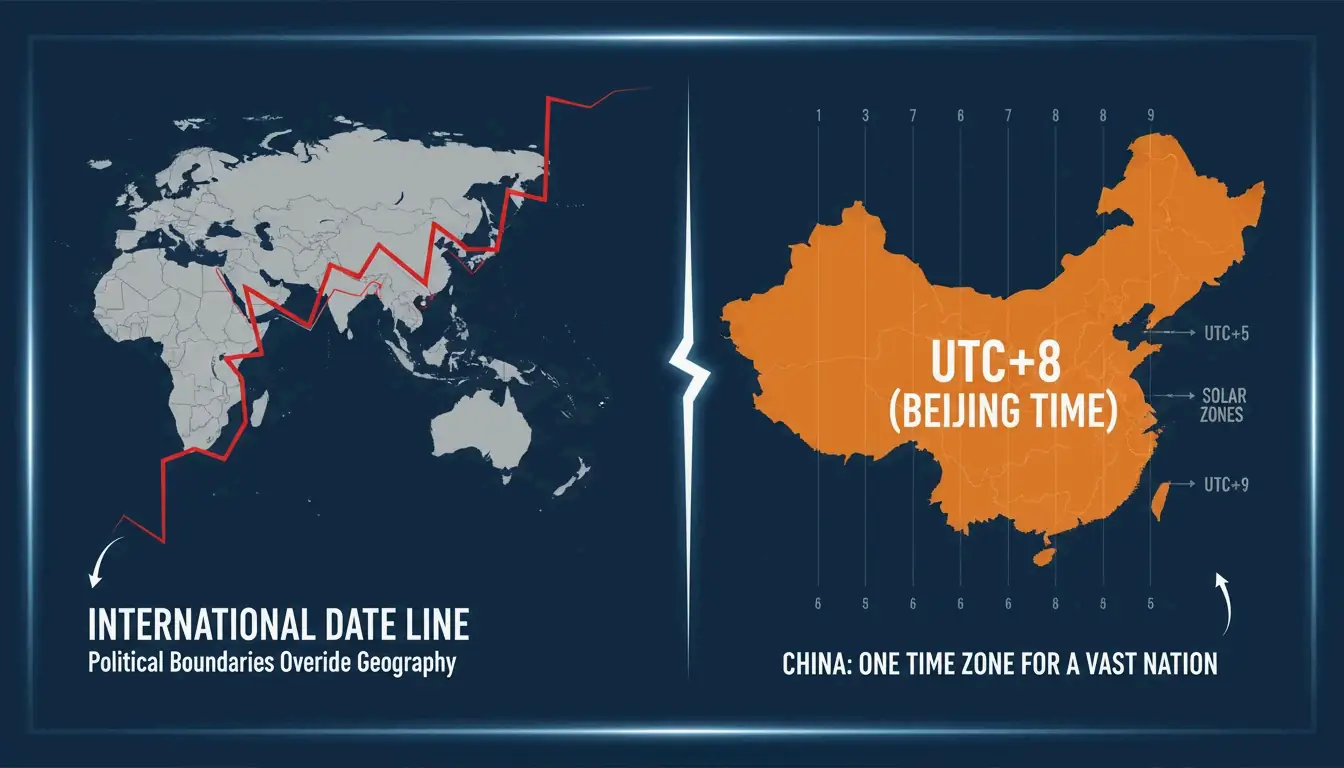
    The International Date Line (IDL) sits at roughly 180 degrees longitude and marks where one calendar day ends and the next begins. It is not a straight line — it zags around island groups to keep them on the same date as their economic and cultural neighbors. It is more of a political boundary than a geographical one.

    Jagged International Date Line and non-standard time zones (China, India) comparison

    The 30 and 45-Minute Oddities

    Some countries use fractional offsets — 30 or 45-minute increments instead of whole hours. These are chosen to align local time with Solar Noon (when the sun is highest) or for political reasons.

    Country/Region Offset Reason
    India UTC+5:30 Compromise between western and eastern solar time
    Nepal UTC+5:45 15-minute shift to assert identity separate from India
    Afghanistan UTC+4:30 Alignment with solar position
    Chatham Islands (NZ) UTC+12:45 Local solar alignment for a small population
    North Korea UTC+9:00 (was UTC+8:30 until 2018) Political statement, later reverted

    Why India Uses UTC+5:30

    India settled on Indian Standard Time (IST) at UTC+5:30 as a deliberate compromise. The country spans roughly 30 degrees of longitude. By picking a point exactly halfway between two standard hour zones, the government ensured Solar Noon occurs close to 12:00 PM for both Mumbai in the west and the eastern borders. Nepal goes further with UTC+5:45 — a 15-minute shift that also serves as a statement of national identity distinct from its larger neighbor.

    China’s Single Zone

    China forces a single time zone (UTC+8) across the entire country, even though it naturally spans five solar time zones. The policy was designed to encourage national unity. The practical effect: when it is noon in Beijing, it is still mid-morning in far-western Xinjiang, where the sun does not reach its peak until around 2:30 PM local time.

    The IANA Time Zone Database: What Powers Your Phone

    Every smartphone, server, and smart device relies on the IANA Time Zone Database (also known as the Olson database). This is a comprehensive digital record of every time zone’s history — every DST change, border shift, and offset adjustment since 1970. When your phone updates its clock automatically after you land in a new country, it is querying this database.

    The database is maintained by a community of contributors and is updated multiple times per year as governments change their DST rules or timezone boundaries. It is the single source of truth that keeps global computing synchronized.

    Nautical Time: Time Zones at Sea

    At sea, ships use Nautical Time, which follows strict 15-degree longitude blocks without regard for political borders. Sailors adjust their clocks in one-hour steps as they cross these lines, keeping ship-time aligned with the sun’s actual position. This system is simpler than land-based time zones precisely because there are no borders to zigzag around.

    FAQ

    Which country has the most time zones in the world?

    France holds the record with 12 standard time zones (13 including its Antarctic claim at Adelie Land). This results from its widely dispersed overseas departments and territories in the Atlantic, Pacific, and Indian Oceans — not from the size of mainland France, which uses only UTC+1.

    What is the difference between UTC and GMT?

    GMT is a solar-based time tied to the Royal Observatory in Greenwich, London. UTC is a high-precision atomic time standard maintained by international atomic clocks. They represent the same time for everyday use, but UTC is more scientifically accurate and does not drift with Earth’s rotational variations. UTC is the standard used in technology, aviation, and Internet protocols.

    Why do some countries like India and Nepal use 30 or 45-minute offsets?

    These fractional offsets align local time more closely with Solar Noon — the point when the sun is highest in the sky. They also serve political purposes: India chose UTC+5:30 as a midpoint compromise across its wide longitude span, while Nepal’s UTC+5:45 distinguishes it from India on the world map.

    Conclusion

    Understanding world time zones requires appreciating the collision between Earth’s rotation, colonial history, political boundaries, and the technical precision of the IANA Time Zone Database. The system is not neat — it is a patchwork of compromises that has evolved over centuries.

    For practical navigation: always double-check DST status in March and October, set international scheduling to UTC, and trust the IANA database to keep your devices accurate. The 38 offsets in use today are unlikely to shrink — if anything, politics will keep adding wrinkles to the map.

  • Standard Prompts vs Timestamp Prompts: Mastering Time-Aware AI for Video and Dev Workflows

    Standard Prompts vs Timestamp Prompts: Mastering Time-Aware AI for Video and Dev Workflows

    The Prompt That Knew Exactly When to Cut

    In early 2026, the audio platform Pocket FM integrated time-anchored AI prompts into their video production pipeline. The result: a 30-40% increase in user retention. The AI did not get smarter. The prompts got more precise. Instead of asking for “a video about a city at night,” the team started giving instructions like “00:00-00:04: Dolly shot zooming into the protagonist’s eyes; 00:05-00:08: Streetlights flicker on one by one.” Same model. Dramatically different output.

    This is the core distinction between standard prompts and timestamp prompts — and it is reshaping how creators, developers, and AI systems communicate about time.

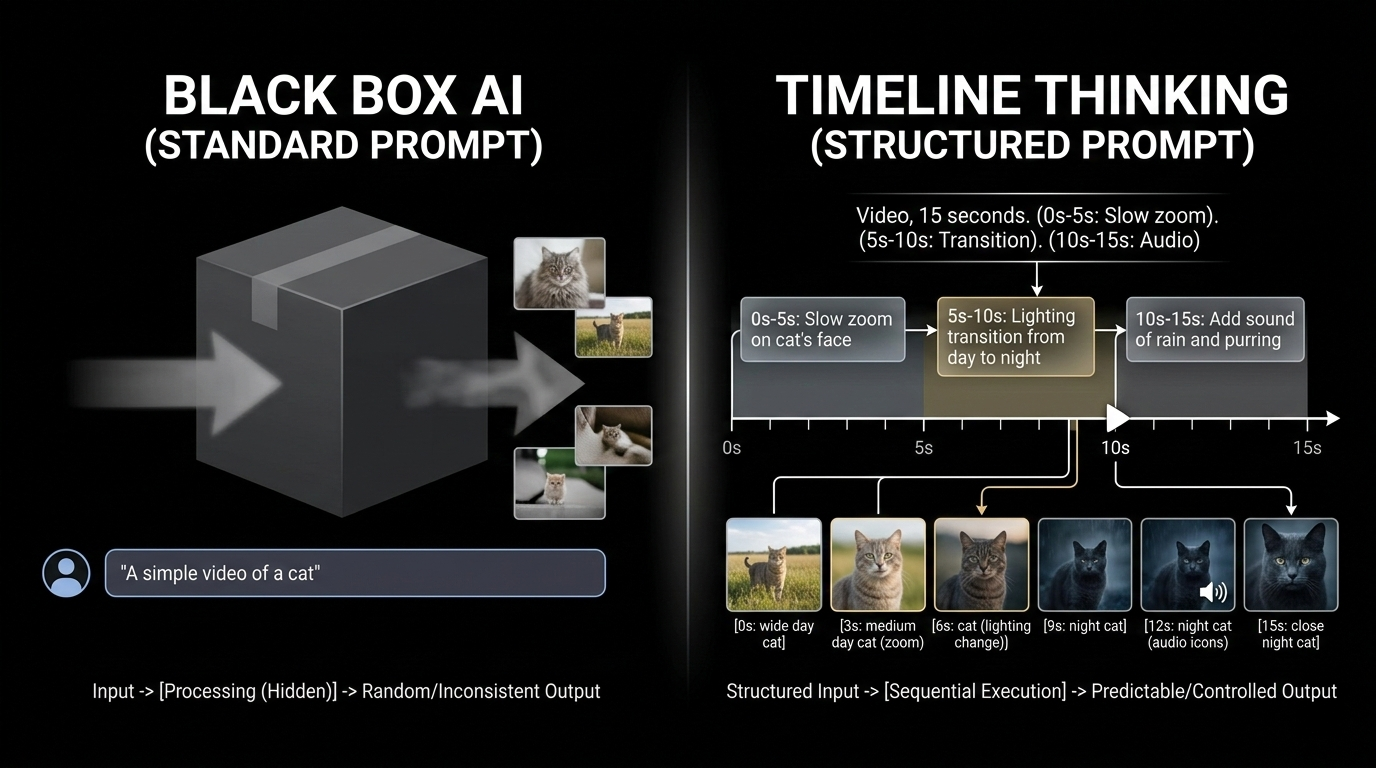
    Standard Prompts: The Black Box Approach

    A standard prompt treats the entire output as a single block. You describe what you want in broad terms, and the AI interprets the whole thing at once.

    Example: “Create a video of a busy city street transitioning from day to night.”

    The model decides the pacing, the transitions, and the timing. You get a result, but you have zero control over when specific events happen within the sequence. The output often suffers from:

    • Pacing that does not match a professional editor’s intent
    • “Hallucinated” transitions that feel random
    • No frame-accurate alignment with music beats or dialogue
    • Iteration requires re-prompting the entire sequence

    Standard prompts work for brainstorming and exploration. They break down when precision matters.

    Timestamp Prompts: Timeline Thinking for AI

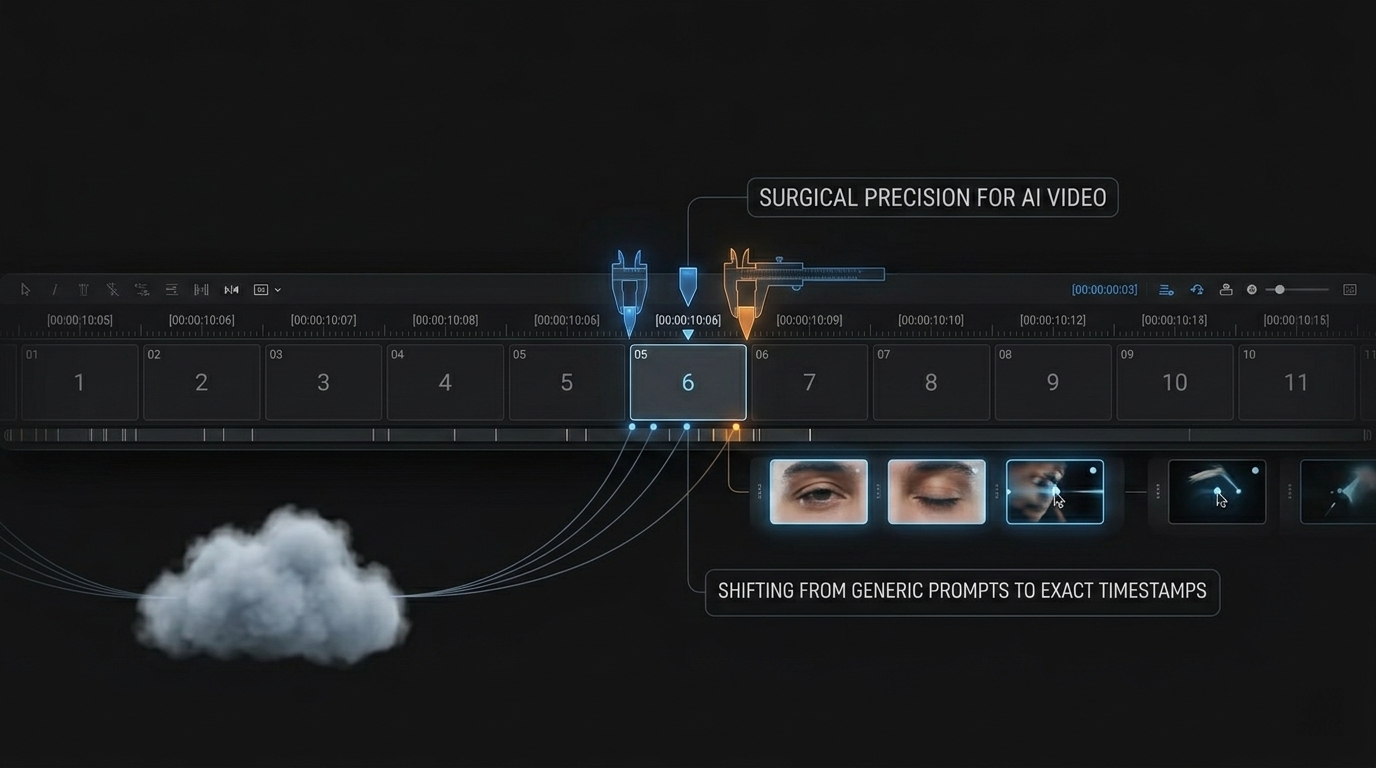
    Timestamp prompts introduce chronological anchors into the instruction itself. Each directive is tied to a specific time bracket, giving the AI surgical control over what happens, and when.

    A split diagram: Left side shows a box labeled 'Standard Prompt' with a random output; Right side shows a linear timeline with specific instruction blocks (0s-5s: Zoom, 5s-10s: Night transition).

    The structured formula: [Timestamp] + [Cinematography Cue] + [Subject] + [Action]

    Example: [00:00-00:04] Dolly shot, zooming in on the protagonist's eyes.

    This approach brings what filmmaker and industry writer Josh Edwards calls “Timeline Thinking” into the AI prompt box. It mirrors the traditional video editing workflow — where cuts and transitions are tied to specific frames — and translates it into language the model can execute precisely.

    Feature Standard Prompt Timestamp Prompt
    Timing control None — AI decides Frame-accurate time brackets
    Iteration speed Re-prompt entire output Adjust specific segments only
    Narrative flow Random pacing Intentional sequencing
    Professional readiness Needs manual editing Ready for post-production
    Audio sync No alignment Precise event-to-beat matching

    The AI Models Leading the Timestamp Revolution

    Veo 3.1: The Cinematic Controller

    Currently, Veo 3.1 is the industry leader for granular, time-based control. Unlike earlier models that struggle with long-form consistency, Veo 3.1 natively supports segmenting actions within a single request. You can layer complex instructions — camera movements, lighting shifts, dialogue — across different time brackets, and the model maintains continuity between them.

    According to Google Cloud, Pocket FM achieved lifelike lip-sync and professional-grade promotional content by combining timestamped instructions with Cinematography Cues — directional commands that specify camera behavior within each time segment.

    Kling 2.5 Turbo: Rapid Segmented Action

    While Veo 3.1 handles cinematic depth, Kling 2.5 Turbo excels at high-speed, action-heavy segments. It works well for short, intense bursts of motion — car chases, fight sequences, sports highlights — within a larger time-anchored sequence. It enables “Rapid Segmented Action” where the AI focuses on fast movement without losing the broader project context.

    Sora 2 Pro: Motion Continuity

    A persistent challenge in AI video is “motion continuity” — ensuring a character’s movement looks natural across segmented instructions. Sora 2 Pro uses timestamps to plan motion trajectories: if a character starts walking at 00:02, the model calculates their position at 00:06 to maintain spatial consistency. For security and provenance, SynthID digital watermarking verifies content authenticity and confirms timing has not been tampered with — critical for professional licensing workflows.

    Beyond Video: Time-Awareness as a Universal AI Anchor

    The logic of timestamping extends far beyond creative media. Chronological data provides the context AI needs to understand “sequence” in any domain.

    ISO Date Format and AI Scheduling

    When prompts include standardized dates (ISO 8601: YYYY-MM-DD), AI models interpret relative terms like “tomorrow,” “next Friday,” or “last week” with dramatically higher accuracy. Specifying the current date in the system prompt eliminates ambiguity and reduces scheduling errors in bots and assistants.

    Execution Logs: Timestamps as Source of Truth

    In software systems, the timestamp is the ultimate audit trail. It tells humans and AI what happened, when it happened, and how long a process took. Log analysis, incident debugging, and performance monitoring all depend on precise chronological markers.

    How to Add Timestamps to Your Terminal Prompt

    For developers, “prompting” often means the command line. Adding a timestamp to your Bash or Zsh prompt improves workflow visibility, making it easy to trace when commands executed — especially during long scripts or overnight runs.

    Discussions on terminal timestamps have accumulated over 160,000 views on Ask Ubuntu, reflecting strong demand for time-aware environments.

    Bash setup:

    1. Open your config: nano ~/.bashrc
    2. Modify the PS1 line: export PS1="\t [\u@\h \W]\\$ "
    3. Apply changes: source ~/.bashrc

    Zsh alternative: Use %D{%L:%M:%S} in your prompt variable.

    A comparison of two terminal windows: one with just '$' prompts, and another showing '[14:30:05] user@host ~ $' to highlight time tracking.

    The \t flag displays 24-hour time (HH:MM:SS) at the start of every prompt. Your terminal becomes a chronological log without installing any additional tools.

    The Deeper Pattern: Time as a Control Surface

    What timestamp prompts reveal is a broader principle: time is a control surface for AI. When you anchor instructions to specific moments, you move from describing what you want to specifying when and how it should happen. That shift transforms AI from a suggestion engine into a precision instrument.

    This principle applies whether you are generating a 10-second video clip, reviewing a server log, or scheduling a meeting. Chronological context makes AI output more predictable, more useful, and more trustworthy.

    FAQ

    Which AI video models are best for timestamp prompting?

    Veo 3.1 leads for cinematic, frame-accurate control with Cinematography Cues. Kling 2.5 Turbo excels at high-efficiency action segments. Sora 2 Pro is strongest at maintaining motion continuity across complex, multi-timestamped instructions. Each model serves a different production need.

    How do I add a timestamp to my Linux terminal prompt?

    Edit ~/.bashrc (Bash) or ~/.zshrc (Zsh). In Bash, add \t or \D{%H:%M:%S} to your PS1 variable. Save and run source ~/.bashrc to apply. The timestamp will appear before each command prompt.

    Can timestamp prompting be used for audio and transcripts?

    Yes. Models like Lyria 3 use timestamps for precision audio syncing — essential for automated lip-syncing and background score alignment. Timestamped transcripts enable AI to perform non-linear editing on podcasts and interviews, allowing users to delete or move audio segments by editing text at specific time coordinates.

    What is the difference between a standard prompt and a timestamp prompt?

    A standard prompt provides a single, holistic description of the desired output. A timestamp prompt breaks the output into time-anchored segments, each with its own specific instruction. Timestamp prompts offer frame-accurate control, faster iteration, and professional-grade output that standard prompts cannot match.

  • Mastering Precision: A Complete Guide to Setting Up Effective Timestamp Prompts for AI and Terminals

    Mastering Precision: A Complete Guide to Setting Up Effective Timestamp Prompts for AI and Terminals

    The 20% Accuracy Gain Hidden in a Timestamp

    In 2026, researchers published a finding that changed how the industry thinks about AI prompting. According to the TPG framework (Temporal Prompt-based and Geography-aware), explicitly modeling time as a primary input led to a 20.2% improvement in NDCG@5 for recommendation and prediction accuracy. The implication was clear: models perform dramatically better when time is a first-class citizen in the prompt, not an afterthought.

    To set up effective timestamp prompts, you need to define clear time markers (like [00:02-00:05]) and pair them with specific sensory details — lighting, movement, dialogue. Breaking longer sequences into 3-5 second blocks helps the AI maintain context and narrative flow across the entire timeline.

    This guide covers both worlds: timestamp prompting for generative AI video models and timestamp configuration for developer terminals.

    Why Temporal Anchoring Matters: The “Concept Bleeding” Problem

    Standard text-to-video prompts suffer from a persistent flaw called concept bleeding — an idea from the start of the prompt accidentally leaks into the end. You ask for a “nighttime transition” and a “sunny morning” in the same paragraph, and the AI gives you a dark, sunlit scene that satisfies neither instruction.

    Timestamp prompting solves this by creating hard boundaries. Each time marker resets the model’s focus, preventing concepts from one segment from contaminating another. As Josh Edwards, a filmmaking veteran, points out: “Timestamp prompting lets you anchor AI tasks to exact moments… instead of vague instructions, you’re pointing to where something happens.”

    An artistic representation of multiple clock gears perfectly interlocking with a video playback bar, symbolizing technical harmony.

    The mechanism works like this:

    Prompt Style How the AI Processes It Result Quality
    Standard paragraph Attempts all instructions simultaneously Concept bleeding, visual chaos
    Timestamp blocks Processes instructions sequentially Clean separation, narrative coherence

    Segmenting Actions: The 3-Second Block Framework

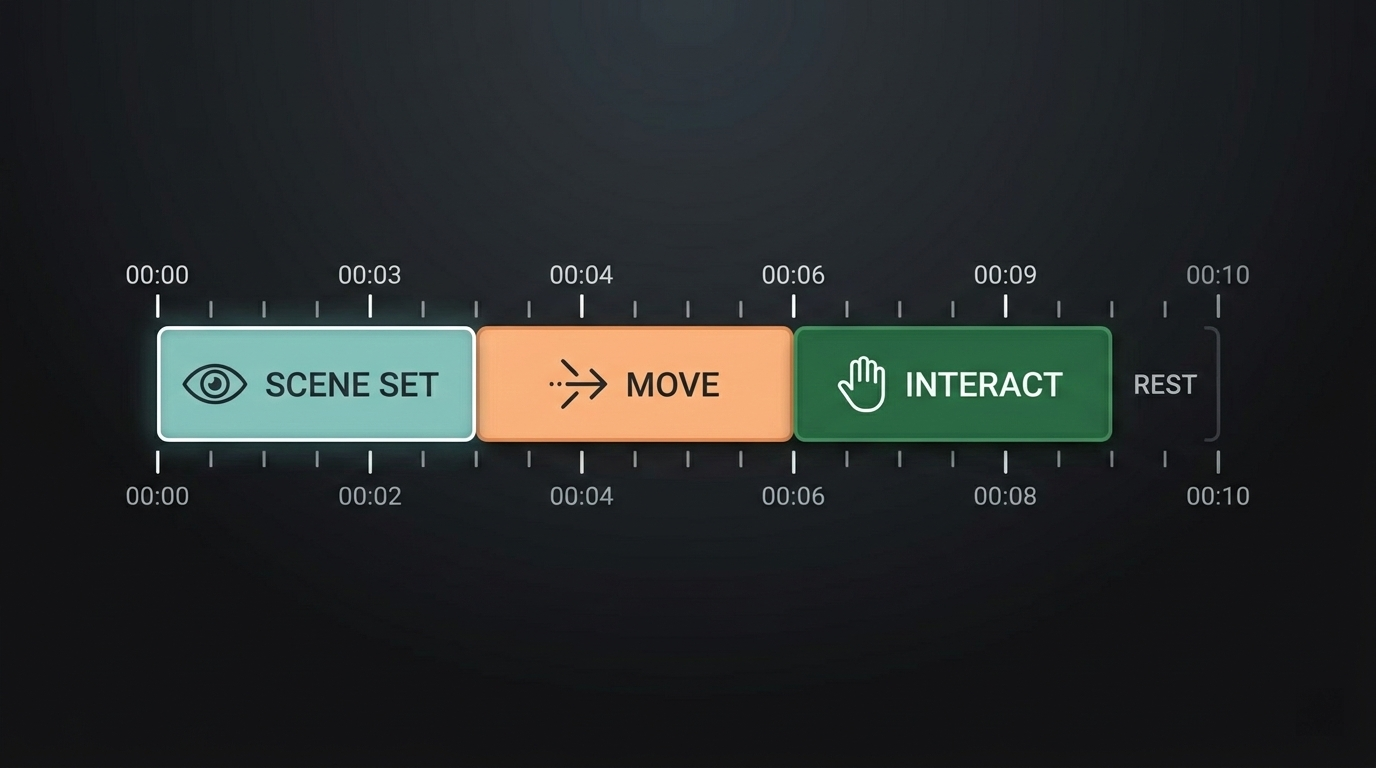
    A horizontal timeline diagram from 00:00 to 00:10, divided into 3-second colored blocks. Each block labeled with a simple action icon.

    High-end video models like Veo 3.1, Sora 2 Pro, and Kling 2.5 Turbo are built to handle sequential data. The standard practice for these tools is chopping a 10-second clip into 3-second Segmenting Actions blocks:

    [00:00-00:03] Establish the scene: wide shot of a mountain valley at dawn
    [00:03-00:06] Gentle camera pan right, revealing a solitary figure on the ridge
    [00:06-00:08] Close-up on the figure's face as the first light hits
    [00:08-00:10] Pull back to wide as the sun crests the horizon
    

    Each block gives the AI a narrow, focused window. The visual consistency improves because the model is not trying to render “dawn,” “a person,” and “a sunrise” in the same frame — it processes them in the exact order you specify.

    Transition Library: Bridging the Segments

    To prevent your video from looking like a slideshow of disconnected clips, use motion keywords to bridge the segments:

    Transition Type Example Phrase Effect
    Camera movement “Gradual push toward subject” Builds tension
    Pan “Gentle camera pan from left to right” Reveals environment
    Dissolve “Cross-fade from night to morning light” Passage of time
    Focus shift “Rack focus from background to foreground” Draws attention

    Example: [00:05-00:07] Gradual zoom on the subject's face to heighten emotion. This turns separate segments into one continuous story.

    Terminal Timestamps: The PS1 Variable in Bash

    In a developer environment, setting up effective timestamp prompts means configuring your shell. The PS1 variable in Linux controls how your terminal prompt looks. Adding real-time timestamps creates an automatic audit trail and helps track how long commands take to execute.

    Based on insights from the DEV Community, here are the four main format specifiers for time in Bash:

    Escape Sequence Format Example Output
    \t 24-hour time (HH:MM:SS) 14:35:22
    \T 12-hour time (HH:MM:SS) 02:35:22
    \@ 12-hour time with AM/PM 02:35 PM
    \A 24-hour time (HH:MM) 14:35

    To persist the change, open ~/.bashrc and add:

    export PS1="\D{%F %T} \u@\h:\w$ "
    

    This places the full date and time before every command prompt, creating an automatic log of when each command was executed.

    Zsh and Oh My Zsh: Modern Shell Timestamps

    Standard Bash guides miss the mark for Mac users, since modern macOS defaults to Zsh. Setting up effective timestamp prompts in Zsh means editing .zshrc instead of .bashrc. Zsh offers more customization room, including right-side prompts (RPROMPT) that display information without cluttering the input area.

    Using Powerlevel10k

    If you use a theme like Powerlevel10k, timestamps are usually built-in. Toggle them with:

    p10k configure
    

    Manual Zsh Setup

    For a manual configuration, add this to your .zshrc:

    PROMPT='%D{%L:%M:%S} %n@%m %~ %# '
    

    This gives you a clean, timestamped interface where every command is anchored to a specific second — the same precision principle that drives effective AI video prompting.

    FAQ

    What are the best AI models for precise timestamp-based video editing?

    Veo 3.1 and Sora 2 Pro are the top choices for temporal accuracy, supporting frame-accurate changes. Kling 2.5 Turbo excels at high-fidelity motion control. Open-source models like Stable Video Diffusion are powerful but typically require extra tools or “FramePack” extensions to achieve the same level of timestamp precision.

    How do I fix synchronization issues between prompt timestamps and AI-generated visuals?

    Shorten your segments. Blocks of 2-3 seconds are significantly more accurate than longer ones. Use “anchor descriptors” at the start of every new timestamp block to refocus the model on the subject. Watch for conflicting motion keywords that might overlap across different time markers.

    Can I use timestamp prompting for audio-only AI generation or transcripts?

    Yes. Models like ElevenLabs and Suno use time-stamped cues such as [00:05] [Whisper] or [00:10] [Laughter] to handle emotional shifts in speech. For transcription, OpenAI’s Whisper uses timestamps to sync text with audio frames. Timestamp prompting in audio ensures that sound effects or tone changes hit exactly when they should.

    Conclusion

    Setting up effective timestamp prompts is the bridge between random AI outputs and professional-grade results. Whether you are building a complex video sequence with Veo 3.1 or configuring your terminal with the PS1 variable, time markers provide the structure that transforms imprecise tools into reliable instruments.

    Start by breaking your next video prompt into 3-second intervals using clear [00:00] markers, or update your .zshrc today with the %D format to track your command history with second-by-second accuracy.

  • How Timestamp Prompting Helps Video Creators: The Pro Guide to Director-Level AI Control

    How Timestamp Prompting Helps Video Creators: The Pro Guide to Director-Level AI Control

    The End of “Prompting and Praying”

    For the first two years of generative video, creators faced the same frustrating loop: write a detailed scene description, hit generate, and hope the AI interpreted the timing correctly. Most of the time, it did not. Actions would bleed into each other. Transitions would land a half-second too early or too late. The result looked like a dream sequence — atmospheric but narratively incoherent.

    Timestamp prompting ends that cycle. By anchoring specific instructions to exact moments on the timeline, creators move from improvisational chaos to directorial intent. The model stops guessing what happens next and starts following a script.

    How timestamp prompting helps video creators: it provides a precise, time-based framework for AI video generation, enabling granular control over motion, lighting shifts, and multi-shot transitions at specific second marks for frame-accurate, edit-ready results.

    The Mechanics: Why Timing Changes Everything

    In professional video production, a transition that is even half a second off can destroy the rhythm of a scene. A product reveal that lands two frames late loses its punch. A lighting shift that arrives too early spoils the mood.

    Timestamp prompting addresses this by giving the AI a temporal roadmap. Instead of describing an entire scene in one paragraph, you segment it into time blocks:

    [0-3s] Silhouette reveal under cold blue backlight
    [3-6s] Side-light sweep revealing product details
    [6-8s] Close-up focus on headphone logo with warm glow
    

    Each block is a self-contained instruction. The AI executes them in sequence rather than trying to mash every visual element into every frame simultaneously.

    Split screen: Left side shows a messy cloud of text labeled 'Standard Prompt'; Right side shows a clean, linear timeline with blocks [0-2s], [2-5s] labeled 'Timestamp Prompt'.

    As Dicloak notes in their 2026 analysis, these frameworks allow for multi-shot sequences with cinematic pacing, turning a hit-or-miss generative process into a reliable production tool.

    The Physics of Time: Acceleration, Deceleration, and Motion Logic

    Effective timestamp prompting is not just about telling the AI what to show — it is about telling it how movement should feel. By segmenting prompts intelligently, you can command acceleration and deceleration that mirrors real cinematography.

    Consider this pattern:

    Time Block Camera Instruction Motion Quality
    [0-2s] Rapid push toward subject Accelerating, building tension
    [2-4s] Hold position Static, letting the viewer absorb
    [6-8s] Slow settle to wide shot Decelerating, releasing tension

    This creates a dynamic range that looks like it was shot by a cinematographer, not generated by a neural network. Data from Wyzowl shows that 73% of consumers prefer short-form videos under 2 minutes — timestamp prompting helps you maximize every second of that limited window.

    You can also evolve lighting profiles across timestamps — shifting from a cold morning blue to a warm sunset glow — to convey the passage of time within a single shot. By defining these motion components at specific intervals, the AI keeps the subject consistent while handling complex physical interactions. This “physics-aware” prompting applies force and resistance to objects at specific moments, making movement feel heavy and real rather than floaty.

    A flow diagram: [AI Prompt Timestamps] -> [NLE Timeline Markers] -> [YouTube Chapters] -> [Google Search Result Snippets].

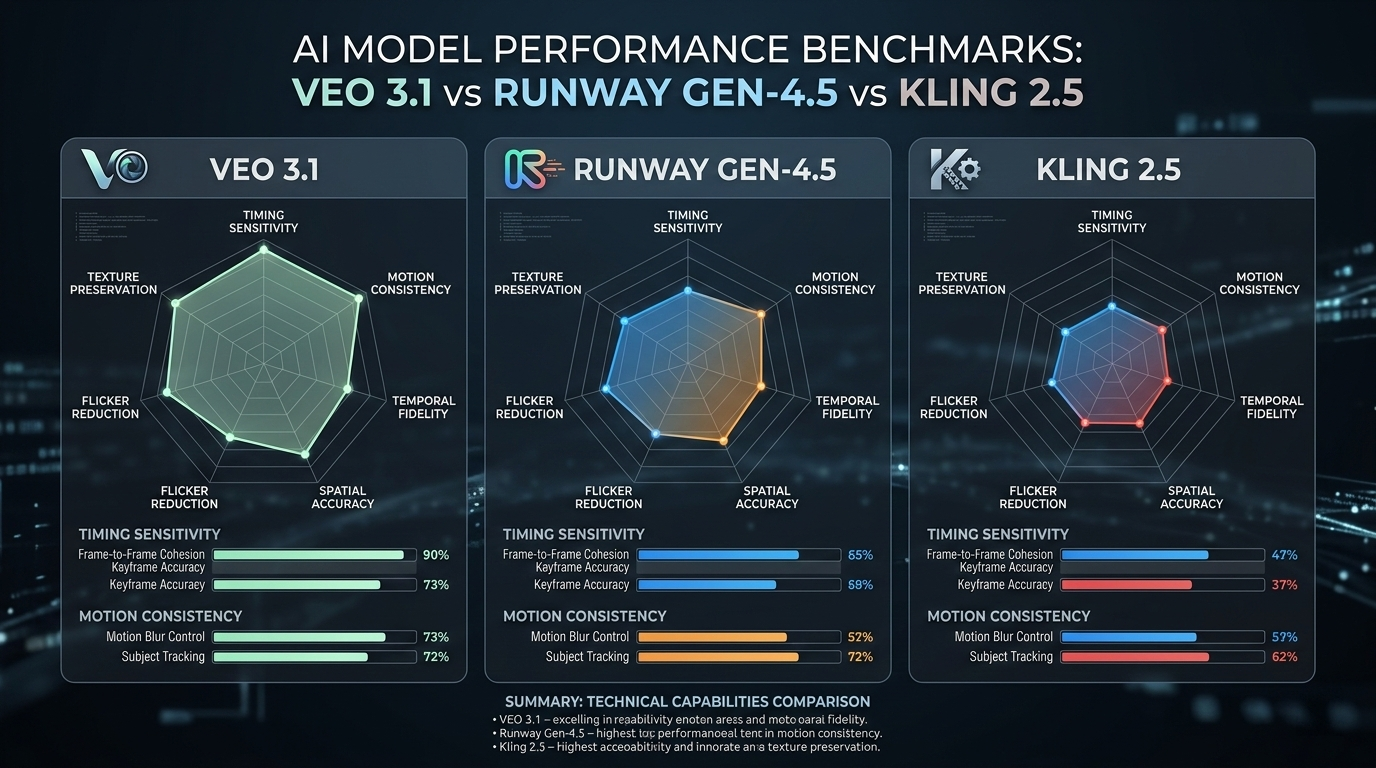
    The Model Landscape: Veo 3.1 vs Runway Gen-4.5 vs Kling 2.5

    Choosing the right model is the first decision in any timestamp-driven workflow. Here is how the current leaders compare:

    Model Primary Strength Timing Sensitivity Best For
    Google Veo 3.1 Native timestamp framework; cinematic logic 0.5s intervals Narrative sequences
    Runway Gen-4.5 Advanced motion brush and temporal markers 1.0s intervals Artistic/experimental
    Kling 2.5 Turbo Segmented action prompts for high-motion 1.0s intervals Fast-paced product demos

    In a 2026 Veo 3.1 product demo, Google showcased an 8-second headphone choreography using timestamp blocks: 0-3s silhouette reveal, 3-6s side-light sweep, 6-8s close-up focus. The result proved that Veo 3.1 follows a chronological progression rather than compressing all instructions into a single messy frame.

    Runway Gen-4.5 and Gen-3 Alpha also handle sequencing well, especially when paired with “Director-level” tools like seed-based consistency for maintaining visual identity across shots.

    A series of progress bars or radar charts comparing Veo 3.1, Runway Gen-4.5, and Kling 2.5 on 'Timing Sensitivity' and 'Motion Consistency'.

    The Full-Cycle Workflow: From Prompt to YouTube SEO

    The benefits of timestamp prompting extend beyond video production into distribution. The time blocks you define during AI generation can cascade directly into your content strategy.

    The pipeline works like this:

    1. Write timestamp prompts during AI generation (e.g., [0-3s], [3-6s], [6-8s])
    2. Map timestamps to NLE timeline markers in your editing software
    3. Convert markers to YouTube chapters with descriptive labels
    4. YouTube chapters become “Key Moments” that Google Search can highlight directly in results

    According to Cisco and Wyzowl, video content will account for 82% of all internet traffic by the end of 2026. When someone searches for a specific step in a tutorial, Google can drop them directly at the timestamp you originally directed with AI — leading to better click-through rates and longer watch times.

    A flow diagram: [AI Prompt Timestamps] -> [NLE Timeline Markers] -> [YouTube Chapters] -> [Google Search Result Snippets].

    Advanced Tactics: Negative Timestamps and Seedance Animation

    Negative Timestamps

    Advanced creators now use negative prompting for specific time windows to suppress artifacts before they appear. For example:

    [4-6s] NO flickering, NO color distortion, NO lens flare
    

    This tells the AI what to avoid during complex transitions, keeping the visual quality clean without sacrificing the actions in adjacent time blocks.

    Seedance 1.0 Pro

    Seedance 1.0 Pro specializes in animating still images based on audio timing. By pairing it with timestamp markers, you can sync the movement of a still image to specific beats of a voiceover. The result eliminates the “floaty” AI aesthetic — every movement has a clear, timed reason for happening, rooted in the audio cadence.

    FAQ

    What is the difference between standard prompting and timestamp prompting?

    Standard prompting describes the entire scene in one block, causing the AI to attempt everything simultaneously. Timestamp prompting anchors specific actions to exact seconds (e.g., [0-2s] zoom, [2-4s] pan). It provides “Director-level” control over the sequence and pacing of every shot.

    Which AI video models are best for frame-accurate timestamp control?

    Google Veo 3.1 is the current gold standard for native timestamping, with 0.5-second sensitivity. Runway Gen-4.5 and Kling 2.5 Turbo also perform well for segmented actions. Newer 2026 models like Sora 2 Pro are catching up fast, offering high accuracy for complex multi-scene storytelling.

    How many timestamps should a single AI video prompt include?

    For a 10-second clip, use 3-5 major time blocks to avoid overwhelming the model. Avoid overlapping actions in the same sub-second window, and leave 1-2 second “buffer” zones between major transitions to maintain visual consistency.

    Conclusion

    Timestamp prompting is the bridge between generative AI and real cinematography. It lets you dictate when an action happens just as clearly as what happens — turning an unpredictable black box into a reliable production tool.

    To get started, break your next 8-second hero shot into three blocks: [0-3s], [3-6s], and [6-8s] using Veo 3.1. The difference in responsiveness is immediately apparent when the AI is working on your schedule rather than its own.