Category: Biohacking

生物黑客

  • Let Compress Review: Fast Multi-Format Compression for the File-Weight Problem Nobody Plans For

    The 50-Kilobyte Rejection That Changed a Workflow

    A job applicant submits a passport photo to a government portal. The upload fails: “File must be under 50KB.” The original image is 3.2MB. She opens an image editor, resizes it, adjusts quality, exports — 78KB. Tries again. Adjusts quality further — 43KB, but now it looks like a watercolor painting. Twenty minutes lost on a task that should have taken thirty seconds.

    This scenario plays out millions of times daily across government portals, job application systems, marketplace listings, and publisher CMS platforms. File size is rarely the main task, but it routinely becomes the blocking task.

    Let Compress was built for exactly this moment. It is a focused compression toolkit that covers images, documents, media, text, and archive formats — all processed client-side in the browser. The platform does not try to be a general utility directory. It has a clear identity: reduce file size quickly, preserve usability, and keep the process simple.

    The Multi-Format Problem Most Compression Tools Ignore

    Most online compression tools are image-only. That makes sense — images are the most common file-weight bottleneck. But modern workflows are not image-only. A typical project might involve:

    • Screenshots (PNG) for documentation
    • Product photos (JPG/WebP) for e-commerce
    • PDF proposals for client delivery
    • Video assets for social media
    • JSON exports for data handoffs
    • Compressed archives for email attachments

    A single-purpose image compressor does not cover this reality. Let Compress organizes its tools by category, reflecting the actual diversity of file types people need to optimize:

    Category Supported Formats
    Images PNG, JPG, WebP, AVIF, universal image compressor
    Documents PDF compression and optimization
    Media Video and audio compression
    Text Code minification, text compression
    Archives ZIP, RAR, and other archive format handling

    This breadth is important because performance problems do not come from one file format alone. They come from the accumulated weight of mixed assets moving through a workflow.

    The Target-Size Compressor: Built for Real Constraints

    One of Let Compress’s most practical features is its Compress Image to Target Size tool. Instead of blindly reducing quality and hoping for the best, you specify the exact output constraint: 50KB, 100KB, 200KB, or any custom threshold. The tool optimizes around that target, balancing quality and size to hit the number.

    This is designed around how file-size constraints actually work in the real world:

    • Government forms: “Photo must be between 20KB and 50KB”
    • Job portals: “Resume must be under 2MB”
    • Marketplace listings: “Product images must be under 500KB”
    • Email attachments: “Total size must not exceed 25MB”
    • Publisher CMS: “Featured image must be under 200KB”

    These are not suggestions. They are hard limits that block submission. A tool that understands target-size constraints solves the problem in one pass instead of the trial-and-error cycle most users endure.

    Why Compression Is a Biohacking Tool

    The connection between file compression and biohacking is not metaphorical — it is operational. Biohacking, at its core, is about removing waste from systems to improve performance. Compression applies that logic to files.

    Smaller files mean:

    • Faster page loads: Directly impacts Core Web Vitals, SEO rankings, and bounce rates
    • Smoother uploads: Eliminates form-submission failures due to size limits
    • Lighter storage: Reduces cloud storage costs and local disk pressure
    • Better mobile performance: Critical for users on limited bandwidth or metered connections
    • Fewer delivery failures: Email attachments, messaging platforms, and collaboration tools all have size ceilings

    Compression is an invisible performance multiplier. It rarely gets credit because the goal is for nobody to notice it happened — things just work faster and more reliably.

    Privacy: Files That Never Leave Your Machine

    Let Compress states clearly that processing is client-side and that files stay on your device. For a compression tool, this matters more than most users realize.

    When you upload a PDF to an unknown server for compression, you are sending:

    • The full content of that document (which might be a contract, a medical record, a financial statement)
    • The file metadata (creation date, author, revision history)
    • Your IP address and browser fingerprint

    Client-side processing means the file never leaves your browser. The compression runs in JavaScript, locally, using your device’s processing power. No server receives the file. No server stores it. No server can be breached to expose it.

    For anyone working with private PDFs, internal slide decks, unreleased product videos, or raw exports containing sensitive information, this is not a nice-to-have. It is a prerequisite for trust.

    Where Let Compress Is Most Useful

    The platform is a strong fit for:

    • Publishers optimizing images and PDFs before CMS upload
    • Marketers reducing asset size for ads, newsletters, and landing pages
    • Developers shrinking web images for performance work and faster deployments
    • Operations teams handling file-size limits in forms, portals, and internal systems
    • Students and job seekers who need documents under strict upload caps
    • Anyone working with mixed file types who wants one consistent compression destination

    Its appeal comes from versatility without bloat. The site remains centered on one job: make files lighter without making the process annoying.

    The Honest Tradeoff

    The main limitation is shared by most browser compression tools: if you need very precise control over codec parameters, batch automation inside a CI/CD pipeline, or enterprise-scale asset management, you will eventually move to dedicated desktop or server workflows. FFmpeg for video. ImageMagick for batch images. Ghostscript for PDF. These are the right tools for automated, large-scale compression.

    But for day-to-day optimization, that is not the point. Let Compress succeeds because it handles the part of compression work that people face constantly and do not want to over-engineer. Most users do not need to configure codec parameters. They need to get a file under 100KB so they can submit a form.

    The Verdict

    Let Compress is a practical, well-positioned compression platform for the modern web workflow. It covers the file types people actually use, keeps the interaction fast, and makes privacy part of the value proposition rather than an afterthought. That combination gives it more staying power than a basic image-only reducer.

    If you care about performance, cleaner uploads, and lower-friction file handling, Let Compress is worth adding to your toolkit. It treats file size as an efficiency problem that can be solved quickly and directly — which is exactly how good utility software should work.
  • ImageLean Review: The Private Image Workspace That Stays in Your Browser

    The Hidden Data in Every Photo You Share

    In 2012, a researcher downloaded 15,000 publicly shared photos from a popular social platform. Using nothing but the EXIF metadata embedded in each image, he was able to map the exact GPS coordinates of 5,000 users, identify the camera models and timestamps of their devices, and reconstruct daily movement patterns. The photos looked harmless. The metadata told a different story.

    This is the invisible risk that most image tools ignore. You compress an image, you resize it, you convert it — and along the way, you upload it to a server you have never heard of, operated by a company whose privacy policy you will never read. The pixels get processed. The metadata goes along for the ride.

    ImageLean was built with a different premise: your images should never leave your browser. It combines compression, conversion, resizing, EXIF inspection, and metadata cleanup into a single, privacy-first workspace where processing happens entirely client-side. For anyone who handles visual assets regularly, that combination is more than convenient. It changes the trust equation.

    What ImageLean Offers: A Layered Image Workspace

    ImageLean is not a single-purpose compressor pretending to be a toolkit. It organizes its capabilities into clear functional groups:

    Category Tools
    Compression JPG, PNG, GIF, HEIC, WebP compression
    Conversion Image format conversion, bulk conversion
    Editing Resizing, cropping
    Inspection EXIF Viewer, metadata analysis
    Cleanup Watermark removal, metadata stripping

    The breadth matters because image work is rarely one-dimensional. A single asset often needs to be resized for a blog post, converted for platform compatibility, compressed for page speed, and checked for hidden metadata before publishing. ImageLean is designed around that real sequence rather than around one headline feature.

    The EXIF Viewer: Where Privacy Meets Practicality

    The EXIF Viewer is one of the platform’s most distinctive tools. It displays:

    • Camera make, model, and settings (aperture, shutter speed, ISO)
    • Capture date and time with timezone
    • GPS coordinates displayed on a map
    • Software used for editing
    • Thumbnail embedded in the file

    For photographers, this is a quality-control tool. For journalists and researchers, it is a forensic instrument. For privacy-conscious users, it is a warning system — showing exactly what personal information is attached to a photo before it gets shared.

    Why Privacy Is the Real Product

    Many online image tools advertise speed. ImageLean leads with privacy. The homepage and About page both emphasize browser-based processing with no upload, stating clearly that images stay private and secure on your device.

    This is not a minor feature. Image files carry enormous amounts of embedded information:

    • Device fingerprints: Camera model, firmware version, lens type
    • Location data: GPS coordinates accurate to within meters
    • Timestamps: Exact capture time, often more precise than the file creation date
    • Editing history: Software used, modifications made, thumbnail of original

    When you upload an image to a server for compression or conversion, all of that data transfers with it. Most users never realize this. Most utility sites never mention it.

    Client-side processing — where the image never leaves your browser — eliminates this risk entirely. The files are processed by the JavaScript engine running locally on your machine. No server receives the pixels, and no server receives the metadata. For biohackers, researchers, journalists, and anyone handling sensitive visual assets, this is a trust model worth prioritizing.

    Where ImageLean Fits: Practical Use Cases

    ImageLean is designed for users who need frequent, lightweight image operations without opening a full desktop editor:

    • Bloggers preparing screenshots and featured images for publication
    • Indie makers optimizing product assets for faster page loads and better Core Web Vitals
    • Photographers checking metadata before sharing files with clients or publishing online
    • Marketers converting image formats across channels (WebP for web, PNG for print, JPG for email)
    • Researchers and investigators who need fast EXIF inspection for source verification
    • Privacy-conscious users cleaning metadata from personal photos before sharing

    Because the entire toolset lives in the browser, the workflow is seamless: inspect, compress, convert, resize, and clean — all in one place, without changing platforms or opening heavy software.

    Workflow Coherence: The Underrated Advantage

    One of ImageLean’s less obvious strengths is consistency. Many sites that offer multiple image tools feel stitched together, with uneven user interfaces between pages. ImageLean presents as a coherent system. Compression, conversion, editing, and metadata utilities are grouped logically, reducing the mental overhead of finding the next step.

    That coherence matters during repetitive work. Every extra click, every different UI pattern, every separate site adds friction. A unified platform turns image maintenance into a smoother routine, supporting the kind of fast visual operations that happen dozens of times per week in publishing, e-commerce, and product marketing.

    The Honest Limitation

    ImageLean is best understood as a fast image operations layer, not a replacement for professional creative software. If you need deep retouching, complex layer management, advanced masking, or design composition, you will still reach for Photoshop, Figma, or Affinity Photo.

    But that limitation is not a flaw in the product strategy. ImageLean is solving the high-frequency image tasks that slow people down: compress, convert, resize, inspect, clean. These actions are common, necessary, and usually much simpler than the heavyweight tools people default to. Using Photoshop to compress a JPEG is like using a helicopter to cross the street. It works, but it is not the right tool for the job.

    The Verdict

    ImageLean stands out because it understands that image workflows are not only about visual aesthetics. They are also about file size, format compatibility, metadata safety, and processing speed. By combining compression, conversion, resizing, and EXIF visibility inside a privacy-first browser environment, it becomes genuinely more useful than a generic image compressor.

    If you publish online, manage product assets, or care about the hidden data attached to your photos, ImageLean is worth bookmarking. It is a lean, focused toolset that respects both your time and your files — and that is exactly what a modern browser utility should deliver.

  • Do Generator Review: The Browser-Based Utility Hub That Collapses Ten Tabs Into One

    The Invisible Tax of Tab Switching

    Here is a scenario most digital workers know intimately: you need to generate a secure password, so you open a tab. Then you need a QR code for a campaign landing page, so you open another. A random number for a giveaway. A barcode for a product listing. A placeholder business name for a side project. A quick invoice for a freelance client. By noon, you have eight browser tabs open, each with a different utility site, a different interface, and a different trust level.

    That context switching is not free. Every tab change costs attention. Every unfamiliar interface costs seconds. Every site with questionable privacy costs a small amount of mental unease. Individually, these costs are tiny. Accumulated over weeks and months, they become a significant drag on cognitive efficiency.

    Do Generator was built to collapse that scattered workflow into a single browser-based hub. It groups practical generators across categories — daily tools, creation tools, text tools, AI tools, and developer tools — and presents them through a consistent interface with a clear privacy posture. The result is a platform that feels less like a collection of random calculators and more like a utility layer for modern digital work.

    The Tool Stack: What Do Generator Actually Offers

    The homepage highlights a focused but broad set of flagship utilities:

    Category Key Tools
    Daily Tools True Random Number Generator, Password Generator
    Creation Tools Name Generator, Username Generator, Business Name Generator
    Utility Output QR Code Generator, Barcode Generator, Invoice Generator
    Text Tools Various formatting and text manipulation utilities
    Developer Tools Formatting, encoding, and support tools for code workflows

    This selection is not random. Each tool addresses a specific, high-frequency task that interrupts work when you do not have a clean way to handle it. A founder needs naming options. A marketer needs a QR code. A freelancer needs an invoice. A developer needs secure random values. These are the small, repeatable operations that break flow state when they require a dedicated tool hunt.

    The Random Number Generator: Cryptographic Grade, Not Sketchy

    One of the platform’s strongest offerings is its True Random Number Generator. The product page emphasizes cryptographic-grade randomness through the Web Crypto API rather than relying on basic Math.random() pseudo-random shortcuts.

    This distinction matters. Pseudo-random number generators (PRNGs) are deterministic — they produce sequences that can be predicted if you know the seed. The Web Crypto API uses system-level entropy sources (hardware timing, mouse movements, keyboard events) to produce values that are genuinely unpredictable. For testing, giveaways, games, or any context where randomness integrity matters, this is a meaningful quality signal.

    Why a Utility Hub Fits the Biohacker Mindset

    The connection between a utility website and biohacking is not biological — it is operational. Biohacking, at its broadest level, is about removing waste from systems and improving performance. Do Generator applies that logic to digital workflows.

    Every time you can collapse ten small chores into one reliable toolset, you reduce decision fatigue and protect mental energy for deeper work. This is especially relevant for solo operators, creators, and technical generalists who move between admin, content, analysis, and product tasks within a single day.

    The platform is also aligned with a workflow-first philosophy because the tools are direct: land on a page, configure a few fields, get an output. There is minimal ceremony. For people who value speed over software bloat, that simplicity is a feature, not a limitation.

    Privacy and Trust: The Invisible Feature

    Do Generator repeatedly emphasizes privacy, simplicity, and reliability across its homepage and About page. While this messaging does not replace a full security audit, it does signal a coherent product promise.

    For browser utilities, trust is the gating factor. Users are often pasting text, generating credentials, or working with structured information they do not want exposed unnecessarily. The strongest practical trust signal is when a utility can do meaningful work client-side or with minimal input complexity. When a random number generator runs entirely in the browser using the Web Crypto API, your data never leaves your device. That is a meaningful privacy posture for a tool you might use casually and repeatedly.

    From a user experience standpoint, the category layout also supports discoverability. You can move laterally across tools instead of hitting a dead-end page after completing one task. That matters when a platform is trying to become part of your regular workflow rather than a one-time bookmark.

    Where Do Generator Shines

    Do Generator is a strong fit for:

    • Founders who need fast naming, branding, and launch assets without hiring a designer
    • Freelancers who want quick document and code generation helpers for client work
    • Marketers handling QR codes, barcodes, and utility formatting tasks across campaigns
    • Developers looking for lightweight randomization, formatting, and support tools
    • Creators who need quick outputs without installing another application

    Its best use case is not one large, mission-critical process. It is the accumulation of dozens of small, daily wins that would otherwise scatter your attention across the internet.

    The Honest Tradeoff

    A multi-tool platform always faces the same tension: breadth can dilute depth. If you need a highly specialized enterprise workflow, you will eventually outgrow a general utility site. A dedicated finance platform will produce more sophisticated invoices. A full password manager offers more than a password generator. A professional design suite does more than a QR code tool.

    That is not a weakness if you understand the category correctly. Do Generator solves the first 80% of many small jobs quickly, and in practice, that is often the part users actually need. The remaining 20% — enterprise integrations, batch automation, pipeline orchestration — belongs in dedicated software, not a browser utility.

    The Verdict

    Do Generator is a well-executed modern utility website with the right priorities: real tasks, clear organization, and lightweight interaction. It focuses on the friction points that slow people down — password generation, naming, QR output, random data, invoices — and handles them with speed and consistency.

    If your workflow regularly includes any of these small but frequent tasks, Do Generator is worth adding to your toolkit. It does not try to replace your entire software stack. It tries to remove friction from the parts of work that should already be effortless, and it does that well.

  • Standard Prompts vs Timestamp Prompts: Mastering Time-Aware AI for Video and Dev Workflows

    Standard Prompts vs Timestamp Prompts: Mastering Time-Aware AI for Video and Dev Workflows

    The Prompt That Knew Exactly When to Cut

    In early 2026, the audio platform Pocket FM integrated time-anchored AI prompts into their video production pipeline. The result: a 30-40% increase in user retention. The AI did not get smarter. The prompts got more precise. Instead of asking for “a video about a city at night,” the team started giving instructions like “00:00-00:04: Dolly shot zooming into the protagonist’s eyes; 00:05-00:08: Streetlights flicker on one by one.” Same model. Dramatically different output.

    This is the core distinction between standard prompts and timestamp prompts — and it is reshaping how creators, developers, and AI systems communicate about time.

    Standard Prompts: The Black Box Approach

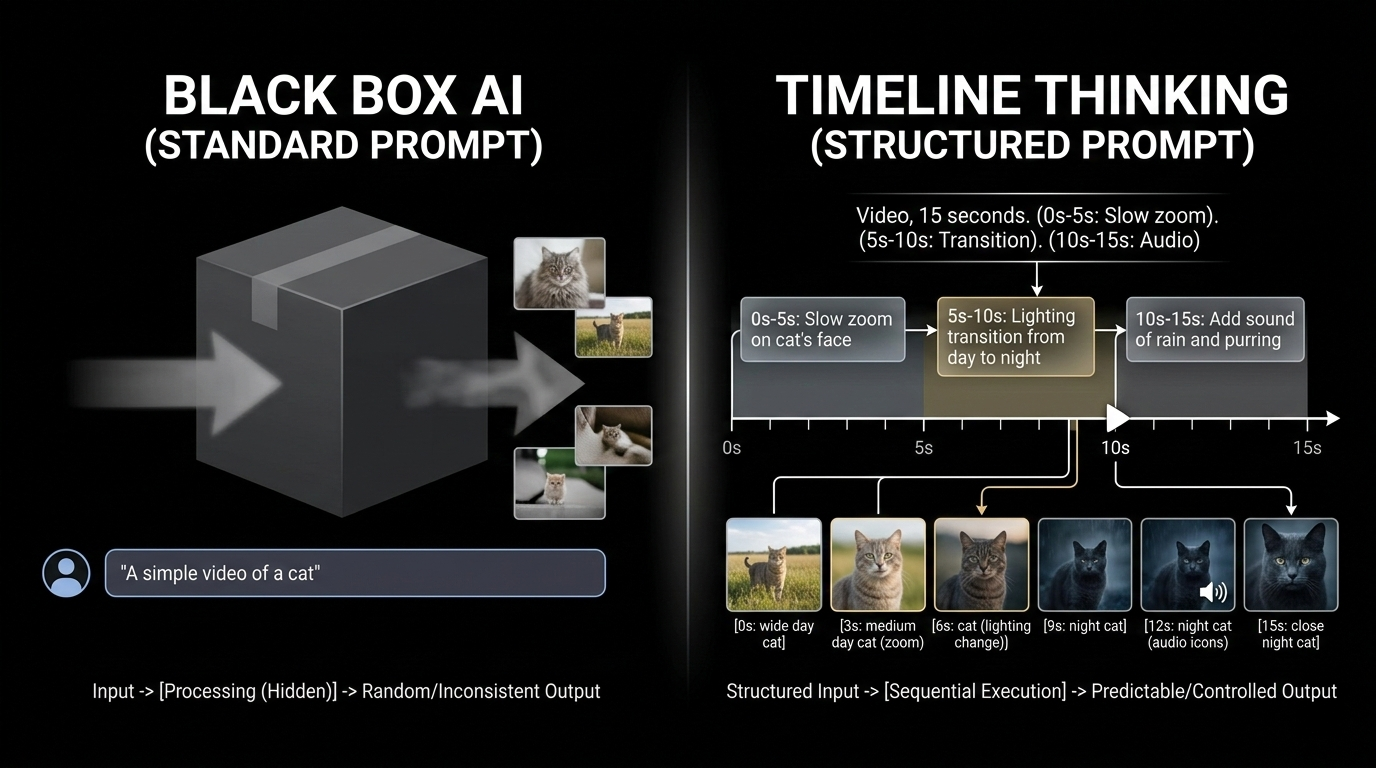
    A standard prompt treats the entire output as a single block. You describe what you want in broad terms, and the AI interprets the whole thing at once.

    Example: “Create a video of a busy city street transitioning from day to night.”

    The model decides the pacing, the transitions, and the timing. You get a result, but you have zero control over when specific events happen within the sequence. The output often suffers from:

    • Pacing that does not match a professional editor’s intent
    • “Hallucinated” transitions that feel random
    • No frame-accurate alignment with music beats or dialogue
    • Iteration requires re-prompting the entire sequence

    Standard prompts work for brainstorming and exploration. They break down when precision matters.

    Timestamp Prompts: Timeline Thinking for AI

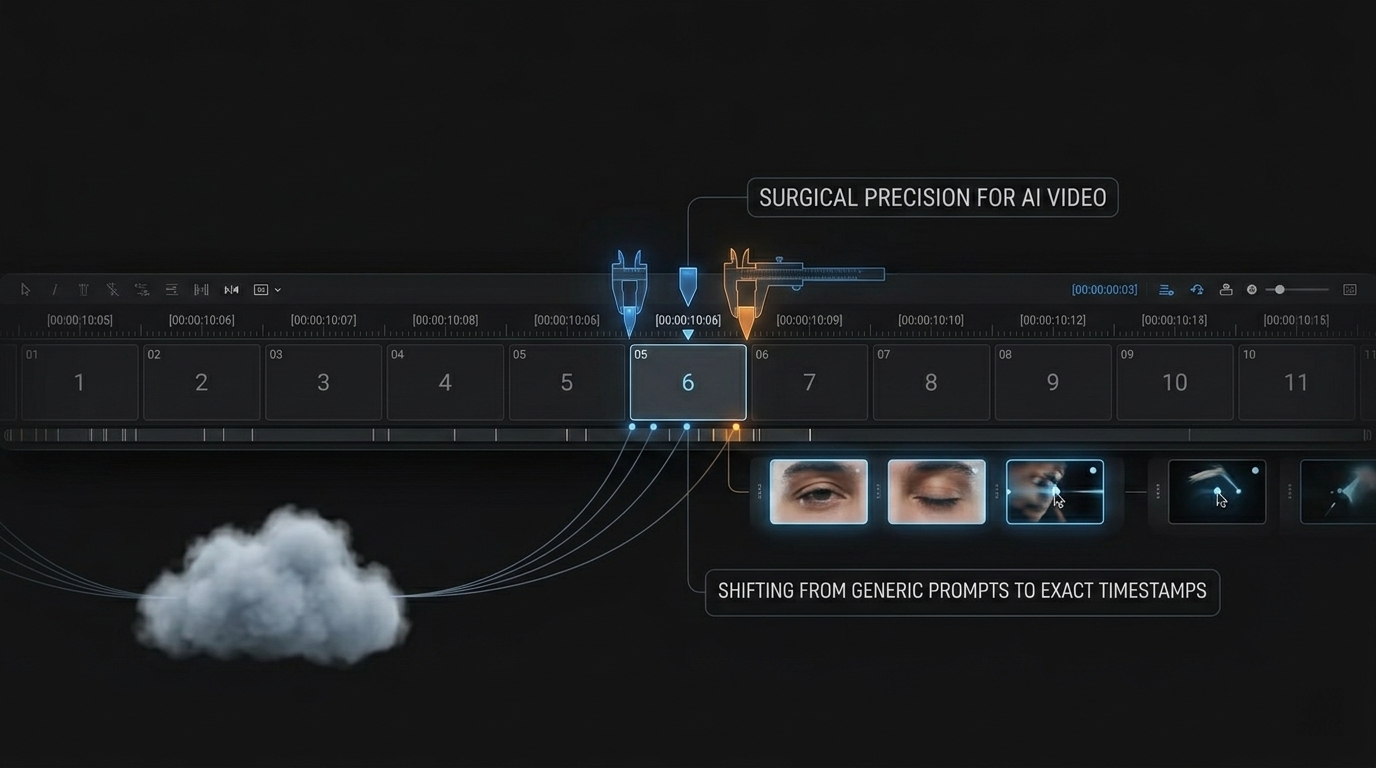
    Timestamp prompts introduce chronological anchors into the instruction itself. Each directive is tied to a specific time bracket, giving the AI surgical control over what happens, and when.

    A split diagram: Left side shows a box labeled 'Standard Prompt' with a random output; Right side shows a linear timeline with specific instruction blocks (0s-5s: Zoom, 5s-10s: Night transition).

    The structured formula: [Timestamp] + [Cinematography Cue] + [Subject] + [Action]

    Example: [00:00-00:04] Dolly shot, zooming in on the protagonist's eyes.

    This approach brings what filmmaker and industry writer Josh Edwards calls “Timeline Thinking” into the AI prompt box. It mirrors the traditional video editing workflow — where cuts and transitions are tied to specific frames — and translates it into language the model can execute precisely.

    Feature Standard Prompt Timestamp Prompt
    Timing control None — AI decides Frame-accurate time brackets
    Iteration speed Re-prompt entire output Adjust specific segments only
    Narrative flow Random pacing Intentional sequencing
    Professional readiness Needs manual editing Ready for post-production
    Audio sync No alignment Precise event-to-beat matching

    The AI Models Leading the Timestamp Revolution

    Veo 3.1: The Cinematic Controller

    Currently, Veo 3.1 is the industry leader for granular, time-based control. Unlike earlier models that struggle with long-form consistency, Veo 3.1 natively supports segmenting actions within a single request. You can layer complex instructions — camera movements, lighting shifts, dialogue — across different time brackets, and the model maintains continuity between them.

    According to Google Cloud, Pocket FM achieved lifelike lip-sync and professional-grade promotional content by combining timestamped instructions with Cinematography Cues — directional commands that specify camera behavior within each time segment.

    Kling 2.5 Turbo: Rapid Segmented Action

    While Veo 3.1 handles cinematic depth, Kling 2.5 Turbo excels at high-speed, action-heavy segments. It works well for short, intense bursts of motion — car chases, fight sequences, sports highlights — within a larger time-anchored sequence. It enables “Rapid Segmented Action” where the AI focuses on fast movement without losing the broader project context.

    Sora 2 Pro: Motion Continuity

    A persistent challenge in AI video is “motion continuity” — ensuring a character’s movement looks natural across segmented instructions. Sora 2 Pro uses timestamps to plan motion trajectories: if a character starts walking at 00:02, the model calculates their position at 00:06 to maintain spatial consistency. For security and provenance, SynthID digital watermarking verifies content authenticity and confirms timing has not been tampered with — critical for professional licensing workflows.

    Beyond Video: Time-Awareness as a Universal AI Anchor

    The logic of timestamping extends far beyond creative media. Chronological data provides the context AI needs to understand “sequence” in any domain.

    ISO Date Format and AI Scheduling

    When prompts include standardized dates (ISO 8601: YYYY-MM-DD), AI models interpret relative terms like “tomorrow,” “next Friday,” or “last week” with dramatically higher accuracy. Specifying the current date in the system prompt eliminates ambiguity and reduces scheduling errors in bots and assistants.

    Execution Logs: Timestamps as Source of Truth

    In software systems, the timestamp is the ultimate audit trail. It tells humans and AI what happened, when it happened, and how long a process took. Log analysis, incident debugging, and performance monitoring all depend on precise chronological markers.

    How to Add Timestamps to Your Terminal Prompt

    For developers, “prompting” often means the command line. Adding a timestamp to your Bash or Zsh prompt improves workflow visibility, making it easy to trace when commands executed — especially during long scripts or overnight runs.

    Discussions on terminal timestamps have accumulated over 160,000 views on Ask Ubuntu, reflecting strong demand for time-aware environments.

    Bash setup:

    1. Open your config: nano ~/.bashrc
    2. Modify the PS1 line: export PS1="\t [\u@\h \W]\\$ "
    3. Apply changes: source ~/.bashrc

    Zsh alternative: Use %D{%L:%M:%S} in your prompt variable.

    A comparison of two terminal windows: one with just '$' prompts, and another showing '[14:30:05] user@host ~ $' to highlight time tracking.

    The \t flag displays 24-hour time (HH:MM:SS) at the start of every prompt. Your terminal becomes a chronological log without installing any additional tools.

    The Deeper Pattern: Time as a Control Surface

    What timestamp prompts reveal is a broader principle: time is a control surface for AI. When you anchor instructions to specific moments, you move from describing what you want to specifying when and how it should happen. That shift transforms AI from a suggestion engine into a precision instrument.

    This principle applies whether you are generating a 10-second video clip, reviewing a server log, or scheduling a meeting. Chronological context makes AI output more predictable, more useful, and more trustworthy.

    FAQ

    Which AI video models are best for timestamp prompting?

    Veo 3.1 leads for cinematic, frame-accurate control with Cinematography Cues. Kling 2.5 Turbo excels at high-efficiency action segments. Sora 2 Pro is strongest at maintaining motion continuity across complex, multi-timestamped instructions. Each model serves a different production need.

    How do I add a timestamp to my Linux terminal prompt?

    Edit ~/.bashrc (Bash) or ~/.zshrc (Zsh). In Bash, add \t or \D{%H:%M:%S} to your PS1 variable. Save and run source ~/.bashrc to apply. The timestamp will appear before each command prompt.

    Can timestamp prompting be used for audio and transcripts?

    Yes. Models like Lyria 3 use timestamps for precision audio syncing — essential for automated lip-syncing and background score alignment. Timestamped transcripts enable AI to perform non-linear editing on podcasts and interviews, allowing users to delete or move audio segments by editing text at specific time coordinates.

    What is the difference between a standard prompt and a timestamp prompt?

    A standard prompt provides a single, holistic description of the desired output. A timestamp prompt breaks the output into time-anchored segments, each with its own specific instruction. Timestamp prompts offer frame-accurate control, faster iteration, and professional-grade output that standard prompts cannot match.

  • Free Online Countdown Timer: Track Every Event, Deadline, and Milestone With Precision

    Free Online Countdown Timer: Track Every Event, Deadline, and Milestone With Precision

    The Clock That Launched a Million Clicks

    When NASA rolls a rocket to the launch pad, the first thing they activate is not the engine — it is the countdown clock. That massive outdoor display at Kennedy Space Center has been ticking backward before every major mission since Apollo. It does not exist because engineers need to know the time. It exists because watching seconds disappear creates focus.

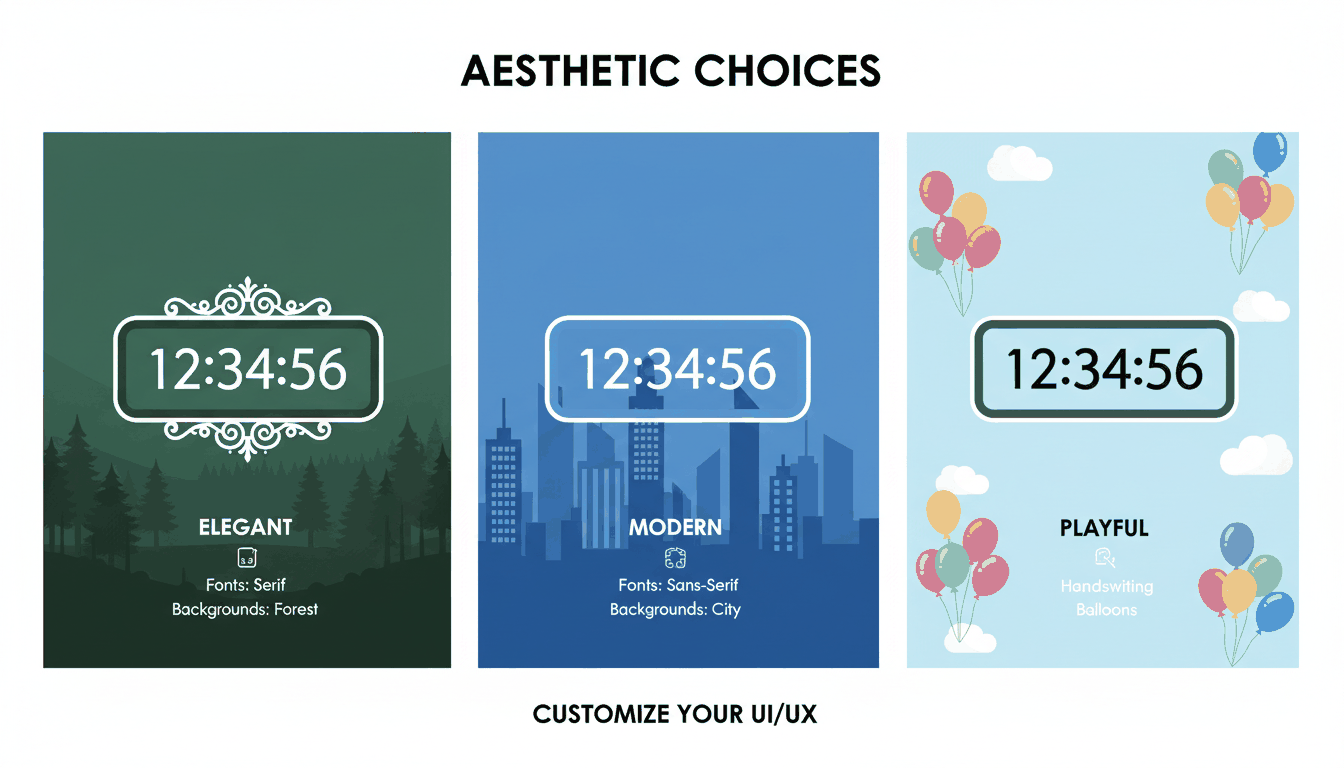
    A visual comparison of different customization styles (fonts and backgrounds)

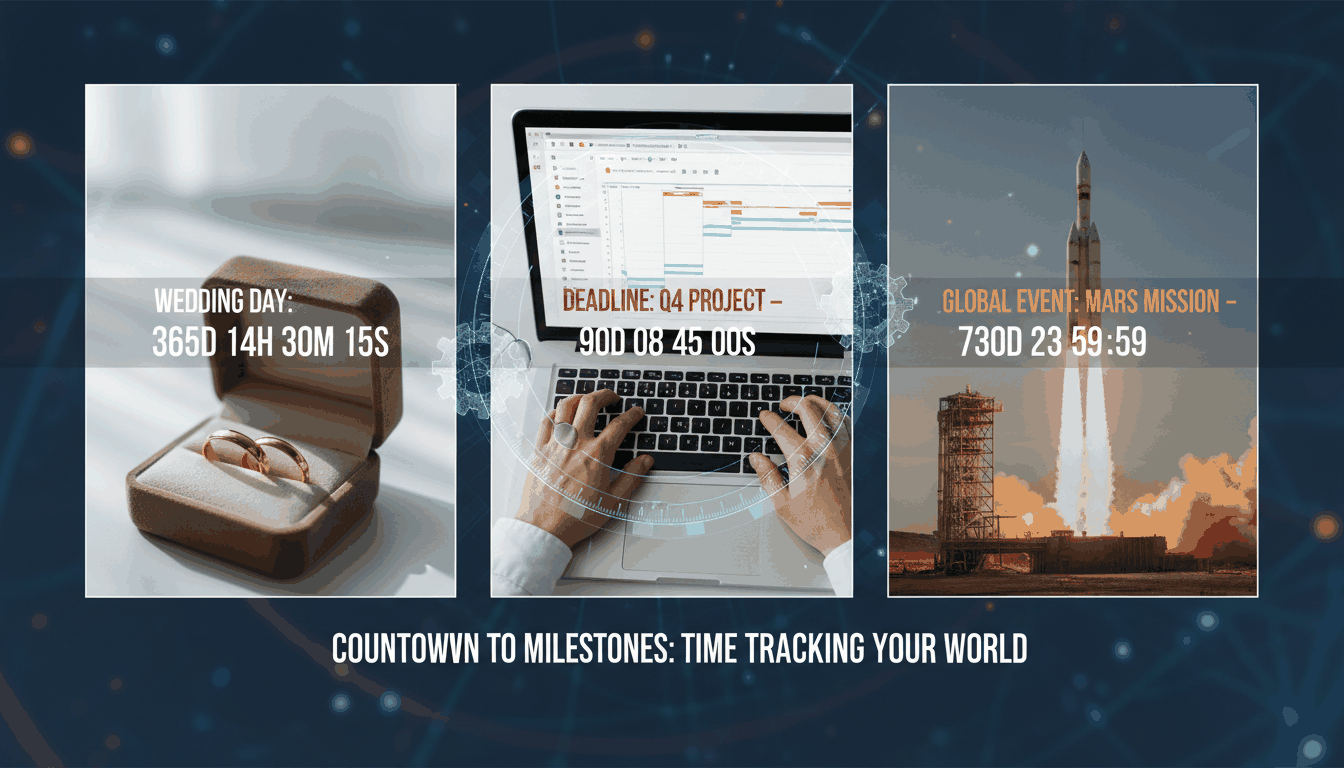
    The same psychology powers every free online countdown timer on the internet today. A countdown turns an abstract future date into a visceral, ticking reality. It transforms “sometime next month” into “14 days, 7 hours, 23 minutes” — and that specificity changes behavior.

    Data from TickCounter shows that custom countdowns generate 200-500 social shares per day as people share upcoming milestones with their networks. The timer is not just a clock. It is a sharing magnet.

    Why Countdown Timers Are Psychological Accelerators

    The human brain responds differently to counting down than to counting up. A stopwatch measures elapsed time passively. A countdown creates urgency, expectation, and a focal point for attention. This is not anecdotal — it is grounded in behavioral psychology:

    • Scarcity effect: A shrinking number signal limited availability, triggering action
    • Goal gradient effect: As the target approaches, motivation intensifies
    • Shared attention: A visible countdown synchronizes everyone looking at it

    This is why countdowns appear everywhere from product launches to wedding websites to political campaigns. The Trump Term Countdown became a viral social media fixture, demonstrating how a simple clock could sustain public engagement over years.

    Countdowns for Event Planning: From Weddings to Product Launches

    For major life events — weddings, vacations, birthdays, graduations — a visual countdown serves as a daily reminder and a communal touchpoint. Friends and family can visit the same URL and watch the same number tick down.

    Modern tools like Time and Date and TickCounter let you customize every element:

    Customization Options
    Fonts Serif, Sans Serif, Handwriting, Monospace
    Backgrounds Night City, Balloons, Forest Lake, Solid Colors
    Display units Days only, Days + Hours, or full Days/Hours/Minutes/Seconds
    Sharing Direct URL, social media embed, or iframe for websites

    The visual identity of the timer can match the tone of the event — playful for a child’s birthday, elegant for a wedding, urgent for a product launch.

    Productivity Power: Time-Boxing With Countdown Timers

    Countdown timers are not only for anticipating the future. They are among the most effective tools for structuring focused work in the present.

    The Pomodoro Technique

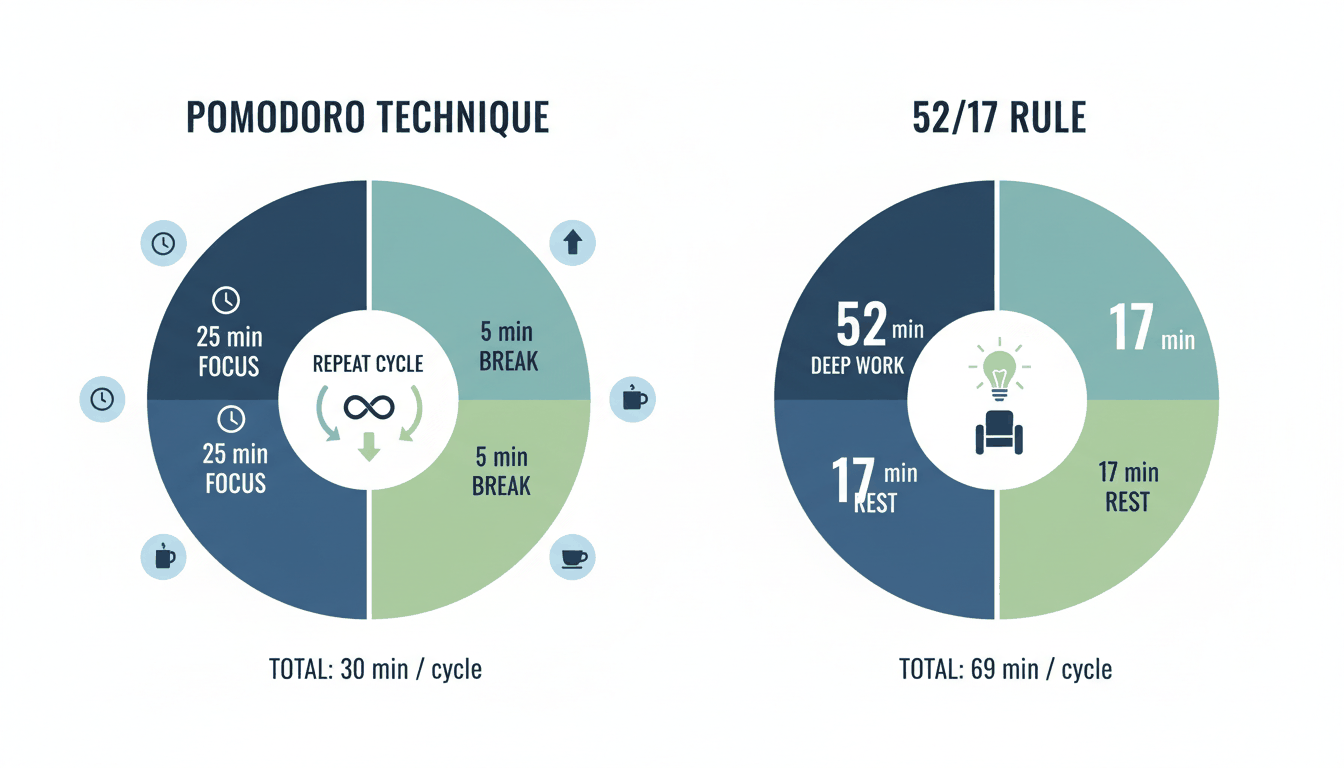
    The Pomodoro Method uses a 25-minute countdown for intense focus, followed by a 5-minute break. After four cycles, take a longer 15-30 minute break. The countdown creates a contained “sprint” that is psychologically easier to commit to than an open-ended work session.

    Visualization of the Pomodoro and 52/17 productivity cycles

    The 52/17 Rule

    Research from the productivity app DeskTime identified a pattern among the most productive workers: 52 minutes of focused work followed by 17 minutes of complete rest. Both intervals are countdown-driven. The hard stop prevents the “just five more minutes” trap that erodes breaks.

    Workday-Only Counting

    Apps like Countdown by Find Appiness offer “workday-only” mode — excluding weekends and holidays from the countdown. For project managers and freelancers, this creates a realistic picture of how many actual working days remain, not calendar days.

    Sensory Timers: Countdowns Without the Pressure

    Not everyone responds well to descending numbers. For people with anxiety, ADHD, or sensory sensitivities, a traditional countdown display can trigger stress rather than focus.

    Sensory Timers offer an alternative: relaxing visual animations instead of digits. Available on platforms like Online-Stopwatch, these timers use flowing patterns, color changes, or gentle motion to represent elapsed time without the pressure of a shrinking number.

    They are particularly effective in therapeutic settings, special education, and for anyone who needs time awareness without time anxiety.

    Classroom Timers: Gamification for Learning

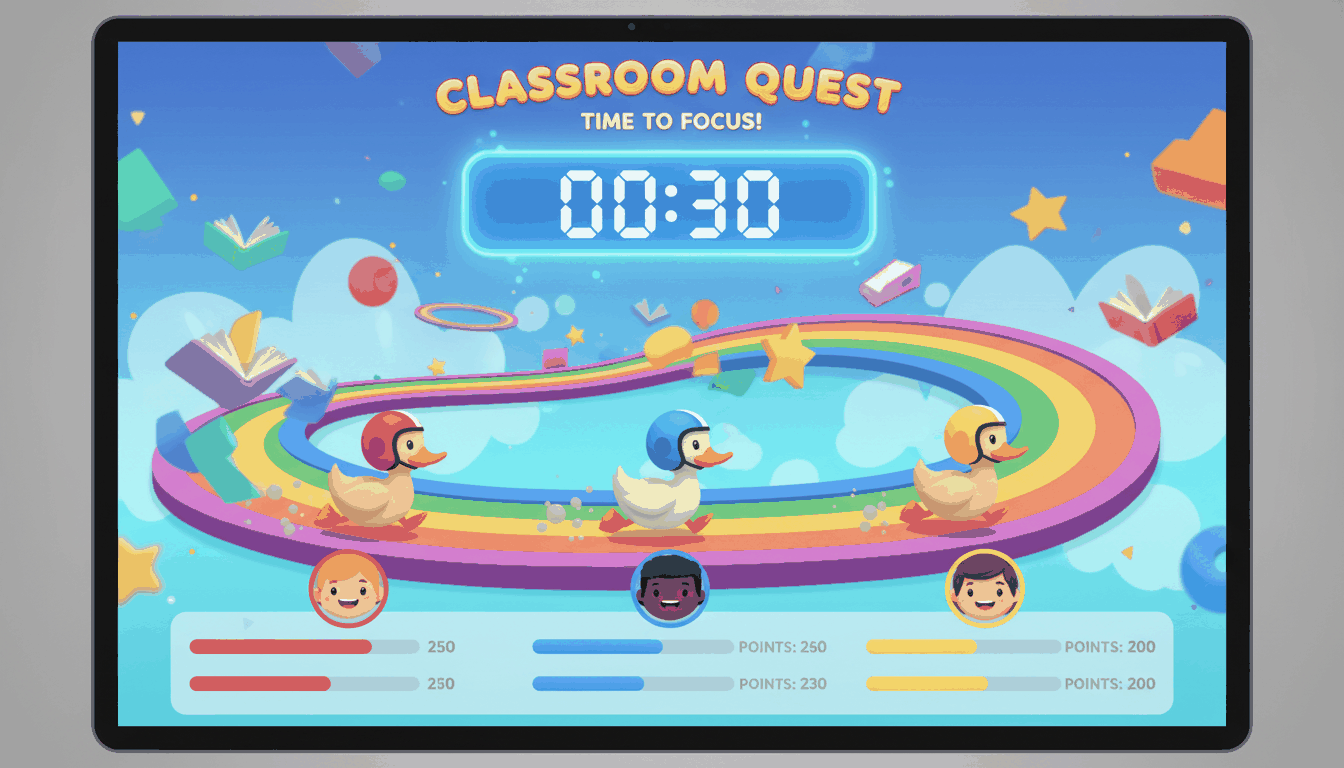
    In educational settings, countdown timers serve a dual purpose: managing transitions and engaging students. “Race Timers” — where a spaceship, robot, or duck advances as time passes — turn routine activities into games. The timer becomes a competition, and the “winner” appears only when time runs out.

    A playful illustration of a gamified classroom timer (e.g., a rocket race)

    Sound selection matters in classrooms. Tools like vClock and TimeMe offer alarm options ranging from a “School Bell” to gentle “Chimes.” The right tone signals the end of an activity without startling students or disrupting the room’s atmosphere.

    Technical Integration: Embedding Countdowns Anywhere

    For businesses, bloggers, and event organizers, a countdown timer is a technical asset that can be embedded directly into websites, emails, and e-commerce platforms.

    Embeddable Widgets

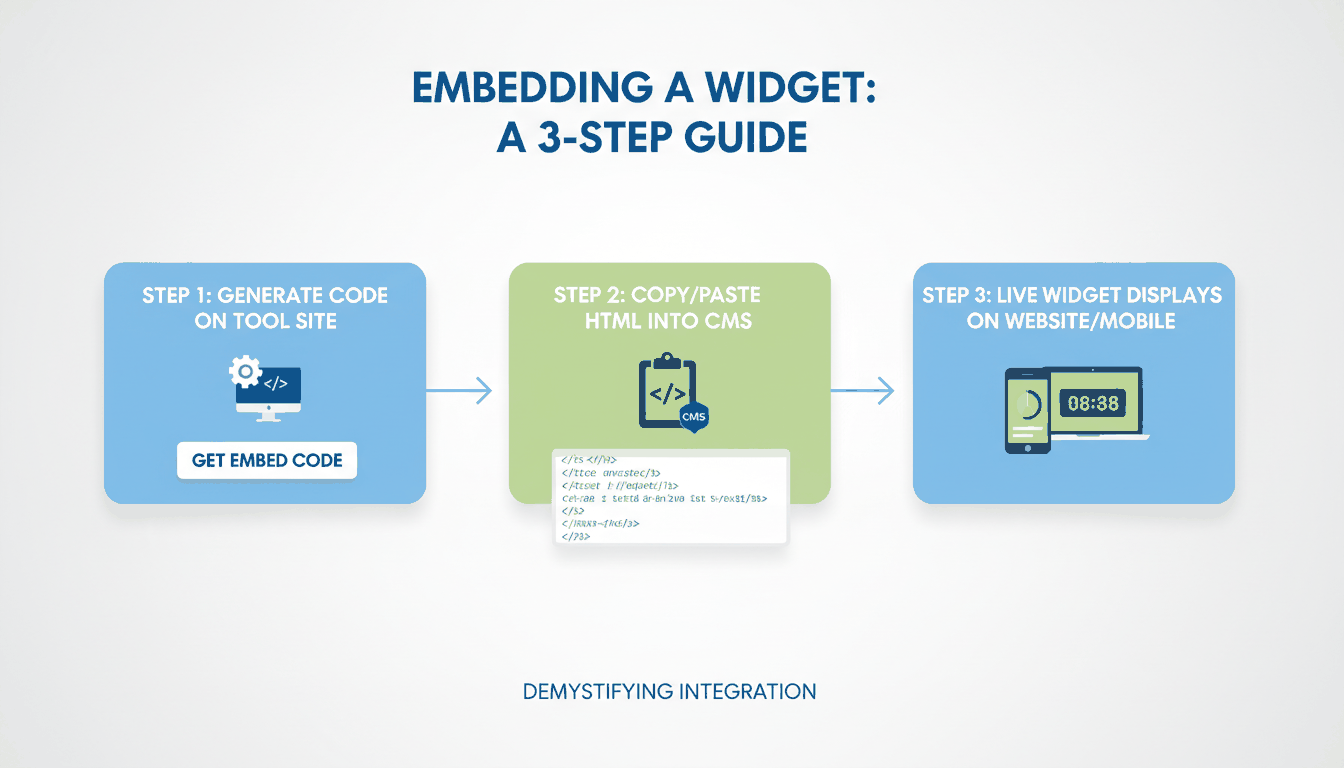
    Copy a simple iframe snippet from providers like TickCounter or CountingDownTo and paste it into WordPress, Shopify, Wix, or any HTML-compatible platform. The widget runs over HTTPS for security.

    How an embeddable widget works from code snippet to live website display

    Timezone Synchronization

    For global events, timezone accuracy is critical. High-quality timers from Time and Date use UTC-based synchronization and automatically adjust for Daylight Saving Time. A product launch at 9 AM in New York, 2 PM in London, and 10 PM in Tokyo stays synchronized across all three.

    Mobile Widgets

    With iOS 14 and Android widgets, countdowns live directly on your home screen or lock screen. Apps like Countdown – Day Counter offer StandBy mode and Apple Watch complications, keeping your most important deadlines always visible.

    Accessibility

    Modern tools are becoming more inclusive: Dark Mode reduces eye strain, and VoiceOver support ensures usability for visually impaired users. Developers like Find Appiness LLC have updated their apps with sufficient contrast and larger text options.

    FAQ

    How do I embed a countdown timer on my website or in an email?

    Copy the iframe or HTML snippet provided by tools like TickCounter or CountingDownTo. Paste it into your CMS HTML block or email editor. Set the widget to “Responsive” so it adapts to both desktop and mobile screens.

    Can I set a countdown to repeat for recurring events?

    Yes. Tools like vClock and TimeMe offer “Loop” or “Repeat” features. Set the timer to recur every 7 days at a specific time, then bookmark the URL for instant weekly access.

    Do online countdown timers adjust for Daylight Saving Time?

    Reliable timers use UTC-based synchronization and automatically adjust for DST. Always verify the “Location of event” setting when creating a timer for a global audience.

    What is the difference between a countdown timer and a stopwatch?

    A countdown timer decrements from a set duration toward zero — ideal for deadlines and events. A stopwatch increments from zero, measuring elapsed time — ideal for tracking how long something takes. Both have distinct use cases.

    Can I use a countdown timer for meditation or mindfulness?

    Absolutely. Set a countdown for your desired session length (5, 10, 20 minutes) and choose a gentle alarm sound. Some tools offer ambient background options specifically designed for meditation timing.

  • Age Calculator: Find Your Exact Age in Seconds, Milliseconds, and Heartbeats

    You Are Older Than You Think — By a Lot

    Here is a number that will reframe how you see your life: if you are 30 years old, you have been alive for roughly 946 million seconds. If you are 40, that number crosses 1.26 billion. Your heart has beaten approximately 2.8 billion times. You have taken around 630 million breaths. And until right now, you probably had no idea.

    We measure our lives in years. Birthdays, anniversaries, decades. But the human brain is notoriously bad at grasping large numbers. A year feels like a year. A billion seconds feels abstract — until an age calculator translates it into something visceral.

    This is not just trivia. Knowing your exact chronological age — down to the day, hour, or even second — has practical applications in medicine, law, fitness, and personal planning. And the tool that makes this possible is simpler than you might expect.

    What an Age Calculator Actually Does

    An age calculator is a digital utility that computes the precise time interval between two dates. Typically, those dates are your date of birth and today. But the underlying math is more sophisticated than simple subtraction.

    Here is what happens in the background when you click “Calculate”:

    Step Operation Example
    1. Full years Subtract birth year from current year 2026 – 1995 = 31 (preliminary)
    2. Month adjustment Check if birthday month has passed this year If born in August and it is May: subtract 1 year
    3. Day calculation Compute remaining months and days since last birthday 30 years, 9 months, 4 days
    4. Precision pass Factor in leap years and variable month lengths Accounts for 29-day February, 30 vs 31-day months

    The Gregorian calendar is irregular by design. Months have 28, 29, 30, or 31 days. Leap years add an extra day every 4 years — except in century years not divisible by 400. Manual age calculation requires tracking all of these rules. An algorithmic calculator handles them instantly and flawlessly.

    How to Use an Age Calculator in 30 Seconds

    1. Find a reliable tool: Search for “age calculator” or use this online tool. The best ones are free, require no sign-up, and display results instantly.
    2. Enter your date of birth: Provide the year, month, and day. Most tools use dropdown menus or calendar pickers for speed.
    3. Click Calculate. One click.
    4. Review your results. A good calculator displays:
    5. Age in complete years, months, and days
    6. Total months since birth
    7. Total weeks
    8. Total days
    9. Total hours, minutes, and seconds
    10. Your next birthday countdown

    Some tools also show your age in unconventional units: heartbeats (at ~72 BPM average), breaths (~16 per minute), or even the number of full moons you have lived through.

    Why Manual Age Calculation Fails

    Try calculating your exact age by hand. You need to count the remaining days in your birth month, add the complete months, handle the year boundary, and adjust for any leap years between your birth and today. Most people make an error within the first three steps.

    Common pitfalls:

    • Leap year miscalculation: Forgetting that 2000 was a leap year (divisible by 400) but 1900 was not (divisible by 100 but not 400)
    • Month length confusion: April has 30 days, March has 31. November has 30, October has 31. The pattern is irregular.
    • Birthday-not-yet-passed error: If your birthday is in September and it is currently March, you cannot simply subtract birth year from current year. You must subtract one.

    An algorithmic age calculator eliminates all of these by encoding the full Gregorian calendar logic.

    Practical Uses Beyond Curiosity

    Knowing your exact age is not purely recreational. It has real-world applications:

    Use Case Why Precision Matters
    Medical assessments Certain health screenings are age-dependent (e.g., mammograms starting at 40, colonoscopies at 45)
    Legal documents Visa applications, insurance forms, and retirement accounts often require exact age
    Sports eligibility Youth leagues, age-group competitions, and master’s divisions require precise chronological age
    Educational enrollment School entry cutoffs are often determined by age as of a specific date
    Pension and retirement Benefit calculations depend on exact years and months of service
    Personal milestones Planning for a specific birthday — “What date will I turn exactly 10,000 days old?”

    That last one is more popular than you might expect. Many people celebrate their 10,000th day, their 500th month, or their 1 billionth second of life.

    Your Age in Perspective: A Numbers Table

    If you are currently 30 years old (born approximately in 1996):

    Unit Approximate Value
    Years 30
    Months ~360
    Weeks ~1,565
    Days ~10,950
    Hours ~262,800
    Minutes ~15,768,000
    Seconds ~946,080,000
    Heartbeats ~2.8 billion
    Breaths ~630 million
    Full moons ~371

    The seconds figure alone reframes how much living has been packed into three decades. And every second, that number grows.

    FAQ

    How accurate is an online age calculator?

    Highly accurate. These tools are programmed with the complete rules of the Gregorian calendar, including all leap year exceptions and variable month lengths. As long as you enter the correct birth date, the result is exact.

    Can I calculate my age for a future date?

    Yes. Most calculators allow you to change the “calculate to” date from today to any future date. This is useful for finding out how old you will be on a specific upcoming event — a wedding, graduation, or milestone birthday.

    Why do different calculators show slightly different results?

    Most discrepancies come from how tools handle the current day. Some include the current date in the count; others do not. Some round months differently. For practical purposes, the differences are negligible (usually 0-1 day).

    Are online age calculators free?

    The vast majority are completely free. Be cautious of any site that asks for payment, account creation, or unnecessary personal information. A legitimate age calculator needs only three inputs: year, month, and day of birth.

    What is the difference between chronological age and biological age?

    Chronological age is the raw time elapsed since birth — what a calculator measures. Biological age reflects how well your body is aging relative to your chronological peers, based on biomarkers like telomere length, cardiovascular fitness, and metabolic health. A calculator tells you the former; a medical assessment tells you the latter.

  • Why You Need a Sleep Calculator to Feel Amazing: The 90-Minute Secret That Changes Everything

    The Morning That Changed How I Think About Sleep

    There was a stretch last year where I was getting a solid eight hours every night — and still waking up feeling like I had been hit by a truck. Groggy, disoriented, reaching for coffee before my eyes were fully open. I assumed I needed more sleep. So I tried nine hours. Worse. I tried going to bed earlier. Still awful.

    Then I stumbled onto something that sounded almost too simple: it was not about how long I slept. It was about when my alarm went off.

    The secret turned out to be a sleep calculator — a free tool that times your wake-up to align with your body’s natural 90-minute sleep cycles. Within two nights, the difference was dramatic. I was waking up clear-headed, alert, and genuinely ready to start the day. No caffeine required.

    Here is why it works — and why almost nobody talks about it.

    Your Brain Does Not Sleep. It Cycles.

    Most people think of sleep as a single state: you are either unconscious or awake. In reality, your brain runs through a repeating pattern all night, and each pattern lasts roughly 90 minutes. This is called a sleep cycle, and it has three distinct stages:

    Stage What Happens What It Feels Like to Wake From
    Light Sleep (N1, N2) Heart rate slows, muscles relax, brain disengages Easy — you barely notice waking
    Deep Sleep (N3) Growth hormone released, tissue repair, immune strengthening Terrible — groggy, confused, “hit by a bus”
    REM Sleep Vivid dreams, memory consolidation, emotional processing Disoriented but recoverable

    The magic happens at the boundaries. When your alarm goes off at the end of a complete cycle — during light sleep — waking feels natural and effortless. When it goes off in the middle of deep sleep, your brain is essentially yanked out of a repair state, and you pay for it all morning.

    A sleep calculator is designed to prevent exactly that.

    How a Sleep Calculator Works: Reverse-Engineering Your Night

    The concept is elegantly simple. Instead of picking a random alarm time, you give the calculator one piece of information:

    1. The time you need to wake up, OR
    2. The time you plan to go to bed

    The tool then counts backward or forward in 90-minute blocks to find the moments when you will be in light sleep — the optimal windows for waking. It is a reverse calculation, and it takes about five seconds.

    Example: If you need to wake up at 6:30 AM, the calculator might suggest falling asleep at:

    Option Fall Asleep By Cycles Completed Total Sleep
    A 9:15 PM 6 cycles ~9 hours
    B 10:45 PM 5 cycles ~7.5 hours
    C 12:15 AM 4 cycles ~6 hours

    Option B is the sweet spot for most adults. Option A is ideal during recovery periods. Option C is survivable but not sustainable. The key insight: all three options land on cycle boundaries, so waking up feels good at any of them.

    Why This Beats a Regular Alarm Clock

    A standard alarm clock knows one thing: what time it is. It has zero awareness of where you are in your sleep architecture. It will happily blast you out of deep sleep at 6:30 AM because that is what you told it to do.

    A sleep calculator adds a layer of biological intelligence:

    • It prevents deep-sleep interruptions. This is the primary cause of morning grogginess — not lack of sleep, but poorly timed waking.
    • It syncs with your circadian rhythm. Working with your body’s natural clock produces dramatically better results than fighting it.
    • It ensures you complete full cycles. The goal is finishing cycles, not just accumulating hours. Six complete cycles feel better than eight interrupted hours.
    • It eliminates the “hit by a bus” feeling. When you wake at a cycle boundary, you skip the sleep inertia entirely.

    How to Use a Sleep Calculator Tonight

    No app purchase required. No subscription. No complicated setup.

    1. Find a free tool: Search “free online sleep calculator” or use this one. It takes seconds.
    2. Enter your constraint: Got a fixed wake-up time? Enter that. Already in bed? Enter the current time and see when to set your alarm.
    3. Review the options: The calculator gives you several target times. Pick the one that fits your schedule.
    4. Commit for three nights: Your body adapts quickly. Most people feel a noticeable difference within 2-3 nights of consistent cycle-timed waking.

    Quick Reference: Cycles and What They Mean

    Sleep Goal Cycles Duration Who It Fits
    Minimum functional 4 cycles ~6 hours Emergency only
    Sweet spot 5 cycles ~7.5 hours Most adults daily
    Full recovery 6 cycles ~9 hours Athletes, illness recovery, high stress

    The Science Behind the 90-Minute Rhythm

    The 90-minute sleep cycle was first documented by sleep researchers in the 1950s using EEG measurements. It has since been confirmed by hundreds of studies across decades. The cycle length is remarkably consistent across adults, though it can vary between 80-120 minutes for individuals.

    During each cycle, your brain does specific work:

    • First half of the night: Dominated by deep sleep. Your body prioritizes physical repair, immune function, and growth hormone release.
    • Second half of the night: Shifts toward REM. Your brain processes emotional experiences, consolidates learning, and integrates new information.

    This is why cutting sleep short — even by 90 minutes — does not just reduce rest evenly. It disproportionately eliminates REM sleep, which is concentrated in the later cycles. You get the physical repair but miss the cognitive and emotional processing.

    The Deeper Lesson: Quality Over Quantity

    The sleep calculator reveals something profound about human biology. We have been conditioned to think about rest in terms of raw hours — “I need 8 hours” — but the body does not measure sleep in hours. It measures it in cycles.

    Eight hours of fragmented, mistimed sleep leaves you worse off than 7.5 hours of perfectly cycled sleep. The number on the clock matters less than the rhythm underneath it.

    This is why some people feel great on 6 hours and others feel destroyed on 9. It is not the duration that determines quality. It is the alignment between your alarm and your architecture.

    FAQ

    Why would I need a sleep calculator?

    You need a sleep calculator to time your alarm with your body’s natural 90-minute sleep cycles. Waking between cycles — instead of during deep sleep — is the difference between feeling refreshed and feeling groggy, regardless of how many hours you slept.

    How can a sleep calculator help me fall asleep?

    It gives you a precise bedtime target based on your desired wake time. Knowing your exact sleep window reduces bedtime anxiety and helps train your circadian rhythm to expect sleep at a consistent time each night.

    Are sleep calculators accurate?

    They are based on well-established sleep science (90-minute cycles averaged from decades of EEG research). Individual cycle length can vary by 10-20 minutes, so the targets are approximate — but they are far more accurate than picking a random alarm time.

    Can I just sleep more instead of using a calculator?

    More sleep does not solve the problem if your alarm still interrupts deep sleep. Waking from the wrong stage produces grogginess no matter how many hours you logged. Timing matters as much as duration — and in many cases, it matters more.

    Do sleep calculators work for naps?

    Yes, with a caveat. The ideal nap length is 20-25 minutes (light sleep only) or a full 90-minute cycle. Anything between 30-60 minutes risks waking from deep sleep, which produces worse grogginess than no nap at all.

  • How Many Hours of Sleep Do You Really Need Each Night? The Science Behind Your Body’s Most Mysterious Maintenance Window

    The Night Your Body Secretly Rebuilds Itself

    In 2019, researchers at the European Heart Journal published a finding that stunned the wellness community: sleeping more than 9 hours a night carries nearly the same cardiovascular risk as sleeping fewer than 6. The data came from over 116,000 people across 21 countries. The curve was U-shaped — both extremes were dangerous — and the sweet spot sat squarely between 7 and 8 hours.

    This challenges one of the most persistent myths in modern health: “More sleep is always better.” It is not. Sleep is not a fuel tank you simply fill to the brim. It is a精密 clockwork of biological processes that runs best within a specific window, and drifts out of tune when that window narrows or widens too far.

    The question is not just how long you sleep. It is how well your biology uses that time.

    What “Optimal” Actually Means in Sleep Science

    The word “optimal” gets thrown around casually, but in sleep research it has a precise definition: the duration that supports peak cognitive function, emotional stability, metabolic balance, and immune resilience — without pushing into oversleeping territory where inflammation markers rise and mortality risk climbs.

    The National Sleep Foundation, after reviewing hundreds of studies, established these evidence-based ranges:

    Age Group Recommended Range Borderline Acceptable
    Teenagers (14-17) 8-10 hours 7-11 hours
    Young Adults (18-25) 7-9 hours 6-11 hours
    Adults (26-64) 7-9 hours 6-10 hours
    Older Adults (65+) 7-8 hours 5-9 hours
    Children (6-13) 9-11 hours 7-12 hours

    These ranges are not arbitrary. They reflect age-related changes in brain development, hormonal cycles, and cellular repair mechanisms. A teenager’s brain is still wiring its prefrontal cortex — it genuinely needs more deep sleep. An older adult’s circadian rhythm naturally shifts earlier, compressing the effective sleep window.

    The U-Shaped Curve: Why Both Extremes Are Dangerous

    Sleep is not passive downtime. It is an active maintenance state where the brain flushes metabolic waste through the glymphatic system, consolidates memories, and regulates hormones that control appetite, stress, and immune response.

    Chronic short sleepers (fewer than 6 hours) face:

    • Impaired memory consolidation — the hippocampus literally fails to transfer information to long-term storage
    • Weakened immune response — a single week of reduced sleep drops vaccine effectiveness by roughly half
    • Elevated cortisol and inflammatory cytokines
    • Significantly increased risk of obesity, type 2 diabetes, and cardiovascular disease

    Habitual long sleepers (more than 9 hours) face:

    • Higher systemic inflammation markers (CRP, IL-6)
    • Greater likelihood of depression and cognitive decline
    • Increased all-cause mortality in longitudinal population studies
    • Possible indication of undiagnosed conditions (thyroid dysfunction, sleep apnea, cardiovascular disease)

    This U-shaped risk curve is one of the most replicated findings in modern epidemiology. It appears across populations, continents, and decades of data.

    The Sleep Architecture Nobody Talks About

    A full night of rest contains four to six complete cycles, each lasting roughly 90 minutes. Every cycle has three distinct phases:

    Stage What Happens Why It Matters
    Light Sleep (N1, N2) Heart rate slows, body temperature drops, brain disengages from external stimuli Transition gateway; constitutes ~50% of total sleep
    Deep Sleep (N3) Slow-wave delta brain activity, growth hormone release, tissue repair Physical restoration, immune strengthening, metabolic reset
    REM Sleep Rapid eye movement, vivid dreaming, emotional processing Memory consolidation, creativity, emotional regulation

    Missing deep sleep means your body skips physical repair. Missing REM means your brain skips emotional processing and learning integration. Both happen naturally when you undersleep. They also fragment when you oversleep, because extended time in bed disrupts cycle regularity.

    Chronotype: The Genetic Clock You Cannot Override

    Not everyone is built for eight consecutive hours. Your chronotype — governed largely by the PER3 gene — determines whether your circadian rhythm peaks early or late. “Night owls” are not lazy; their melatonin onset shifts 2-3 hours later, and forcing them onto a 6 AM wake schedule creates a chronic misalignment called “social jet lag.”

    In fieldwork with hospital staff on rotating shifts, researchers found that workers who adapted their total daily sleep — even splitting it into two sessions — reported better mood regulation, lower cortisol, and fewer errors than those forcing a traditional consolidated schedule that fought their biology.

    The lesson: total sleep quality matters more than sleep format. If your life demands segmented rest, make each segment count.

    Practical Strategies: Engineering Your Best Night

    Step 1: Establish Your Baseline

    Before changing anything, track your current state for two weeks:

    • Use a wearable (Oura Ring, WHOOP, Apple Watch) or a simple journal
    • Record: bedtime, wake time, subjective sleep quality, next-day energy, mood, and focus
    • Look for patterns. Your body will tell you where it lands on the 7-9 hour spectrum.

    Step 2: Control the Environment

    Sleep quality is heavily determined by the conditions you create:

    • Temperature: Keep the bedroom between 60-67 degrees F (15-19 degrees C). Core body temperature must drop ~2 degrees F to initiate sleep.
    • Light: Avoid screens for 60 minutes before bed. Blue light suppresses melatonin production by up to 50%.
    • Consistency: Maintain the same bed and wake times — even on weekends. A one-hour weekend shift creates the equivalent of flying across one time zone every week.

    Step 3: Respect Temporary Demands

    During illness recovery, intense training blocks, or high-stress periods, your body may need 1-2 additional hours. In a clinical study of post-COVID rehabilitation patients across Asia-Pacific clinics, average nightly needs increased by up to two hours during recovery windows before returning to baseline within three months.

    Listen to these signals without guilt — but do not let temporary needs become permanent habits unless medically indicated.

    The Tech Executive Who Saved His Career by Sleeping More

    A senior software engineer at a major Silicon Valley firm was averaging five hours per night, sustained by caffeine and the cultural glorification of “hustle.” After experiencing anxiety attacks, impaired decision-making, and a resting heart rate 20 BPM above his baseline, he consulted a sleep specialist.

    The intervention was gradual: increase to 7-hour minimums using scheduled wind-down routines, no screens after 9 PM, and a consistent 10:30 PM bedtime. Within six weeks:

    • Productivity scores improved (self-reported and manager-evaluated)
    • Mood stabilized — anxiety episodes dropped from daily to near-zero
    • Resting heart rate dropped by 10 BPM
    • He described it as “getting my brain back”

    This was not magic. It was biology finally given the space to perform its nightly maintenance.

    The Athlete Paradox: When More Sleep Makes You Slower

    Elite athletes often assume extra rest accelerates recovery. Lab trials with semi-professional cyclists told a different story. Riders who exceeded 9 hours of sleep reported “sleep inertia” — that heavy, groggy feeling upon waking — and performed worse in morning training sessions than peers who stuck to 8-hour averages supplemented with strategic 20-minute naps.

    The takeaway: recovery is about quality and timing, not raw volume.

    FAQ

    What happens if I consistently sleep only 6 hours?

    Chronic 6-hour nights impair memory retention, weaken immune response, elevate cortisol, and increase long-term risk for heart disease and diabetes. Harvard Medical School longitudinal studies show that even one week of 6-hour sleep produces cognitive deficits equivalent to two nights of total sleep deprivation — even though subjects report feeling “fine.”

    Can I catch up on sleep during weekends?

    Occasional catch-up sleep reduces acute sleep debt, but irregular patterns disrupt circadian rhythm over time, creating “social jet lag.” Research consistently shows that consistency beats compensation. A regular 7.5 hours every night outperforms 5 hours on weekdays plus 10 hours on weekends.

    Can naps replace lost nighttime sleep?

    Short naps (20-30 minutes) boost alertness and performance without disrupting nighttime rest. However, they cannot replace the deep-stage and REM processes that occur during consolidated nocturnal cycles. Naps are supplements, not substitutes.

    How do I know if I am oversleeping?

    If you regularly exceed 9 hours and still wake up tired or feel foggy throughout the day, you may be oversleeping relative to your body’s needs. Consider evaluating underlying conditions such as depression, thyroid dysfunction, or sleep apnea with a healthcare provider.

    Does genetics affect how much sleep I need?

    Yes. Certain gene variants, particularly DEC2 (also called the “short-sleeper gene”), allow some individuals to function optimally on fewer than 6 hours. However, these variants are rare — estimated at roughly 1% of the population. Most people benefit from staying within the standard recommended ranges unless advised otherwise by a medical professional.