Blog

  • Understanding How a Time Stamp Indicates the Date and Time in Digital Systems

    TL;DR: A time stamp indicates the date and time (often to fractions of a second) when a specific event occurred. It ensures data integrity, enables event synchronization, and provides a chronological audit trail for files, transactions, and communications across computer systems and blockchains.

    Why a Time Stamp Indicates the Date and Time: Core Functions

    In digital environments, a timestamp acts as a temporal anchor, pinning a specific event to a unique point in history. Beyond simply telling the time, it provides Data Integrity & Verification. By attaching a persistent temporal record to a file or a packet of data, systems can prove exactly when information was created, modified, or exchanged. This is necessary for legal compliance and technical troubleshooting.

    [Image of a digital timestamp structure showing date, time, and milliseconds]

    According to Sumo Logic, log management systems rely on these markers for the “integrity of the data in your account.” Their collectors assume that log messages from a specific source will have timestamps within a window of -1 year to +2 days compared to the current time—in this case, 2026—to ensure the timeline remains accurate and queryable.

    The Role of UTC in Global Synchronization

    Coordinated Universal Time (UTC) is the primary time standard used to regulate clocks worldwide. In globalized computing, local time creates headaches due to daylight saving changes and shifting time zones. By defaulting to UTC, developers ensure that a timestamp generated in New York sequences perfectly with one from Tokyo without needing manual offsets.

    What is the Unix Epoch and How Does It Track Time?

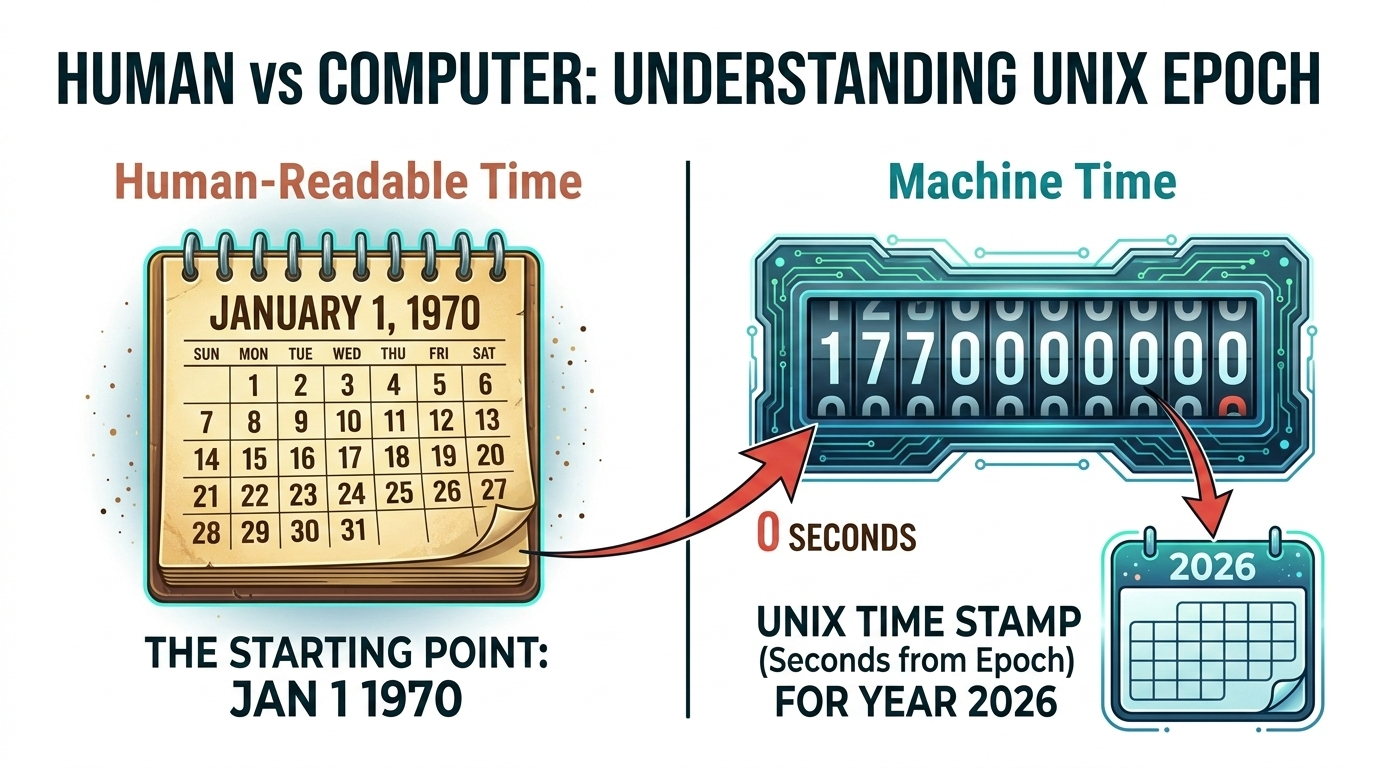
    Most modern operating systems don’t store time as “March 2nd, 2026.” Instead, they use Unix Epoch / Unix Time, which counts the seconds that have passed since the “Epoch” at 00:00:00 UTC on January 1, 1970. This integer-based system allows computers to handle chronological calculations by simply subtracting one number from another.

    While Unix is the industry standard, different systems have used different starting points throughout history:

    • Unix/Linux/macOS: January 1, 1970.
    • Windows: January 1, 1601.
    • Legacy Macintosh: January 1, 1904.

    As data moves from machine-readable integers (like 1772458528) to human-readable strings (like 2026-03-02 05:41:30), the timestamp bridges raw logic and human understanding.

    Developer’s Cheat Sheet: Generating Timestamps in Modern Languages

    Software engineers generate and manipulate timestamps to log errors or record user actions. Here are the standard ways to capture the current moment:

    • Python: The datetime module is the go-to. datetime.now(timezone.utc) provides a timezone-aware object.
    • JavaScript: Date.now() gives you the milliseconds elapsed since the Unix Epoch.
    • Java: System.currentTimeMillis() is preferred for high-performance logging.

    For Infrastructure-as-Code (IaC), the Terraform timestamp() function is a standard tool. According to TechTarget, developers use this to capture the date and time during a terraform apply. This allows resources to be tagged with their creation time, making lifecycle management much easier.

    When storing these values, SQL systems typically use TIMESTAMP or DATETIME types. NoSQL databases like MongoDB often use BSON Date objects, which allow for efficient range-based queries—like finding all logs between 2 PM and 4 PM.

    ISO 8601: The International Standard for Global Consistency

    To avoid confusion in cross-border transactions, we use the ISO 8601 standard. It follows a big-endian format: YYYY-MM-DDThh:mm:ssZ. The “Z” stands for “Zulu time,” which is the same as UTC. This format is the standard choice because it is lexicographically sortable; an alphabetical sort will also result in a chronological sort.

    [Image of ISO 8601 format breakdown]

    Staying consistent requires the Network Time Protocol (NTP). As noted by TechTarget, NTP lets computers calibrate their internal clocks to tiny fractions of a second. This ensures that even if a server’s hardware clock drifts, it stays synced with global atomic clocks, preventing “dirty timestamps” from ruining your data analysis.

    Blockchain & Cryptocurrency: Securing the Ledger with Timestamps

    In Blockchain & Cryptocurrency, timestamps act as a defense against fraud. They provide the order needed to prevent “double-spending,” where someone tries to send the same digital coin to two people at once. By timestamping each block, the network verifies which transaction actually happened first.

    Bitcoin uses a security protocol called the Median Past Time (MPT) Rule. According to Bitcoin’s protocol rules, a new block’s timestamp must be greater than the median of the previous 11 blocks. This stops miners from trying to game the system by manipulating time to adjust mining difficulty.

    Do You Need a Time Stamping Authority (TSA)?

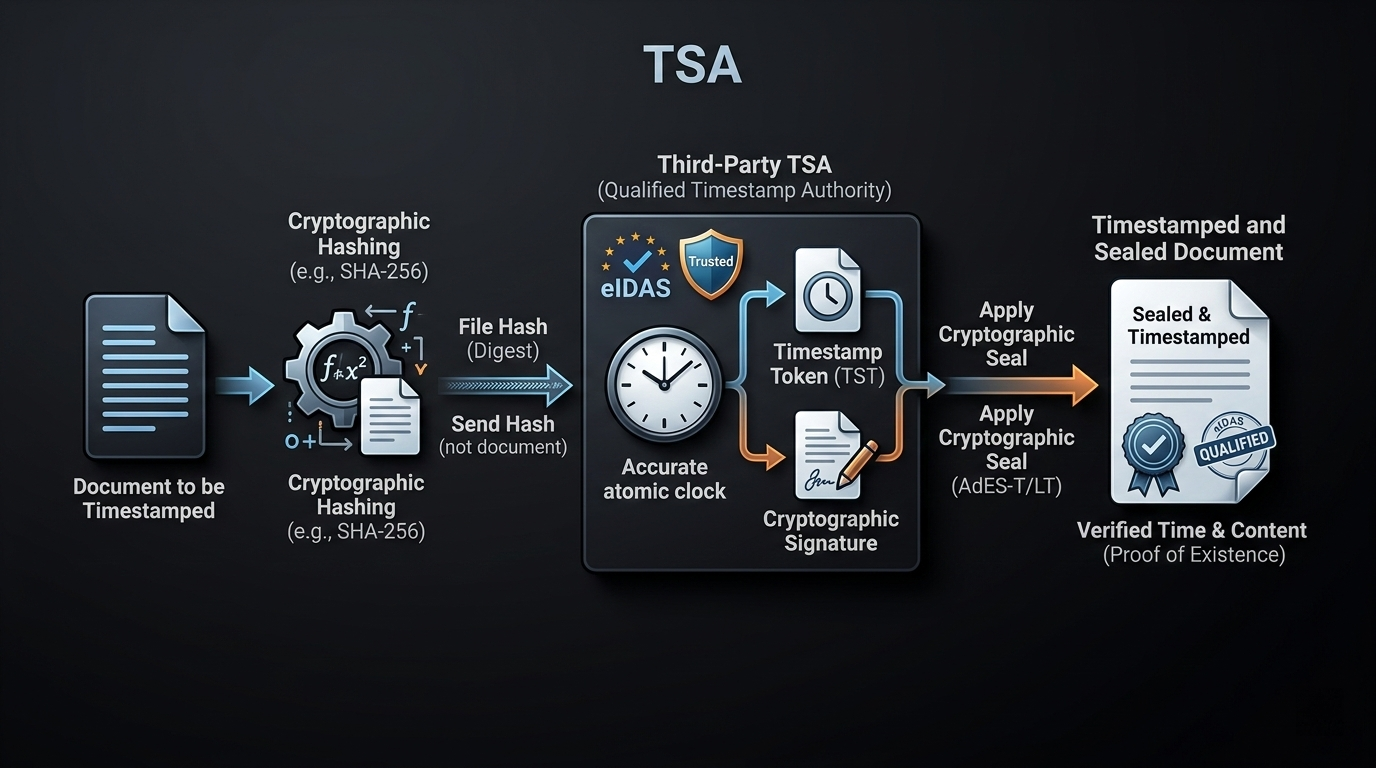
    For most apps, the system clock is enough. However, for legal digital contracts (like DocuSign), you need a Time Stamping Authority (TSA). A TSA is a trusted third party that provides a cryptographically secure timestamp, proving a document existed at a specific time and hasn’t been touched since.

    TSAs use Public Key Infrastructure (PKI) to sign the record. This is vital for preventing “Dirty Timestamps”—records that were manually changed or corrupted. In big data, a TSA-verified timestamp provides an immutable audit trail that holds up in court.

    FAQ

    What is the difference between a datestamp and a timestamp?

    A datestamp only records the calendar date (e.g., 2026-03-02), whereas a timestamp includes both the date and the specific time of day, often extending to milliseconds or nanoseconds. While a datestamp tells you what day something happened, a timestamp tells you exactly when it occurred within that day.

    Why is the Unix epoch date set to January 1, 1970?

    The date was chosen as an arbitrary “point zero” by the original creators of Unix. It provided a convenient reference point for 32-bit systems to count seconds. Although arbitrary, it has since become the universal standard for programming, allowing different languages and systems to share time data without complex conversions.

    How do blockchain timestamps prevent ‘double spending’ in cryptocurrency?

    Timestamps create a definitive chronological order for every transaction added to the ledger. When a user tries to spend the same funds twice, the network checks the timestamps. The transaction with the earlier, verified timestamp is accepted, while the subsequent attempt is rejected as invalid, ensuring the integrity of the digital currency.

    Can a computer timestamp be manipulated or ‘dirty’?

    Yes. Local system clocks can be manually changed by users or drift due to hardware battery failure. These are often called “dirty timestamps.” To combat this, professional environments use the Network Time Protocol (NTP) for synchronization and Time Stamping Authorities (TSAs) for legal-grade verification that cannot be altered.

    How do I convert a Unix timestamp to a human-readable format in Excel?

    You can use the formula: =((A1/86400)+25569). In this formula, 86400 represents the total seconds in a day, and 25569 is the specific offset required to align the Unix epoch (1970) with Excel’s internal calendar system (which begins in 1900). After applying the formula, format the cell as a “Date” or “Time.”

    Conclusion

    A timestamp is more than a clock reading; it’s a building block of digital trust. By understanding how a time stamp indicates the date and time, you can protect data integrity, sync global networks, and secure financial ledgers. Whether you’re a developer using Terraform timestamp() or an executive signing a contract, these markers are what keep the digital world in sync.

    When building your next system, stick to UTC and ISO 8601. It’s the best way to keep your data verifiable, API-compatible, and safe from “dirty” data errors.

  • Excel Convert Epoch to Datetime: The Exact Formula & Timezone Guide

    Excel Convert Epoch to Datetime: The Exact Formula & Timezone Guide

    To make excel convert epoch to datetime, divide the timestamp by 86,400 (the number of seconds in a day) and add Excel’s base date offset. The exact formula is =(A1/86400)+DATE(1970,1,1). After entering the formula, apply Custom Cell Formatting using mm/dd/yyyy hh:mm:ss to view the human-readable calendar date and time.

    The Core Formula: Dividing by 86400 and Adding DATE(1970,1,1)

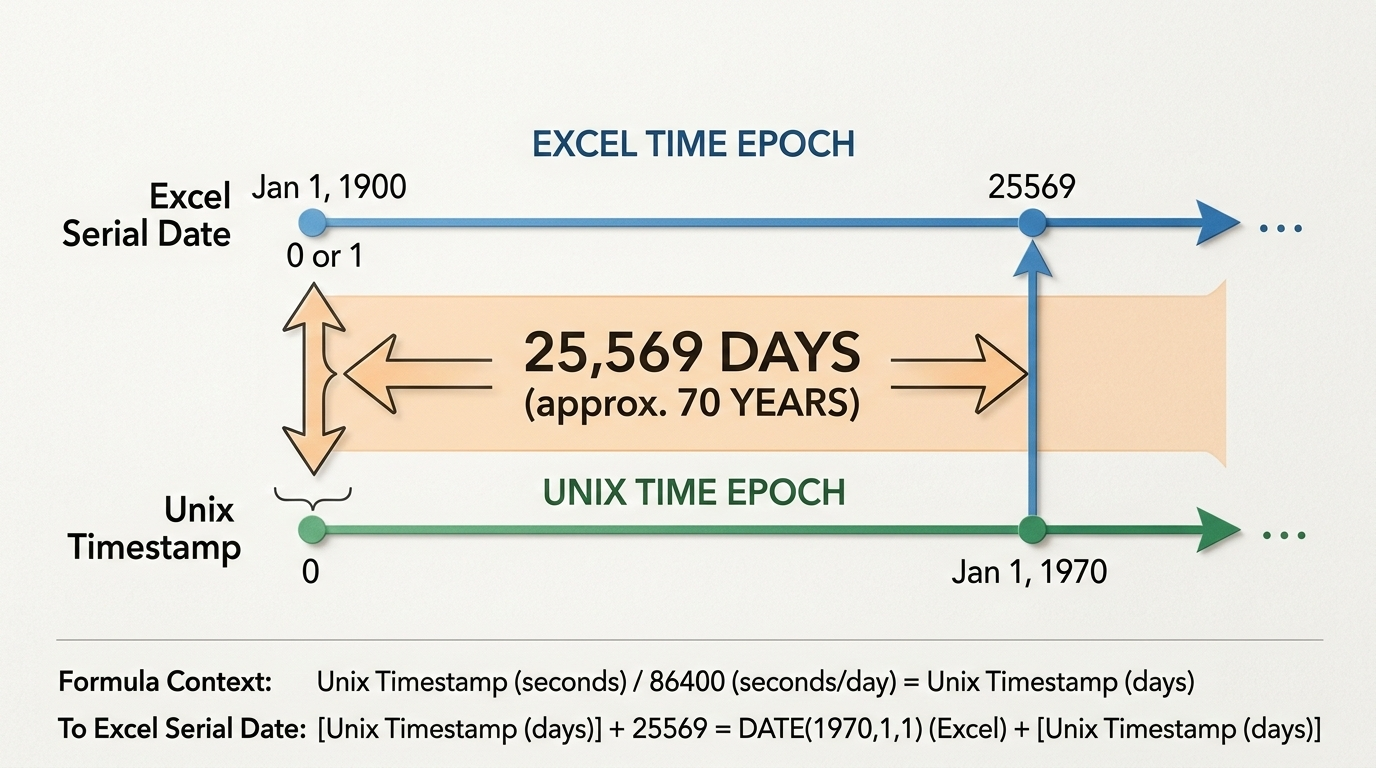
    Excel and Unix systems track time differently. Excel counts continuous days starting from January 1, 1900, while the Unix epoch counts continuous seconds starting from January 1, 1970. Based on data from Exceljet, a standard 24-hour day contains exactly 86,400 seconds.

    To translate between the two systems, you divide the Unix timestamp by 86,400 to turn those seconds into days. Then, you account for the gap between the two starting years. As noted by Microsoft Q&A, this gap is exactly 25,569 days. You can write this offset in your formula as either the raw number 25569 or the DATE(1970,1,1) function.

    Put your epoch timestamp in cell A1 and enter =(A1/86400)+DATE(1970,1,1) in cell B1 to calculate the raw decimal value.

    双时间轴对比图:上方为Excel时间轴(起点1900年1月1日),下方为Unix时间轴(起点1970年1月1日),中间用箭头标出25,569天的差距。

    How to Apply Custom Cell Formatting

    Your formula will initially return a decimal number like 44538.66. To make this readable, select the cell, press Ctrl + 1 to open the Format Cells dialog box, and click the “Custom” category. Type mm/dd/yyyy hh:mm:ss into the “Type” field and hit OK to reveal the actual date and time string.

    The Digit Count Guide: Handling 13-Digit Millisecond Timestamps

    Standard Unix timestamps are 10 digits long and measure seconds. However, lots of API exports and telemetry logs use 13-digit millisecond timestamps for higher precision. If you use the standard formula on these, you’ll end up with an incorrect date thousands of years in the future.

    According to Excel Insider, you need to adjust your divisor to 86,400,000 for 13-digit data. This divides the milliseconds into seconds and the seconds into days all in one mathematical step.

    Timestamp Type Digit Count Required Formula
    Standard Seconds 10-digit =(A1/86400)+DATE(1970,1,1)
    Milliseconds 13-digit =(A1/86400000)+DATE(1970,1,1)

    How Do I Apply Timezone Adjustments to Converted Epoch Dates?

    Unix epoch time is always recorded in Coordinated Universal Time (UTC). Your converted formula will output the UTC datetime by default.

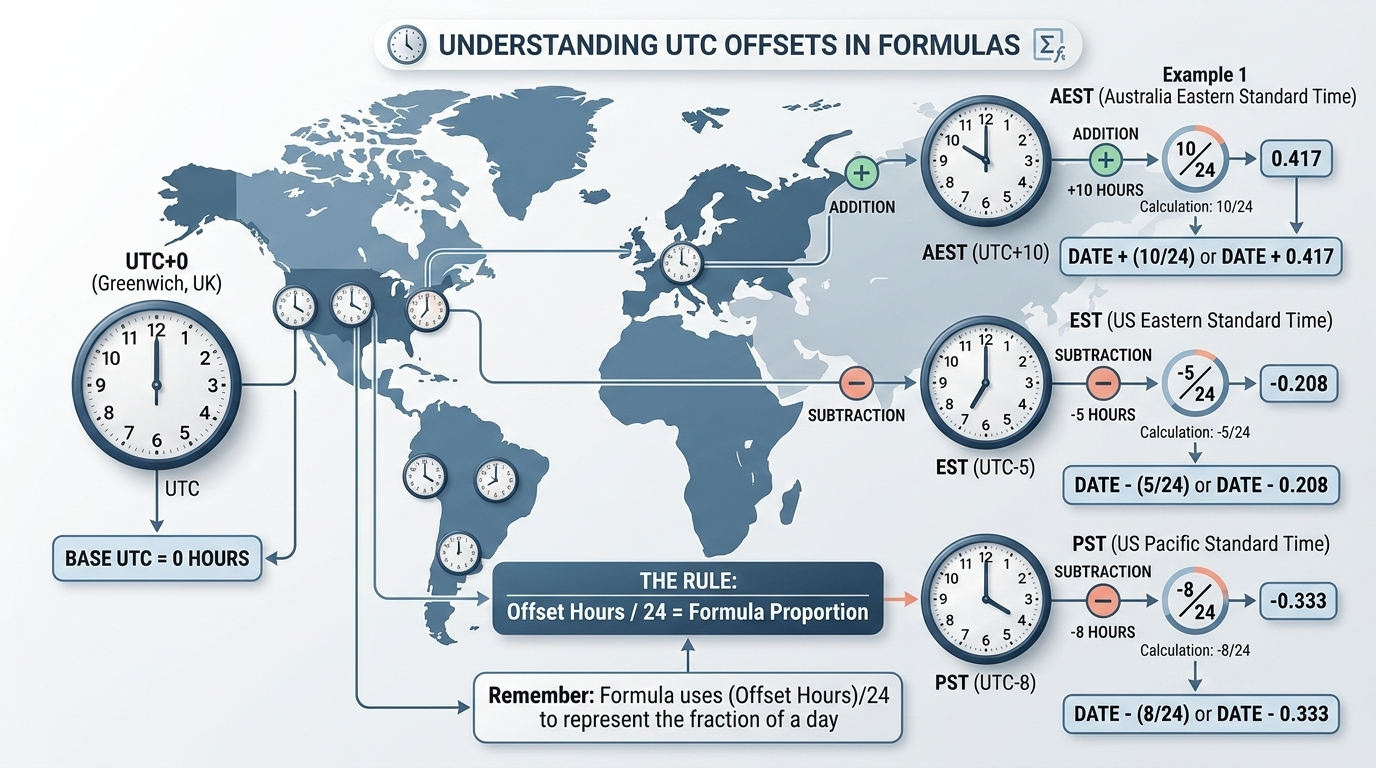
    To get your local time, add or subtract the hour difference as a fraction of a 24-hour day directly in your formula. Just attach +(hours/24) or -(hours/24) to the end of the core conversion math.

    Quick Reference Cheat Sheet for Major Time Zones

    Here are the static adjustments for common global time zones. Keep in mind you’ll need to manually update these formulas when Daylight Saving Time (DST) shifts occur.

    Time Zone UTC Offset Excel Formula Adjustment
    Eastern Standard Time (EST) UTC-5 =(A1/86400)+DATE(1970,1,1)-(5/24)
    Pacific Standard Time (PST) UTC-8 =(A1/86400)+DATE(1970,1,1)-(8/24)
    Greenwich Mean Time (GMT) UTC+0 =(A1/86400)+DATE(1970,1,1)
    Australian Eastern Standard (AEST) UTC+10 =(A1/86400)+DATE(1970,1,1)+(10/24)

    带有世界地图或全球时钟分布的图表,直观显示UTC+0到常见时区(如EST、PST、AEST)的加减偏移计算逻辑。

    Extracting the Calendar Date Only Using INT and TEXT Functions

    If you only need to group metrics by the calendar date—not track the exact hour and minute—wrap your formula in the INT function. The formula =INT(A1/86400)+DATE(1970,1,1) strips away the time decimals, leaving you with a clean whole number representing midnight of that date.

    If you’re exporting this data to a CSV or combining it with other text cells, use the TEXT function instead. The formula =TEXT((A1/86400)+DATE(1970,1,1), "mm/dd/yyyy") converts the math straight into a static text string that won’t break if someone accidentally changes the spreadsheet formatting.

    Bulk Processing Millions of Rows with Power Query

    Applying standard cell formulas to massive datasets will severely lag your spreadsheet. For millions of rows, handle the conversion in Power Query during the data ingestion phase instead.

    Open the Power Query Editor and add a Custom Column. Use the M code snippet #datetime(1970, 1, 1, 0, 0, 0) + #duration(0, 0, 0, [EpochColumn]) for 10-digit timestamps. This does the math efficiently in the background without bloating your file size, giving you a clean datetime column ready for PivotTable analysis.

    流程图:原始海量数据源 → 进入Power Query Editor → 应用M代码转换 → 输出干净的Datetime列用于数据透视表。

    Troubleshooting the Negative Dates Error (####)

    Seeing a row of hash symbols (####) filling your cells usually means one of two things. First, try double-clicking the boundary of the column header to widen it—the full mm/dd/yyyy hh:mm:ss format requires a lot of horizontal space.

    If the cell still shows hash symbols after widening, your formula is generating a negative date. Excel’s date system cannot display dates before January 1, 1900. Check your source data: make sure you aren’t using the 10-digit formula on a 13-digit timestamp, and verify that your timezone subtraction didn’t push an early-1970 date backward into 1899.

    FAQ

    Why does my Excel cell show ####### after applying the epoch conversion formula?

    Usually, your column is simply too narrow for the full ‘mm/dd/yyyy hh:mm:ss’ format. Try widening it. If it still shows hashes, your formula resulted in a negative number, meaning the date falls before Excel’s minimum cutoff of January 1, 1900.

    How do I convert a 13-digit millisecond epoch timestamp to a date in Excel?

    Because 13-digit timestamps track milliseconds, you need to increase your formula’s divisor by a factor of 1,000. Use the updated formula =(A1/86400000)+DATE(1970,1,1) to handle both the millisecond-to-second and second-to-day conversions accurately.

    How can I adjust my converted Excel datetime for my specific local timezone (e.g., EST, AEST)?

    Since epoch time is measured in UTC, you adjust it by adding or subtracting the hour difference as a fraction of a 24-hour day. To switch to EST (UTC-5), just add -(5/24) to the very end of your conversion formula.

    What is the difference between Excel’s date system and the Unix epoch?

    Excel counts continuous days starting from January 1, 1900. The Unix Epoch counts continuous seconds starting from January 1, 1970. The number 25,569 bridges this gap, representing the exact number of days between those two starting points.

    Conclusion

    Getting readable dates from epoch timestamps comes down to matching Unix seconds to Excel’s daily clock using the 86400 divisor and the DATE(1970,1,1) offset. Just remember to check whether your data is in 10-digit seconds or 13-digit milliseconds before you apply the formula to ensure the math lines up.

    Start by pasting =(A1/86400)+DATE(1970,1,1) into your worksheet, tweak it for your local timezone, and apply custom formatting to actually see the date.

    Would you like me to help you write a custom VBA macro to automate this conversion across multiple workbooks?

  • Free Online Countdown Timer: Track Every Event, Deadline, and Milestone

    Free Online Countdown Timer: Track Every Event, Deadline, and Milestone

    A countdown timer is a virtual tool used to track time remaining until a specific moment. Whether you need a simple kitchen timer for minutes or a long-term tracker for a wedding or holiday, these tools help create urgency, improve productivity, and build anticipation for important life milestones and deadlines.

    Why Use a Countdown Timer for Event Planning and Milestones?

    A countdown timer turns an abstract future date into a ticking reality. For major life events like a Vacation, Wedding, or Birthday, a visual tracker acts as a “sharing magnet.” Data from TickCounter shows that custom countdowns generate significant social engagement, often reaching 200-500 social shares per day as people celebrate upcoming moments with their networks.

    The psychological impact of watching time tick away is real. Seeing the seconds drop creates a focal point for everyone involved, turning a static date into a shared experience. This method has long been used to capture public imagination; for example, NASA uses a massive outdoor countdown clock to build national focus for space launches, proving that timers are powerful symbolic tools for collective goals.

    Customizing Your Event: Backgrounds and Fonts

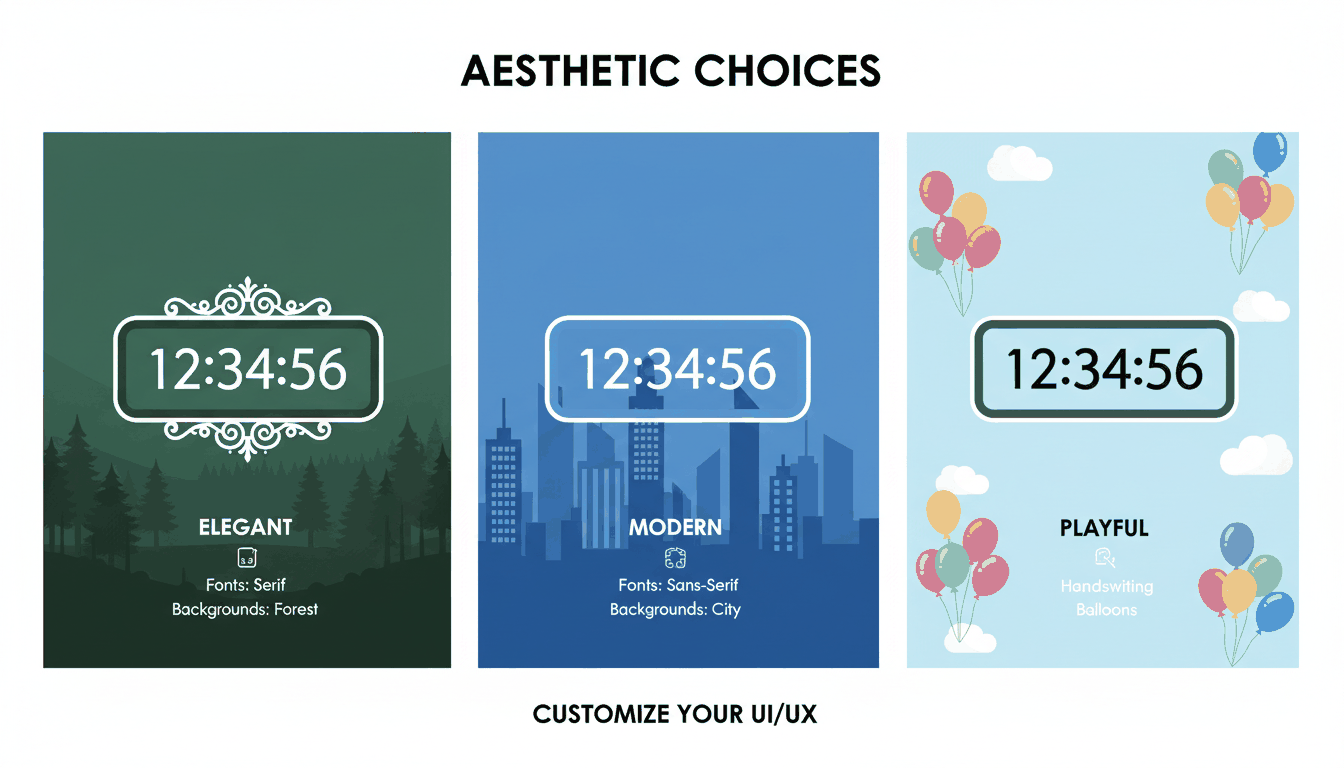
    Personal branding matters when you’re sharing a countdown for a birthday or a product launch. Tools like Time and Date and TickCounter let you choose from various font styles—such as Serif, Sans Serif, and Handwriting—and professional backgrounds like “Night City,” “Balloons,” or “Forest Lake.” These options help the timer match the actual vibe of your event.

    A visual comparison of different customization styles (fonts and backgrounds)

    Boosting Productivity: Integrating Countdown Timers with Work Frameworks

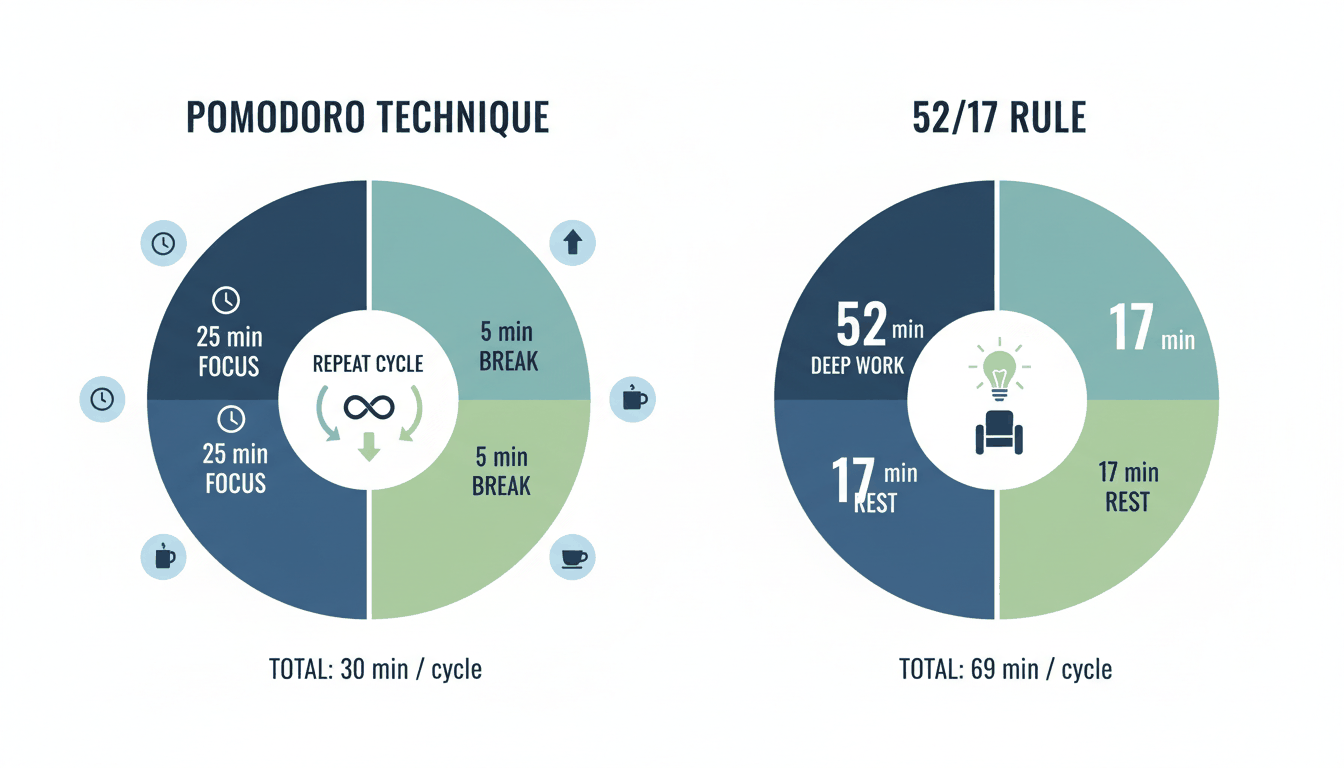
    Using a countdown timer in your professional workflow is a practical way to beat procrastination through “time-boxing.” By setting a hard limit on a task, you use the “magic of urgency” to get moving. This works especially well with frameworks like the Pomodoro Technique or the 52/17 rule (52 minutes of work followed by 17 minutes of rest), which rely on visual cues to keep your output high.

    Visualization of the Pomodoro and 52/17 productivity cycles

    In many offices, “Workday-only Counting” is now a standard feature for project management. Apps like Countdown by Find Appiness allow you to exclude weekends and holidays, showing exactly how many actual working days are left before a deadline. This creates a realistic sense of Urgency Marketing, similar to the tactics Amazon or eBay use (“Order within 3 hours for next-day delivery”) to improve Conversion Rates.

    A famous example of a timer’s impact is the Trump Term Countdown, which became a massive social media focal point. It showed how a simple clock could track a high-stakes “term” and keep people engaged over several years.

    Sensory Timers for Anxiety and Focus

    If traditional ticking clocks feel stressful, Sensory Timers offer a “no numbers, no stress” alternative. Available on platforms like Online-Stopwatch, these use relaxing animations instead of digits. They are helpful for anyone with anxiety or ADHD who needs to manage time without the pressure of a descending numerical display.

    How to Use Classroom Timers for Better Group Management?

    Classroom Timers are essential for managing student transitions and keeping kids engaged. Teachers often use “Race Timers”—like spaceship, robot, or duck races—where the “winner” appears only when the time is up. This gamification turns routine chores, like cleaning up or finishing a quiz, into a fun competition that keeps the room focused.

    A playful illustration of a gamified classroom timer (e.g., a rocket race)

    The right Alarm Sound Selection makes a big difference in a school setting. Tools like vClock and TimeMe offer sounds ranging from a “School Bell” or “Ta Dah” to quieter “Beeps” or “Chimes.” Choosing a clear but non-disruptive sound ensures the activity ends without startling the students or breaking the classroom’s flow.

    Technical Integration: Embeddable Widgets and Mobile Support

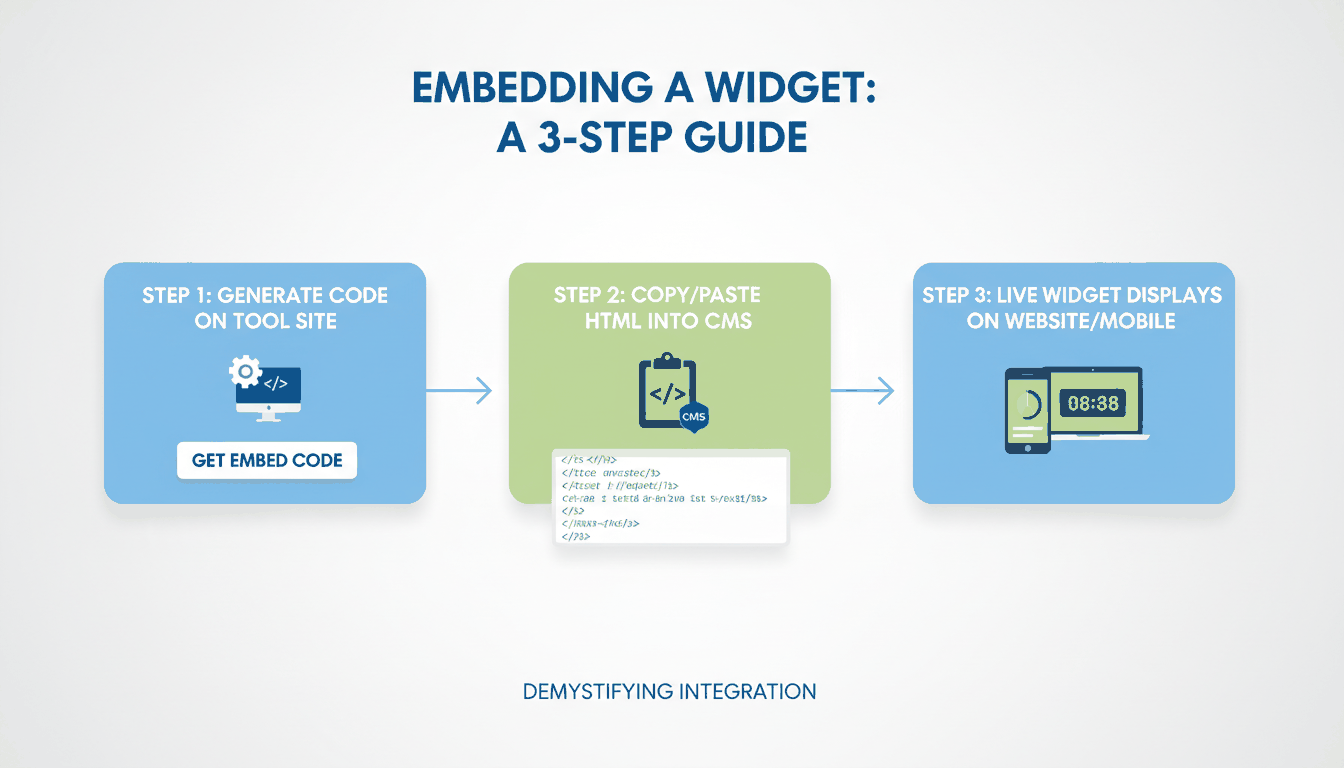
    For businesses and bloggers, a countdown is a technical asset you can add via an Embeddable Widget / Iframe. By copying a simple HTML snippet from a provider like TickCounter, you can drop a live timer directly onto WordPress, Shopify, or Wix. These widgets usually run via encrypted connections (HTTPS) to keep the host site secure.

    Timezone Synchronization is a must for global events. High-quality online timers, like those from Time and Date, use UTC-based synchronization and automatically adjust for Daylight Saving Time (DST) changes. This ensures a product launch or New Year’s event happens at the exact same moment for users in New York, London, and Tokyo.

    How an embeddable widget works from code snippet to live website display

    Mobile App / Widget Support has made these tools even more accessible. With iOS 14 and Android widgets, you can put countdowns right on your home screen or lock screen. Apps like Countdown – Day Counter offer “StandBy” mode and Apple Watch complications, so your most important deadlines are always just a glance away.

    Accessibility: Dark Mode and Screen Reader Support

    Modern countdown tools are becoming more inclusive by offering Dark Mode to reduce eye strain and supporting features like VoiceOver. Developers like Find Appiness LLC have updated their apps in 2025 to include “Sufficient Contrast” and “Larger Text,” making sure the timers work for everyone, including those with visual impairments.

    FAQ

    How do I embed a countdown timer into my personal website or email?

    To embed a timer, copy the provided Iframe or HTML code from a tool like TickCounter or CountingDownTo. Paste this code into your website’s CMS (like WordPress) or your email editor’s HTML block. Make sure the widget is set to “Responsive” so it looks right on both desktop and mobile screens.

    Can I set a countdown timer to repeat for recurring weekly meetings?

    Yes, several advanced tools like vClock and TimeMe have a “Loop” or “Repeat” feature. You can set the timer to trigger every 7 days at a specific time. Once it’s set up, just save the unique URL as a bookmark to access it quickly every week.

    Do online countdown timers adjust automatically for Daylight Saving Time (DST) changes?

    Reliable timers, such as those from Time and Date, use UTC-based Timezone Synchronization. They automatically adjust the remaining time based on the event’s location and local DST rules. It’s always a good idea to double-check the “Location of event” setting when you’re creating a timer for a global audience in 2025.

    Conclusion

    A countdown timer is more than just a clock; it’s a tool for motivation, a professional asset for marketing, and a simple way to celebrate life’s big moments. By creating a visual focus, these tools help you get things done and stay excited about what’s coming next.

    Try setting a custom timer for your next big deadline or personal goal today. Whether you use a widget for your online shop or a simple app on your phone, tracking the time is the first step toward making every second count in 2025.

  • How to Perform a Timestamp Difference Calculate: A Cross-Platform Guide

    How to Perform a Timestamp Difference Calculate: A Cross-Platform Guide

    To perform a timestamp difference calculate, use environment-specific functions. For SQL databases, use TIMESTAMPDIFF() (MySQL) or EXTRACT(EPOCH). In JavaScript, simply subtract two Date objects. Always align your timestamps to the same timezone—preferably UTC—before running the math to dodge daylight saving time bugs.

    (Note: Use our interactive JavaScript calculator below to instantly verify your logic before pushing code to production.)

    The Danger of DST: Why You Must Understand the UNIX Epoch

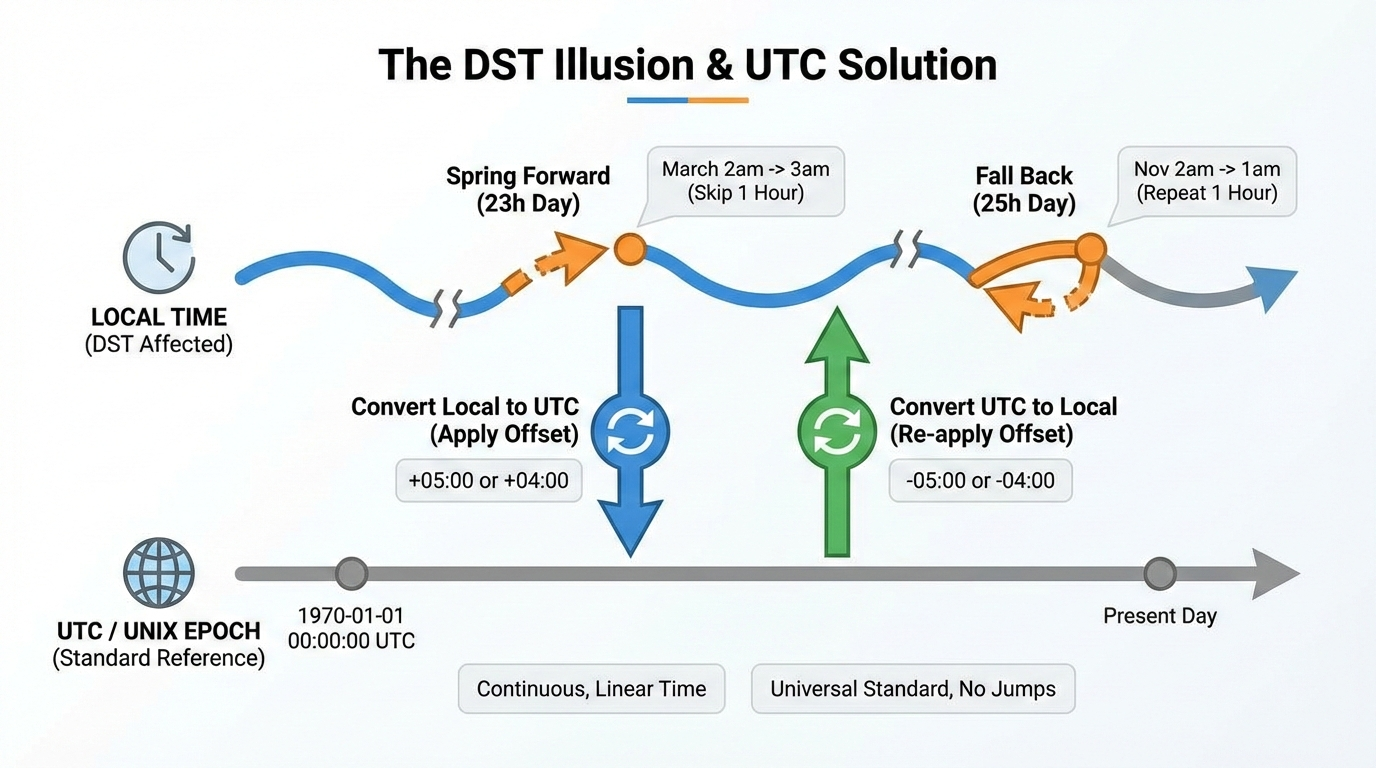
    解释夏令时(DST)带来的23小时/25小时错觉,并展示使用UTC作为标准参照物解决问题的流程,这是文章中最需要抽象思维的部分。

    Relying on local timezones for math is a recipe for bad data. Thanks to Daylight Saving Time (DST), a standard day might actually be 23 or 25 hours long. If you subtract local timestamps across a DST boundary, your tracking will break.

    The safest fix is the UNIX Epoch (January 1, 1970, at 00:00:00 UTC). A UNIX timestamp counts the exact seconds since that moment, ignoring geography and DST completely.

    Normalize your local times to UTC seconds first. When you measure everything in exactly 86,400-second days, you immune your app from local timezone quirks.

    How Do You Handle PostgreSQL and MySQL Queries?

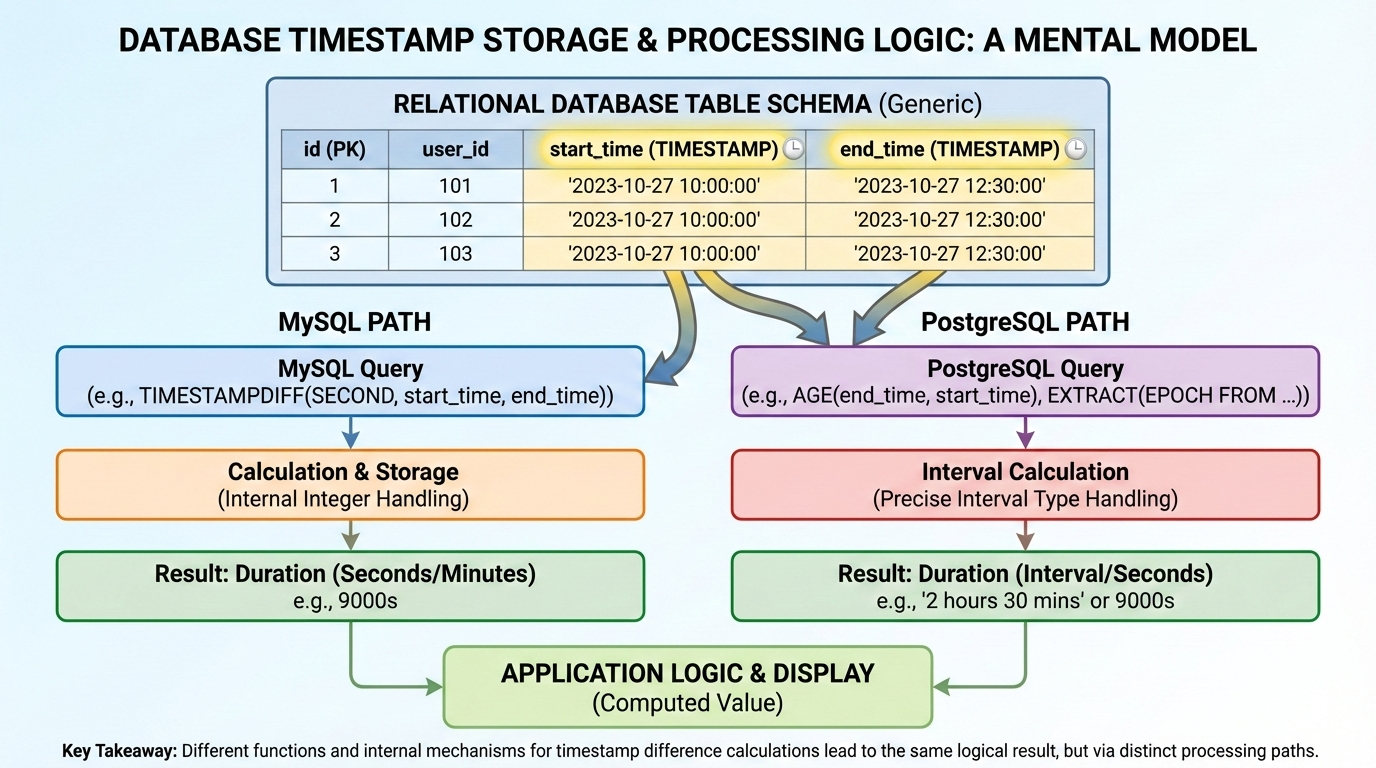
    在进入具体的数据库函数解释前,提供一个关于数据库时间戳存储和处理逻辑的视觉心理模型。

    Running calculations directly in your SQL query is usually much faster than pulling raw timestamps into your app and processing them later. While database engines handle date math natively, MySQL and PostgreSQL take entirely different approaches.

    MySQL: TIMESTAMPDIFF Explained

    For MySQL, TIMESTAMPDIFF() is the go-to function. You just pass it three arguments: the time unit you want back (like SECOND, MINUTE, HOUR, or DAY), the start timestamp, and the end timestamp.

    If you only care about raw seconds, UNIX_TIMESTAMP() is another solid option. Converting both dates first lets you do a simple subtraction: UNIX_TIMESTAMP(end_date) - UNIX_TIMESTAMP(start_date). This works great when exporting data to an external app that expects standard integers instead of formatted date strings.

    PostgreSQL: Extracting Epoch and Age

    PostgreSQL has the AGE() function, which gives you human-readable outputs like “1 mon 15 days”. It looks great on a dashboard, but it’s a headache to parse programmatically. For strict math, stick to EXTRACT(EPOCH FROM (date1 - date2)), which safely converts the interval into raw seconds.

    For example, if you need to flag overdue equipment, a database admin might use something like: extract(day from age(now(), rental.rental_date)) > 90. This handles the logic right at the database level, skipping the heavy backend processing entirely.

    JavaScript / Node.js: Converting Milliseconds to Seconds, Minutes, Hours, and Days

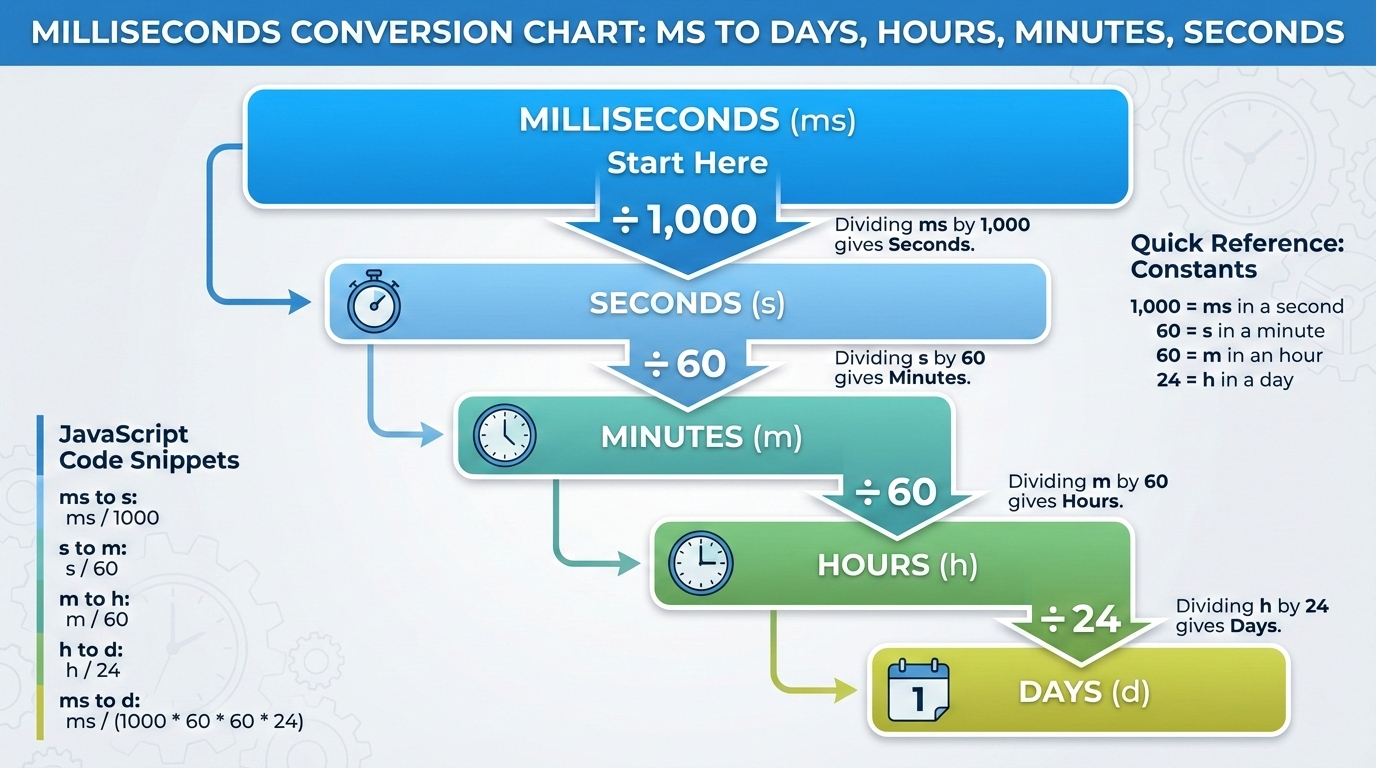
    将抽象且容易出错的数学乘除法直观化,帮助读者快速记忆毫秒到天、小时、分钟的换算比例。

    When you subtract standard Date objects in JavaScript or Node.js, you get the difference in raw milliseconds. Since JS doesn’t have a built-in duration formatter, you have to divide that integer yourself to get standard units:

    • Seconds: Divide by 1,000
    • Minutes: Divide by 1,000 * 60 (60,000)
    • Hours: Divide by 1,000 * 60 * 60 (3,600,000)
    • Days: Divide by 1,000 * 60 * 60 * 24 (86,400,000)

    Remember to wrap these in Math.floor() so floating-point decimals don’t mess up your UI.

    Other languages skip the millisecond math entirely. PHP’s strtotime() gives you seconds right away. Golang’s time.Sub() returns a typed Duration object, letting you call .Hours() or .Minutes() directly.

    FAQ

    How do you calculate the difference between two timestamps excluding weekends or break times?

    Simple subtraction won’t work here. You usually have to generate an array of dates between the two timestamps and filter out Saturdays and Sundays in your code. In enterprise setups, developers rely on specialized tools like SAP ABAP factory calendars to automatically drop non-working days.

    What happens if I subtract a future timestamp from a past timestamp?

    You get a negative integer. Just wrap your calculation in an Absolute Value (ABS) function. This forces the number to stay positive, keeping your countdowns and interval tracking systems intact.

    How do I handle timestamps that fall before the 1970 UNIX Epoch?

    Standard UNIX timestamp conversions usually fail for pre-1970 dates. As Stack Overflow expert OderWat notes, relying on functions like UNIX_TIMESTAMP() for older dates can break your code. It’s much safer to use direct date-diff functions like TIMESTAMPDIFF() that naturally support broader historical ranges.

    Why does my timestamp calculation return an inaccurate number of days when crossing timezones?

    Local timezones get hit by Daylight Saving Time (DST) shifts, which changes the total hours in a day. Always cast both timestamps to UTC before doing the math. This guarantees a uniform 24-hour day and stops DST from messing up your data.

    Conclusion

    Getting your timestamp math right comes down to using the correct native function and respecting UTC. Ignoring the UNIX Epoch or DST will eventually break your logic.

    Keep the Cross-Platform Syntax Matrix bookmarked for quick reference, and always test your timezone conversions using an interactive calculator before pushing your code to production environments.

  • What is a Unix Timestamp? The Complete Guide, Converter, and Y2038 Fix

    What is a Unix Timestamp? The Complete Guide, Converter, and Y2038 Fix

    A Unix timestamp is a simple numeric value that tracks the total number of seconds passed since January 1, 1970, at 00:00:00 UTC. Software systems use this universal, time-zone-independent standard to store dates efficiently and calculate time across different global platforms without any timezone confusion.

    Understanding the Unix Epoch and UTC

    The Unix Epoch—January 1, 1970, at 00:00:00 UTC—is the absolute starting line for Unix time. Every timestamp is just a running count of the seconds that have ticked by since that baseline moment. Servers, databases, and operating systems rely on this shared reference point to keep digital events synced around the world.

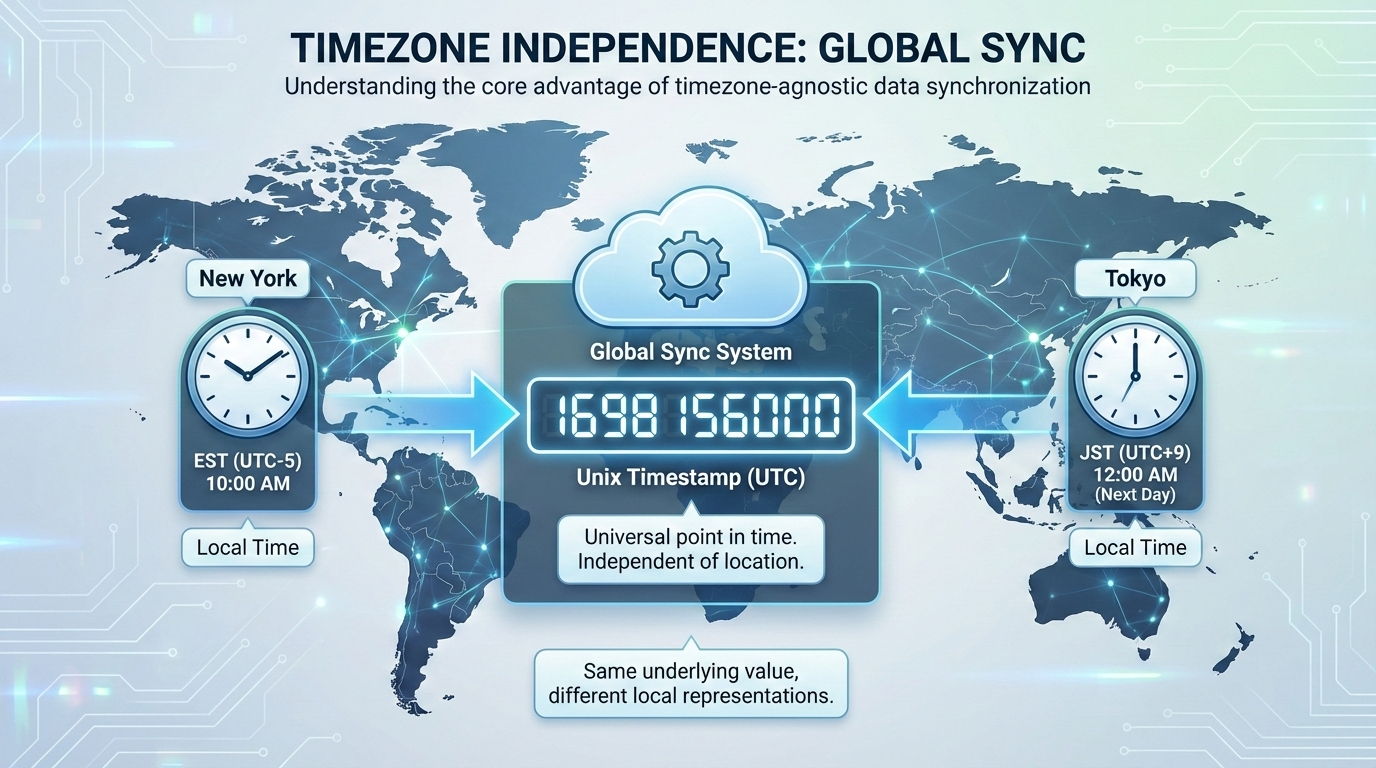
    Because it relies on UTC (Coordinated Universal Time), Unix time ignores local timezones entirely. If a server in New York and a server in Tokyo generate a timestamp at the exact same moment, they output the exact same integer. This skips the headache of dealing with daylight saving time adjustments or regional offsets.

    Computers also process raw integers much faster than text strings like “October 24, 2026, 10:00 AM EST.” Storing time as a single number speeds up database queries and keeps JSON API payloads light. When it’s time to show the date to a user, the frontend simply calculates the offset from the Epoch and applies the local browser’s timezone rules.

    Timezone-agnostic timekeeping illustration

    The Unix Epoch—January 1, 1970, at 00:00:00 UTC—is the absolute starting line for Unix time. Every timestamp is just a running count of the seconds that have ticked by since that baseline moment. Servers, databases, and operating systems rely on this shared reference point to keep digital events synced around the world.

    Because it relies on UTC (Coordinated Universal Time), Unix time ignores local timezones entirely. If a server in New York and a server in Tokyo generate a timestamp at the exact same moment, they output the exact same integer. This skips the headache of dealing with daylight saving time adjustments or regional offsets.

    Computers also process raw integers much faster than text strings like “October 24, 2026, 10:00 AM EST.” Storing time as a single number speeds up database queries and keeps JSON API payloads light. When it’s time to show the date to a user, the frontend simply calculates the offset from the Epoch and applies the local browser’s timezone rules.

    You will usually see timestamps in one of two formats: 10 digits or 13 digits.

    A 10-digit Unix timestamp counts standard seconds. This is the default format for most backend systems, relational databases, and Unix-like operating systems like Linux and macOS.

    A 13-digit Unix timestamp counts milliseconds instead of seconds. JavaScript and many modern frontend environments use this format for higher precision event tracking by adding three extra digits. Converting between the two is just basic math: multiply a 10-digit timestamp by 1,000 to get milliseconds, or divide a 13-digit timestamp by 1,000 to drop back to seconds.

    Cheat Sheet for Non-Developers

    You don’t always need a converter to figure out roughly what year a timestamp represents. An average calendar year packs in about 31,556,926 seconds.

    Adding 31.5 million to a timestamp moves it forward by roughly one year. For quick reference, a timestamp starting with 16 points to the early 2020s. If it starts with 17, you’re looking at dates spanning from late 2026 through the early 2030s. Recognizing these leading digits helps data analysts eyeball database rows and spot weird date ranges without writing custom conversion scripts.

    Cheat sheet for non-developers

    How to Use Unix Timestamps in Programming Languages

    Grabbing the current system time and formatting it correctly is a daily task in development. Here is how different Programming Languages handle their native time functions.

    In JavaScript, running Date.now() gives you the current 13-digit millisecond timestamp. If you need the 10-digit version, use Math.floor(Date.now() / 1000). To turn that raw number into a readable ISO 8601 string, you can call new Date().toISOString().

    Python relies on its time module. Running import time; time.time() returns a float of the current seconds. To convert that float into an ISO 8601 string, use datetime.datetime.utcfromtimestamp(time.time()).isoformat().

    PHP keeps things straightforward with the time() function for a 10-digit timestamp. If you need milliseconds, you use microtime(true). To format that core PHP timestamp into an ISO 8601 string, use date('c', time()).

    Relational databases have their own extraction commands. MySQL uses UNIX_TIMESTAMP(), while PostgreSQL relies on EXTRACT(EPOCH FROM NOW()). When sending these database records to an API, formatting the integers into ISO 8601 ensures mobile apps and third-party integrations can read the dates correctly.

    What is the Year 2038 Problem (Y2038)?

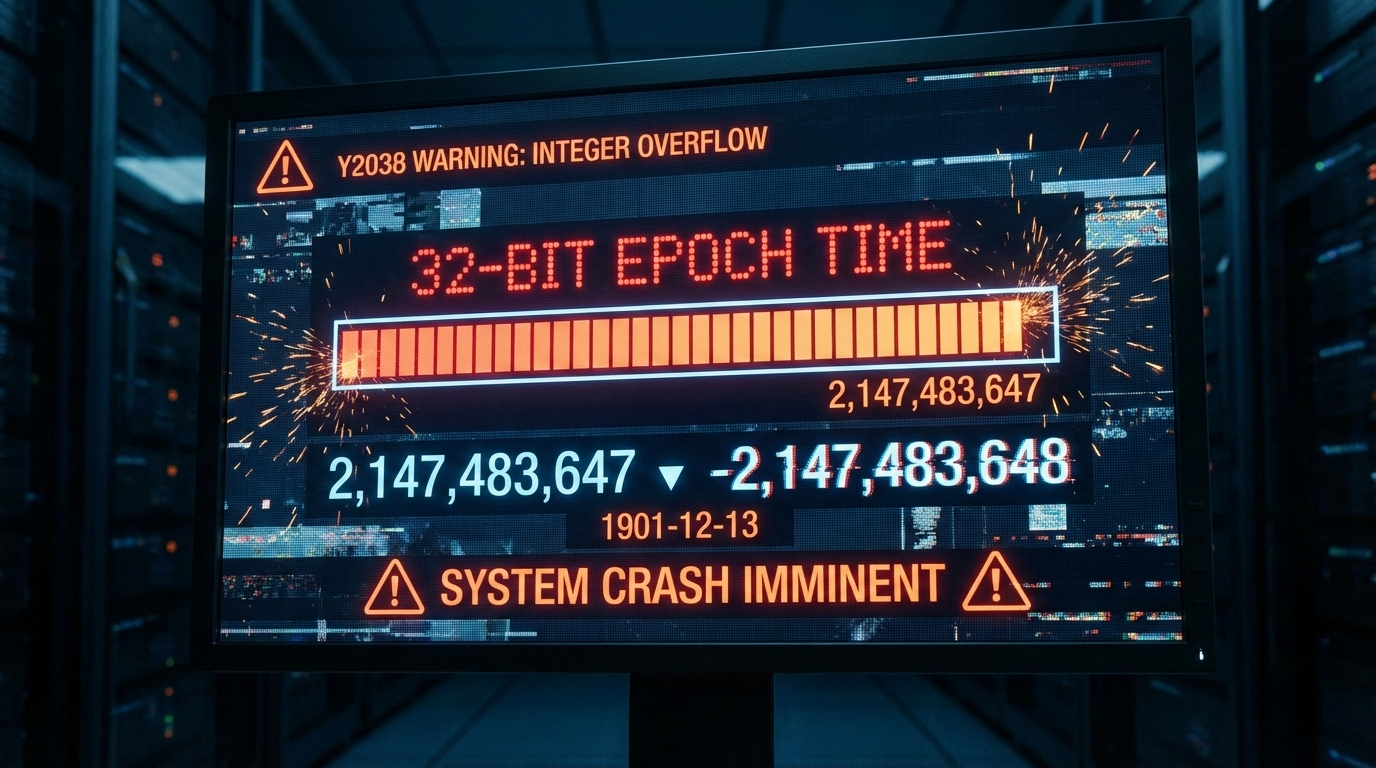
    The Year 2038 Problem (Y2038) is a ticking clock for older systems that store time as a 32-bit signed integer. Because of strict binary limits, a 32-bit integer maxes out at exactly 2,147,483,647.

    When the global timestamp hits that number, systems won’t smoothly roll over to the next second. Instead, the integer overflows and flips to a massive negative number (-2,147,483,648). Computers reading that negative value will suddenly think the date is December 13, 1901.

    This overflow is scheduled to happen on January 19, 2038, at 03:14:08 UTC. If they aren’t updated, legacy apps, older servers, and embedded IoT hardware using 32-bit integers will face massive logic failures, corrupted databases, and total crashes.

    32-bit integer overflow visualization

    Future-Proofing Your Database against Y2038

    The only real fix for Y2038 is upgrading to a 64-bit integer architecture. A 64-bit signed integer pushes the next overflow event out by about 292 billion years—safely making it a problem for another era.

    Database admins need to audit their tables and find any columns storing time as INT or INTEGER. Updating those columns to BIGINT immediately secures that 64-bit capacity. You will also need to check your application’s source code to ensure the backend variables can handle the larger 64-bit memory size without accidentally trimming the numbers.

    How Do Systems Handle Leap Seconds?

    Standard Unix time pretends every day has exactly 86,400 seconds. It completely ignores leap seconds to keep the math predictable. When an actual leap second is added to global clocks, a Unix timestamp handles it by simply repeating the 86,400th second twice.

    Repeating a second is dangerous for distributed systems that rely on strict chronological order. It can crash financial databases or scramble transaction tokens. To get around this, major tech companies use a workaround called “Leap Smearing.” Rather than repeating a specific second, servers using leap smearing slightly stretch out the length of every second across a 24-hour period. The extra time gets absorbed seamlessly, and the system clock keeps moving forward without a hiccup.

    FAQ

    What is the difference between Unix time and Epoch time?

    There really isn’t a practical difference; developers use the terms interchangeably. Technically, Epoch time refers to the starting baseline (January 1, 1970), while Unix time is the actual count of seconds ticking away since that moment.

    Why do some Unix timestamps have 10 digits while others have 13 digits?

    A 10-digit timestamp counts standard seconds, which is the default for most backend servers and databases. A 13-digit timestamp counts exact milliseconds. JavaScript and modern frontend frameworks use the 13-digit format to track high-precision events.

    How does Unix time handle leap seconds?

    It essentially ignores them. Unix time assumes every day has exactly 86,400 seconds. When a leap second happens, the standard timestamp just repeats the final second. To avoid issues with repeated seconds, larger enterprise systems often use “leap smearing” to gradually stretch the extra time out across a full day.

    Why did the Unix epoch start specifically on January 1, 1970?

    It was mostly an arbitrary choice. Back in the early 1970s, Unix engineers needed a recent, convenient date to start counting system time. January 1, 1970, offered a clean baseline that fit neatly into the tight memory limits of early computers.

    Can a Unix timestamp be a negative number?

    Yes, negative timestamps simply represent historical dates before the Epoch (prior to January 1, 1970, at 00:00:00 UTC). The system counts backward, letting software track past dates using the exact same logic.

    Conclusion

    A Unix timestamp acts as the backbone of timezone-independent timekeeping, steadily counting seconds since 1970. Turning complex dates into a single number makes database storage cleaner, processing faster, and cross-platform communication much more reliable.

    If you are still running legacy systems, audit your database and code to ensure they support 64-bit architectures. Upgrading those limits now is the best way to future-proof your infrastructure and avoid the system crashes coming with the Year 2038 overflow.

  • JWT Parser: Decode Tokens Like a Pro

    What a JWT Parser Does

    JWT parsers help people read and understand digital tokens. These tools act like simple decoders for JSON Web Tokens, or JWTs. Think of them as keys that open up secure ID cards used in apps and websites. Without a JWT parser, tokens look like jumbled code. But with one, you see the details inside.

    Breaking Down Digital IDs

    A JWT parser breaks down these digital IDs step by step. JSON Web Tokens store info about users, like who they are or what they can access. It reads the token without needing special software. This makes it easy for anyone to check tokens from logins or sessions. Developers love them for testing apps. Regular users can spot issues fast.

    For example, imagine logging into a site. The site gives you a token. A good JWT parser shows if it’s valid or not. It handles the header, payload, and signature parts clearly.

    Why We Need JWT Parsers

    You need a JWT parser for several reasons. First, it checks if the token is real and hasn’t been tampered with. Second, it reveals hidden info, like user roles or expiration times. Third, these tools work smoothly with websites, mobile apps, and even APIs.

    Here’s a quick list of benefits:

    • Verify authenticity: Ensures the token comes from a trusted source.
    • Extract data: Pulls out details like user ID or permissions without hassle.
    • Boost security: Helps spot fake or expired tokens before problems arise.
    • Save time: No more guessing what the code means—decode JWTs in seconds.

    In today’s world, apps rely on JWTs for secure logins. A reliable JWT parser keeps things safe and straightforward.

    How JWTs Work

    JSON Web Tokens, or JWTs, power many online services. They let systems share user info securely. A JWT parser makes this process clear by decoding the token’s structure. Let’s dive into the basics.

    The 3-Part Code in JWTs

    Every JWT looks like a long string with three parts, split by dots. This setup keeps things organized and secure. A JWT parser splits them for you.

    1. Header: This part describes the token type and signing method. It tells how the token is protected, like using a secret key.
    2. Payload: Here’s the main info. It holds claims, such as your username, email, or groups you belong to. Remember, this data is base64 encoded, so a JWT parser decodes it to plain text.
    3. Signature: The final piece verifies everything. It uses a secret to sign the header and payload, proving no one changed it.

    Using a token decoder like a JWT parser, you can view each part separately. This helps in understanding how apps use JWTs for authentication.

    Safety First with JWT Parsers

    Safety matters when handling tokens. Always use a trusted JWT parser to avoid risks. Check these key points:

    • Source check: Make sure the token comes from a legit server.
    • Expiration date: Look for the “exp” claim to see if it’s still valid.
    • Secret code: Verify the signature matches the issuer’s key.

    Don’t paste sensitive tokens into unknown tools. Opt for offline JWT parsers if dealing with private data. This way, you protect user privacy while decoding JWTs.

    Using a JWT Parser

    Getting started with a JWT parser is simple. These tools range from online sites to code libraries. They help decode JWTs quickly, whether you’re a user or a developer building apps.

    Online Tools for JWT Parsing

    Online JWT parsers are great for fast checks. No downloads needed—just paste your token and decode.

    Try these popular, safe options:

    1. jwt.io: The top free tool for decoding JSON Web Tokens. It shows header, payload, and signature in real time. Plus, it has a debugger for testing signatures.
    2. TokenDecoder.app: A clean site focused on quick token decoding. It highlights claims like user ID and expiration.
    3. Browser extensions: Some add-ons in Chrome or Firefox act as built-in JWT parsers. Search for “JWT decoder” in your store.
    Tool TypeBest ForSafety Tip
    Web ToolsQuick ChecksDon’t share private tokens; use incognito mode
    Browser Add-onsDaily UseUpdate regularly to avoid bugs
    Code ToolsDevelopersUse trusted libraries like those in Node.js

    These free tools make JWT parsing accessible. Just copy a token from your app’s network logs and paste it in.

    Reading Token Info with a Parser

    Once decoded, a JWT parser displays the token’s secrets. You’ll see useful details right away.

    Common info includes:

    • Account name: Your username or email.
    • Issued at (iat): When the token was created.
    • Expiration (exp): The end date—check this to avoid errors.
    • Permissions: Claims like “admin” or “read-only” access.

    For instance, a valid token might say: “User: john_doe, Expires: 2024-12-31.” If something’s off, the JWT parser flags it. This helps troubleshoot login issues or verify API responses.

    FAQ

    What is a JWT parser and why use one?

    A JWT parser is a tool that decodes JSON Web Tokens to show their parts: header, payload, and signature. Use it to check token validity, read user data, and ensure security without coding. It’s perfect for quick insights into app logins.

    Is it safe to use an online JWT parser?

    Yes, if you pick trusted sites like jwt.io. Avoid sharing sensitive tokens publicly. Offline options or code-based parsers add extra safety for private use, keeping your data secure during decoding.

    How do I decode a JWT token manually?

    Paste the token into a reliable JWT parser tool. It splits the dot-separated parts and decodes base64 content. No special skills needed for basics—advanced users can verify signatures with libraries like jsonwebtoken.

    What if my JWT token shows an error in the parser?

    Errors often mean invalid format, like missing dots or expired time. Check the “exp” claim for dates past now. Regenerate the token from your app if needed, and always use a fresh one for secure sessions.

    Can anyone create their own JWT parser?

    Sure, developers can build one using libraries. Try jsonwebtoken for JavaScript or PyJWT for Python—these are free and easy. Start with sample code to handle encoding, decoding, and signing for custom apps.

  • Epoch Time: Unlocking the Computer Clock Revolution

    What Is Epoch Time?

    Epoch Time, often known as the Unix Timestamp, tracks every second since January 1, 1970. It’s like a big digital counter for computers. Instead of messy dates like “July 20, 2025,” this system uses one simple number. Coders love it because it’s quick to handle. You can add or subtract these timestamps without confusion. Think of it as the backbone for apps, websites, and even your phone’s clock.

    Why January 1, 1970 as the Starting Point?

    Back in the 1960s, smart engineers built early computers. They needed a clear beginning for time tracking. January 1, 1970, became that “zero moment.” It was a fresh start, free from old calendar quirks. This date stuck because it worked well for Unix systems, the foundation of many modern operating systems. No drama, just a reliable epoch starting point that everyone agreed on.

    • It avoids issues with different calendars around the world.
    • Helps in building software that runs smoothly from day one.
    • Sets the stage for accurate time measurements in tech.

    Why Computers Rely on Epoch Time

    Computers pick Epoch Time for smart reasons. It’s a universal timestamp that ignores time zones. No worries about daylight saving changes or regional formats. This makes programming easier. Developers can focus on code, not calendar headaches.

    Here’s a quick list of its key perks:

    • Global Consistency: The same Epoch Time number means the same moment everywhere. Perfect for international apps.
    • Simple Calculations: Want to know how long a game session lasted? Just subtract two timestamps. Boom, you get seconds, minutes, or hours.
    • Error-Free Handling: Forget debates over MM/DD vs. DD/MM. Epoch Time uses pure numbers, reducing bugs in software.

    In daily life, it powers things like social media posts. When you timestamp a tweet, it’s an Epoch Time value behind the scenes. Converted to your local time, it shows up neatly.

    Real-World Uses of Epoch Time in Technology

    Epoch Time shines in various tech areas. For logging events in servers, it records exact moments without fuss. In mobile apps, it helps sync data across devices. Even in finance software, it tracks trades precisely.

    • Email systems use it to sort messages by when they arrived.
    • Video platforms measure watch time with timestamp differences.
    • IoT devices, like smart thermostats, rely on it for scheduling.

    Without this system, coordinating global networks would be chaos. It’s the quiet hero keeping the digital world ticking.

    How to Convert Epoch Time to Readable Dates

    Seeing a number like 1823545600 might puzzle you. That’s Epoch Time in action. Converting it back to a human-friendly date is straightforward. You don’t need to be a programmer to do it.

    Quick Ways to Convert Epoch Time

    Use tools for instant results. Online converters make it fun and fast.

    1. Search for “Epoch Time converter” on your browser.
    2. Enter the Unix Timestamp, like 1721452800.
    3. Hit convert. You’ll see something like “July 18, 2024, 12:00 PM UTC.”

    Many websites offer free versions. Some even handle time zones for you. No downloads needed—just paste and go.

    Manual Conversion Basics for Epoch Time

    If you want to try by hand, start simple. But remember, it’s tricky with leap years.

    • Divide the timestamp by 86,400 to get days since 1970 (that’s seconds in a day).
    • Add those days to January 1, 1970.
    • Adjust for months and years. Tools are better for accuracy.

    For example, 0 is exactly January 1, 1970. Positive numbers go forward; negatives go back. Practice with small numbers to get the hang of it.

    Tips for Working with Epoch Time in Programming

    If you’re into coding, languages like Python or JavaScript have built-in functions. In Python, use datetime.fromtimestamp() to turn the number into a date object. This saves time in projects involving data analysis or web development.

    • Always store timestamps in UTC for global apps.
    • Convert to local time only when displaying to users.
    • Watch for the 64-bit upgrade to dodge future issues.

    FAQ

    What Makes January 1, 1970 Special for Epoch Time?

    It serves as the epoch starting point for Unix systems. Engineers chose it in the 1960s for simplicity. This date acts like ground zero on a timeline, ensuring all computers count time the same way. No old dates to complicate things— just a clean slate for tech. (124 characters)

    How Does the Year 2038 Problem Affect Epoch Time?

    The original 32-bit Epoch Time will overflow on January 19, 2038, causing errors in old systems. Modern setups use 64-bit timestamps for way more years. Update software to stay safe. It’s like upgrading from an old clock to a digital one that lasts forever. (198 characters)

    Do Smartphones and Everyday Devices Use Epoch Time?

    Yes, most phones and gadgets rely on Unix Timestamps under the hood. They convert Epoch Time to your local format for clocks, photos, and messages. This keeps everything synced, whether you’re in New York or Tokyo. No visible numbers, but it’s working quietly. (187 characters)

    What Do Negative Epoch Time Values Mean?

    Negative timestamps count time before January 1, 1970. For instance, -315619200 equals January 1, 1960. It’s useful for historical data in apps. Just plug it into a converter to see the past date clearly. This backward counting maintains full timeline support. (192 characters)

    Can Developers Switch to a Different Epoch Starting Date?

    No, changing it would break global compatibility. All systems depend on this standard to stay in sync. It’s like resetting a worldwide clock—too much disruption. Stick to the original for seamless integration across software and hardware. (168 characters)

  • Age Calculator: Find Your Exact Age in Seconds!

    Have you ever wondered exactly how old you are, right down to the day? Maybe you need to fill out a form that asks for your precise age, or perhaps you’re just curious. An online Age Calculator is the perfect tool to get this information in a flash. It quickly tells you how many years, months, and days you’ve been alive. This guide will walk you through how easy it is to use one.

    How to Use an Age Calculator

    Using an online age calculator is incredibly simple. You don’t need any special skills, just a few key pieces of information. In less than a minute, you can find out exactly how old you are.

    Find a Reliable Online Tool

    The first step is to find a calculator. You can do this with a quick search online.

    • Type phrases like “age calculator tool” or “calculate my age” into your favorite search engine.
    • You will see many free websites and apps that offer this service.
    • Choose a website that looks clean and is easy to navigate. The best tools are straightforward and don’t ask for unnecessary personal details.

    Enter Your Date of Birth

    This is the most important part of the process. The calculator needs your exact birth date to work correctly. You will typically be asked to provide:

    1. Year: The year you were born (for example, 1995 or 2008).
    2. Month: The month of your birth, like January or July.
    3. Day: The specific day of the month you were born on, such as the 5th or the 23rd.

    Many age calculator tools use drop-down menus or a calendar pop-up to make entering your birthday quick and easy.

    Click the Calculate Button

    Once your birth date is entered, look for a button on the page. It will usually say something clear like “Calculate Age” or “Find Age.” A single click is all it takes to get the process started.

    See Your Detailed Age Results

    Almost instantly, the tool will display your precise age. The results are usually broken down into a very detailed format, which often includes:

    • Your age in total years.
    • The number of extra months that have passed since your last birthday.
    • The number of extra days on top of the years and months.

    Some calculators might also show you other fun facts, such as your total age calculated in months, weeks, days, or even hours.

    Why an Online Tool Beats Manual Math

    Trying to calculate your age manually can be tricky. It’s easy to make a small mistake, especially when counting months and days. Forgetting a leap year or misremembering how many days are in a particular month can lead to the wrong answer. An age in years months days calculator handles all of these details automatically, giving you a perfect result every time without any effort.

    What is an Age Calculator Tool?

    An age calculator is a digital utility designed for one specific purpose: to calculate the time that has passed between two dates. It takes a starting date, which is your date of birth, and an end date, which is usually today’s date. The program then computes the difference and presents it in a way that is easy for humans to understand, such as “30 years, 5 months, and 12 days.”

    How It Calculates Your Age So Quickly

    While the answer appears in an instant, the calculator performs several steps in the background. It uses a clear, logical process to determine your exact age.

    1. It Counts the Full Years: The tool starts by subtracting your birth year from the current year. This gives a baseline number of years.
    2. It Compares the Months and Days: Next, it looks at the month and day. If your birthday has already passed this year, the year count is correct. If it hasn’t passed yet, it subtracts one year from the total.
    3. It Calculates Remaining Months and Days: Finally, the tool calculates the precise number of months and days that have passed since your last birthday, taking into account the varying lengths of each month and including leap years.

    This automated process ensures you always get an accurate age without having to worry about the complexities of the calendar.

    Key Benefits of Using an Age Calculator

    Knowing your exact chronological age can be helpful in many situations. It’s not just for fun; it has many practical uses in daily life.

    • Completing Forms and Applications: Many official documents for school, jobs, or travel require your precise age.
    • Planning for Events: You can calculate how old you will be on a specific future date, like a wedding, graduation, or milestone birthday.
    • Educational Purposes: It’s a great tool for school projects or for teaching children about time and calendars.
    • Just for Fun: Settle a friendly debate with a sibling about who is older, or find out your age in days just for fun.

    An age calculator tool saves you time and provides a level of precision that is difficult to achieve by counting on your own.

    FAQ

    How accurate is an online Age Calculator?

    These tools are extremely accurate. They are programmed with the precise rules of the Gregorian calendar, including leap years and the number of days in each month. As long as you enter the correct birth date, the result will be correct.

    Can I calculate my age for a future date?

    Yes, most age calculators allow this. You can usually change the “calculate to” date from today to any date in the future. This is a great feature for finding out how old you will be for an important upcoming event.

    Why do different calculators show different formats?

    Different tools may present the information in various ways. Some show a simple year count, while others provide a detailed breakdown of years, months, and days. Some even calculate your age down to the second. Choose the one that gives you the format you need.

    Are online age calculators free?

    Yes, the vast majority of online age calculators are completely free to use. They are supported by advertising on the webpage. Be cautious of any site that asks for unnecessary personal information or tries to charge a fee for a simple calculation.

  • What is Base64? Your Easy Guide to Encoding

    You’ve probably sent an email with a picture attached or filled out a form online. Working silently in the background of these everyday tasks is a clever process called Base64 encoding. Think of it as a universal translator for computers. It takes complex computer data, like photos, audio files, or documents, and converts it into a simple string of text made up of letters and numbers. This process ensures the data can travel safely across the internet without getting mixed up or broken.

    Why is Base64 Encoding So Common?

    Computers and the internet have a long history, and many of the original systems were designed to handle only plain text. Sending raw binary data—the fundamental ones and zeros that make up a file—can cause problems. Base64 was created to solve this challenge by making all data look like simple text.

    Here are the main reasons why Base64 is used everywhere:

    • It Makes Data Safe for Transmission: Some systems misinterpret the special characters found in binary data, leading to corruption. Base64 converts this data into a safe set of 64 ASCII characters (including A-Z, a-z, 0-9, +, and /) that all systems understand perfectly.
    • It Prevents Data Corruption: When data moves between different programs or servers, there’s a risk that it could be altered accidentally. Since Base64 strings are just plain text, they move reliably without errors.
    • It is Universally Compatible: Because text is a universal format, a Base64 string can be included in emails, web page code, and configuration files without causing any issues.

    Imagine you are trying to mail a complex Lego model. If you just throw the loose pieces in an envelope, they will likely get lost or broken. Base64 is like disassembling the model, putting all the pieces in a clearly labeled box (the text string), and shipping it securely.

    How Does Base64 Encoding Work Step-by-Step?

    While the technical details involve bits and bytes, the core idea behind Base64 encoding is straightforward. The process converts binary data into a text representation that can be easily and safely transmitted.

    Here is a simplified look at the steps involved:

    1. Start with Binary Data: The process begins with the original file, which a computer sees as a stream of binary data (ones and zeros).
    2. Divide into Chunks: The computer reads this data and groups it into small, manageable chunks of 6 bits each.
    3. Map to a Character: Each 6-bit chunk is then matched to a specific character from the Base64 index table. This table contains 64 safe, printable characters.
    4. Assemble the String: The characters are joined together in order to create the final Base64 encoded string.
    5. Add Padding if Necessary: If the last piece of binary data isn’t long enough to form a complete 6-bit chunk, one or two = signs are added to the end. This padding ensures the final string has a valid length.

    Base64 is Encoding, Not Encryption

    It is crucial to understand that Base64 is an encoding method, not an encryption method. Its purpose is to change the format of data, not to secure it or hide it from view. Anyone who understands Base64 can easily decode the string back to its original form. For protecting sensitive information, you must use proper encryption tools like AES, which use secret keys to lock the data.

    Common Examples of Base64 in Daily Life

    Base64 operates behind the scenes in many applications you use every day. You may not see it, but it plays a vital role in keeping things running smoothly.

    • Email Attachments: Early email systems were only built for text. Base64 provides a way to embed files like images and documents directly into the body of a plain text email.
    • Web Images and Data URLs: Sometimes, small images on a website are embedded directly into the HTML or CSS code using a data URL. This URL contains the Base64 string of the image, which helps the page load faster by reducing the number of requests to the server.
    • API Data Transmission: When applications communicate via APIs, they often exchange data in text-based formats like JSON. If a file needs to be sent, it is first converted to a Base64 string to be safely included in the text payload.
    • Basic HTTP Authentication: An older method for web authentication encodes the username and password in Base64. However, this is considered highly insecure by modern standards because it can be decoded so easily.

    The Pros and Cons of Using Base64

    Like any technology, Base64 has its own set of advantages and disadvantages. Understanding them helps explain why it is used for some tasks but not others.

    Advantages of Base64

    • Reliable Data Transfer: The main benefit of Base64 is its ability to ensure binary data is transmitted through text-only channels without any risk of corruption.
    • Simplicity and Wide Support: Base64 is a well-established standard supported by virtually every programming language and platform, making it extremely easy to implement.

    Disadvantages of Base64

    • Increased Data Size: The Base64 encoding process makes the resulting text string about 33% larger than the original binary data. This is because every 3 bytes of original data become 4 characters in the encoded string.
    • No Security: As mentioned, Base64 offers no confidentiality. It should never be used as a method to protect secret or private information.
    • Performance Cost: Encoding and decoding data requires processing power. For very large files, such as videos, this can add a slight performance overhead.

    FAQ

    Is Base64 the same as encryption?

    No. Base64 is for encoding, which just changes data into a text-safe format. Anyone can easily decode it. Encryption uses a secret key to secure data, making it unreadable to unauthorized parties.

    Why do Base64 strings sometimes end with = or ==?

    The equal signs (=) at the end are padding characters. They are added to ensure the final encoded string is the correct length for the Base64 algorithm. They do not represent any part of the original data.

    Can I decode Base64 myself?

    Yes, absolutely. There are many free online Base64 decoder tools available. You can simply paste the encoded string into one of these tools, and it will convert it back to its original form for you.

    Is Base64 used for passwords?

    It should not be. Some old or poorly designed systems might use it to obscure passwords, but this provides almost no real security. Modern, secure systems use strong hashing algorithms to protect passwords.

  • Find the Time Difference Between Two Timestamps Quickly

    What Exactly Is a Timestamp?

    A timestamp is simply a record of a specific moment in time. Think of it as a digital or written snapshot that captures when an event happened. For example, when you see “2023-10-26 09:00 AM” or just “2:15 PM,” you’re looking at a timestamp. People use them everywhere—from personal diaries and work logs to video files and social media posts—to mark when something started or ended.

    Why Timestamps Are So Useful

    Timestamps are incredibly important for tracking duration. They help you figure out how long things take. You can use them to measure:

    • How long your workout lasted.
    • The duration of a business meeting.
    • When a specific scene in a movie begins.
    • The exact time a project task was completed.

    Most timestamps include the date, the time, or a combination of both to provide a full picture.

    Common Timestamp Formats You’ll See

    Timestamps don’t all look the same. You might encounter a few different styles, but they all represent a point in time. Here are some common formats:

    • Simple Time: “3:30 PM” or “10:00 AM” (12-hour clock).
    • Date and Time: “October 26, 2023, 3:30 PM.”
    • 24-Hour Format: “15:30” (also known as military time).
    • Including Seconds: “15:30:45” (hours:minutes:seconds).

    How to Calculate the Time Difference Between Timestamps

    Finding the time gap between two timestamps is a straightforward process. The basic idea is to subtract the earlier time (the start time) from the later time (the end time). Follow these steps to get an accurate result every time.

    Step 1: Write Down Your Timestamps

    First, clearly identify and write down both of your timestamps. To stay organized, it’s a great idea to label them so you don’t get them mixed up.

    • Start time: 10:00 AM
    • End time: 2:30 PM

    Knowing which is the start and which is the end is the most important first step to avoid errors.

    Step 2: Convert to the Same Format

    If your timestamps are in different formats, you’ll need to make them match before you can do any math. Converting both to a 24-hour format or to a single unit like minutes is the easiest way to calculate the time difference.

    For instance, let’s say one time is “10:00 AM” and the other is “14:30.”

    1. “10:00 AM” is easy.
    2. “14:30” is in 24-hour format, which is the same as 2:30 PM.

    To make subtraction simple, let’s convert both to minutes from midnight:

    • Start time (10:00 AM): 10 hours × 60 minutes/hour = 600 minutes.
    • End time (14:30): 14 hours × 60 minutes/hour + 30 minutes = 840 + 30 = 870 minutes.

    Step 3: Subtract the Start Time from the End Time

    Now that both timestamps are in the same unit, you can subtract the smaller number (start time) from the larger one (end time).

    Using our example:

    870 minutes - 600 minutes = 270 minutes

    The time duration between the two timestamps is 270 minutes. To make this number more useful, you can convert it back into hours and minutes.

    270 minutes ÷ 60 = 4 with a remainder of 30

    So, the time difference is 4 hours and 30 minutes.

    Step 4: Handle Gaps That Cross Midnight

    What if the time period you’re measuring goes past midnight into the next day? This can seem tricky, but the logic is simple. You just need to account for the change in day.

    Let’s take this example:

    • Start time: 10:00 PM (Day 1)
    • End time: 2:00 AM (Day 2)

    The easiest way to calculate this is to break it into two parts:

    1. Calculate the time from the start time to midnight: From 10:00 PM to 12:00 AM is 2 hours.
    2. Calculate the time from midnight to the end time: From 12:00 AM to 2:00 AM is 2 hours.
    3. Add the two results together: 2 hours + 2 hours = 4 hours.

    Real-World Examples of Finding the Time Difference

    You can use this skill in many everyday situations. Calculating the time between events helps with planning, logging, and more.

    Example: Plan Your Workout

    Let’s say you want to track how long you spend at the gym.

    • Timestamp 1 (Start): 9:15 AM
    • Timestamp 2 (End): 10:45 AM

    You can quickly see that the difference is 1 hour and 30 minutes. This helps you know if you’re meeting your fitness goals.

    Example: Clocking a Work Project

    Imagine you need to log your hours for a freelance project.

    • Start: 1:00 PM
    • End: 4:45 PM

    By subtracting the start from the end, you find that you worked for 3 hours and 45 minutes. If your rate is $50/hour, you know exactly how much to bill.

    Tips for an Easy Time Difference Calculation

    Avoid common mistakes and make the process even faster with these simple tips.

    Use Online Tools or Apps

    Why do the math when you don’t have to? There are many free and reliable time difference calculators available online. Your smartphone’s clock or calendar app likely has this feature built-in. Just input the start and end timestamps, and the tool will instantly give you the duration.

    Be Mindful of Time Zones

    If both of your timestamps are from the same local time zone, you don’t need to worry about anything else. However, if you are working with timestamps from different parts of the world, time zones become very important. Before you calculate the difference, you must first convert one of the times to the other’s time zone.

    FAQ

    What if the timestamps include different dates?

    If your timestamps are on different days, first calculate the number of full days between them. Multiply the number of full days by 24 to get the hours. Then, calculate the time difference for the remaining hours and minutes and add it to your total.

    Can I calculate the time difference with seconds?

    Yes, absolutely. For maximum precision, convert both timestamps entirely into seconds. Calculate the total seconds from midnight for the start and end times, subtract them, and then convert the resulting number back into hours, minutes, and seconds.

    How do I handle AM and PM in time calculations?

    The easiest way to avoid AM/PM confusion is to convert all your times to a 24-hour format (military time). For example, 9:00 AM stays 09:00, but 2:00 PM becomes 14:00. This makes subtraction simple and removes any chance of error.