Category: timestamp

  • Understanding How a Time Stamp Indicates the Date and Time in Digital Systems: From Unix Epoch to ISO 8601

    Understanding How a Time Stamp Indicates the Date and Time in Digital Systems: From Unix Epoch to ISO 8601

    Understanding how a time stamp indicates the date and time in digital systems involves tracking elapsed intervals from a fixed reference point. Most systems use the Unix Epoch (seconds since Jan 1, 1970) or formatted strings like ISO 8601 to ensure precise synchronization across global networks, blockchain ledgers, and modern 64-bit computing environments as of 2026.

    The Core Logic: How Digital Systems Define Time

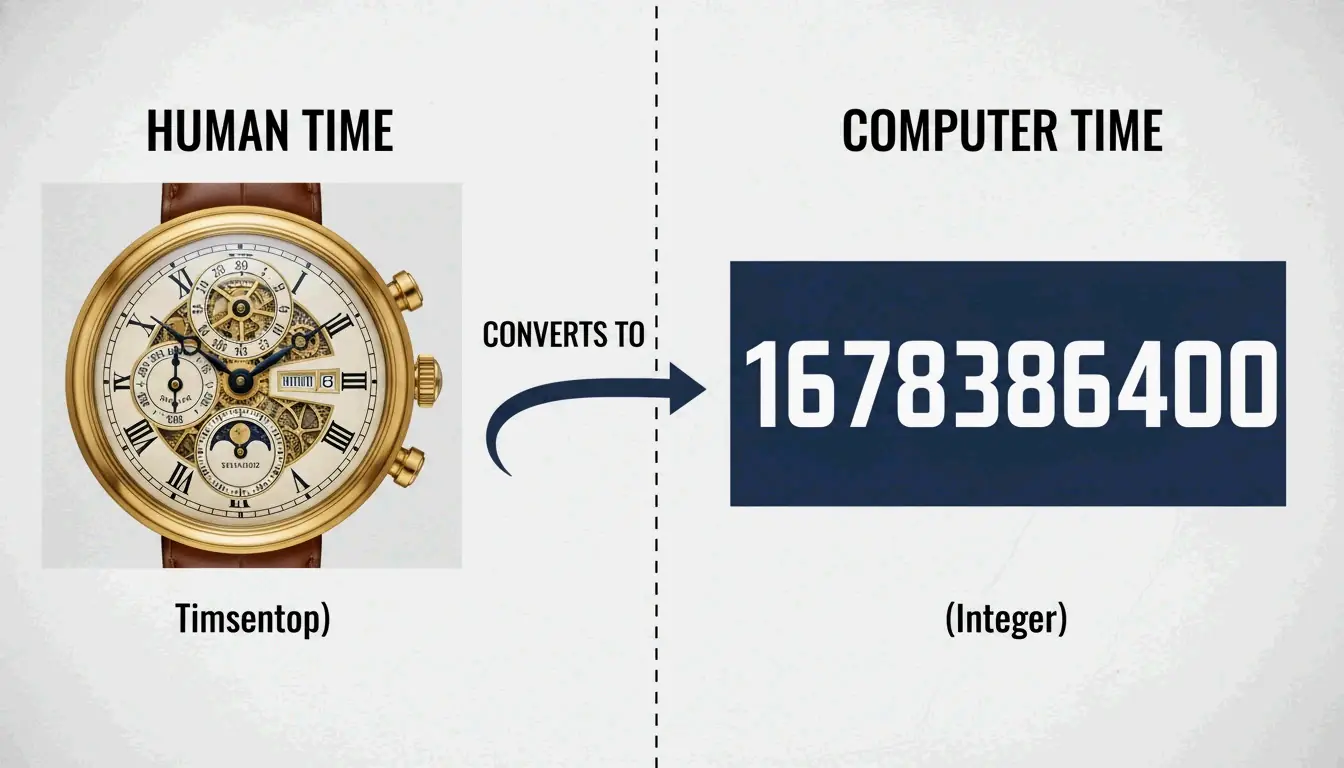
    In computing, a timestamp is more of an operational measurement than a simple label. According to Merriam-Webster, a digital timestamp is an indication of the date and time recorded as part of a signal or file, marking exactly when an event occurred. While humans rely on descriptive names like “April” or “Tuesday,” digital systems treat time as a continuous linear counter.

    The foundation of this counting system is the “Epoch,” which acts like a universal starting line. Most modern operating systems calculate the current moment by counting the number of increments that have passed since this specific point. This process relies on hardware oscillators—usually small quartz crystals—that turn physical vibrations into digital ticks, allowing the system clock to move forward with high precision.

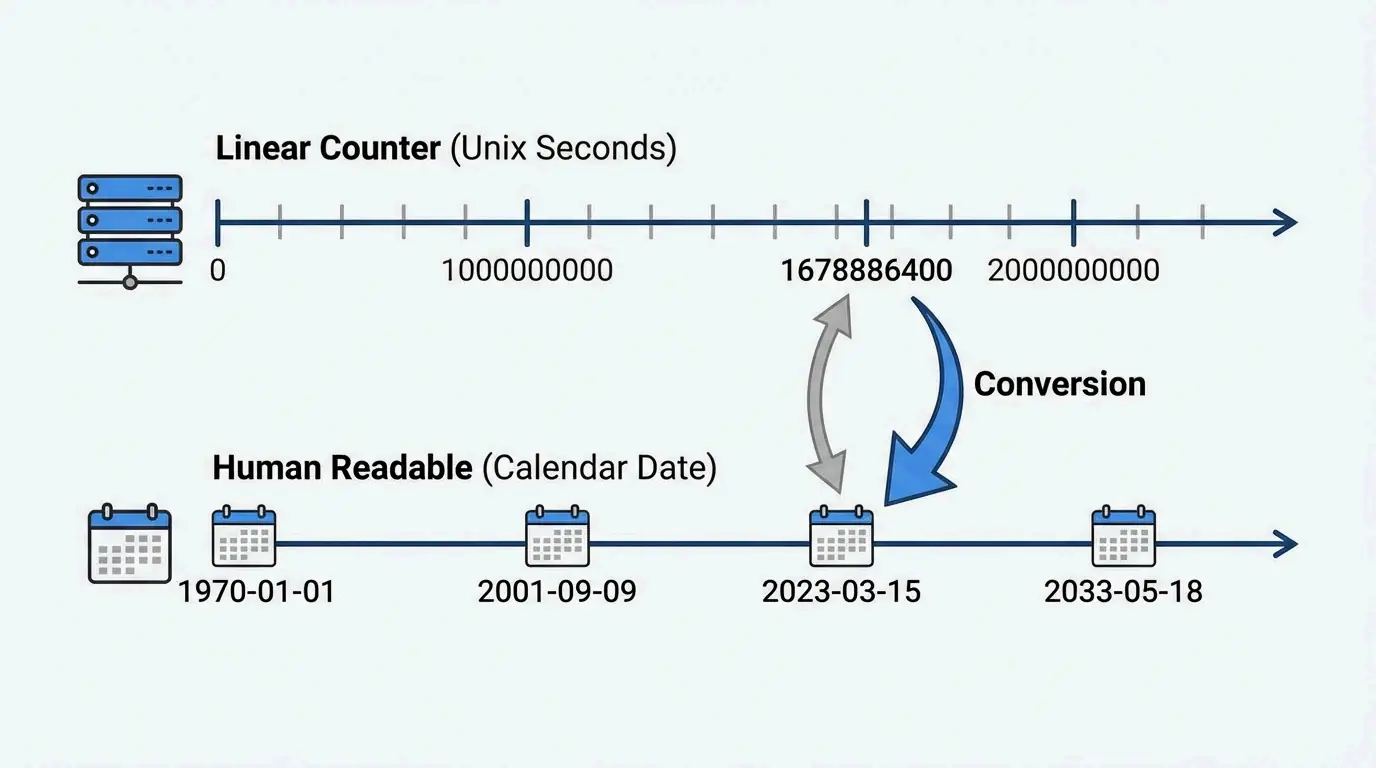
    To keep everything consistent across different hardware, the world uses Coordinated Universal Time (UTC). As noted by Wikipedia, the Unix “billennium” reached 1,000,000,000 seconds on September 9, 2001. This milestone shows how these counters track our history using a purely numerical format.

    Why does the world rely on UTC (Coordinated Universal Time)?

    UTC provides an international time standard that stays the same no matter where you are on Earth. According to Wikipedia, UTC is an atomic time scale designed to approximate mean solar time at 0° longitude. By using UTC, computers in different time zones can synchronize perfectly. The timestamp remains a constant number based on UTC, and the “local time” you see on your screen is only calculated at the very last step for the user.

    人类可读时间与机器线性时间的对比关系

    The Unix Epoch: The Standard for Global Computing

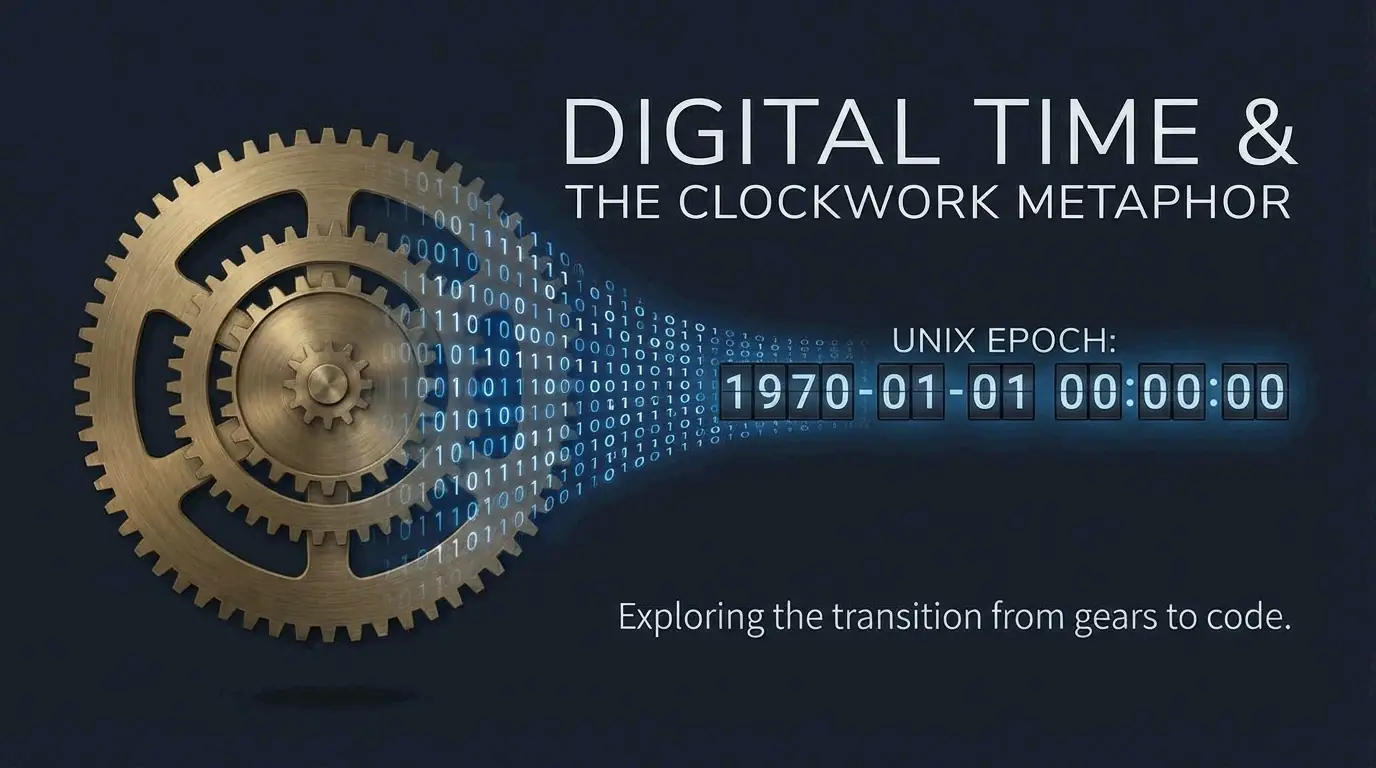
    The most common way computers keep time is called Unix time. It measures time by counting the number of non-leap seconds that have passed since 00:00:00 UTC on Thursday, January 1, 1970—a moment known as the Unix Epoch. As explained by NIXX/DEV, a Unix timestamp is just a single integer with no timezone attached. This makes it unambiguous; if two systems record the same event at the exact same moment, they will produce the same number.

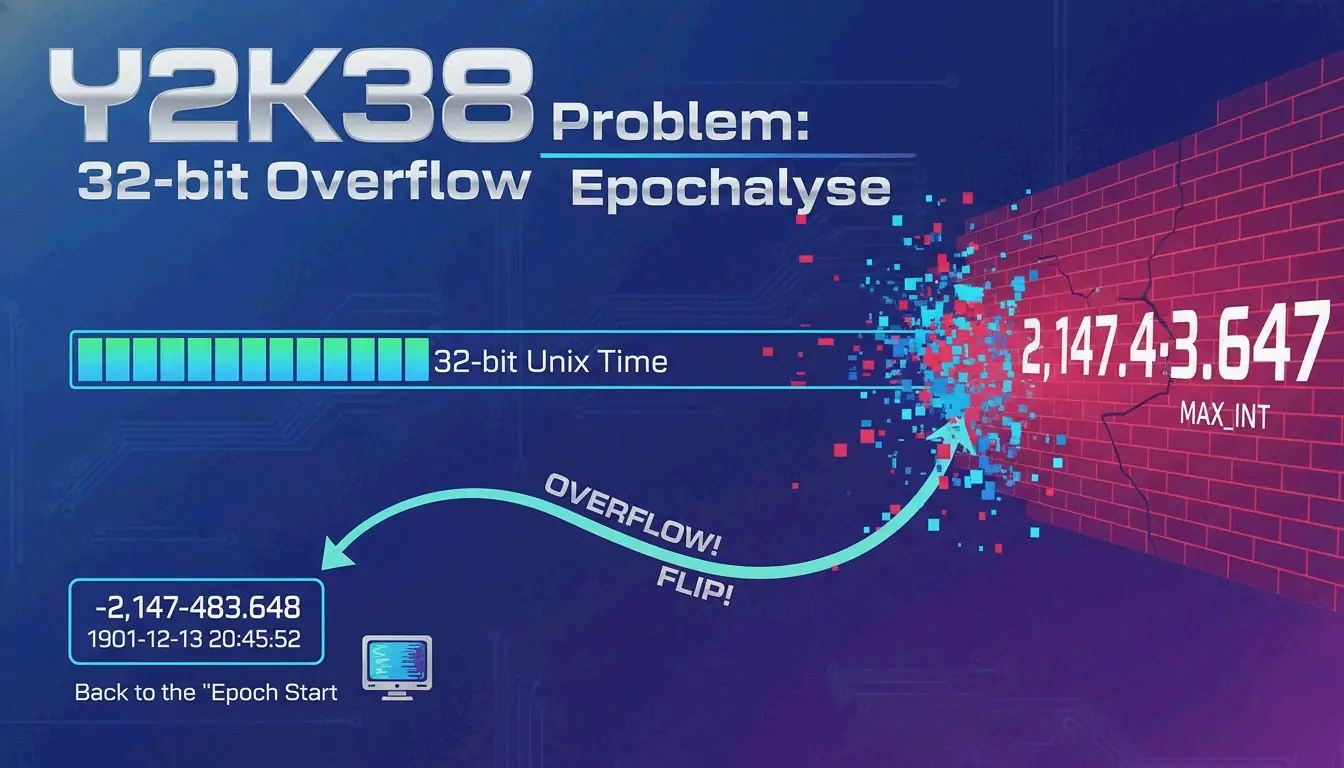
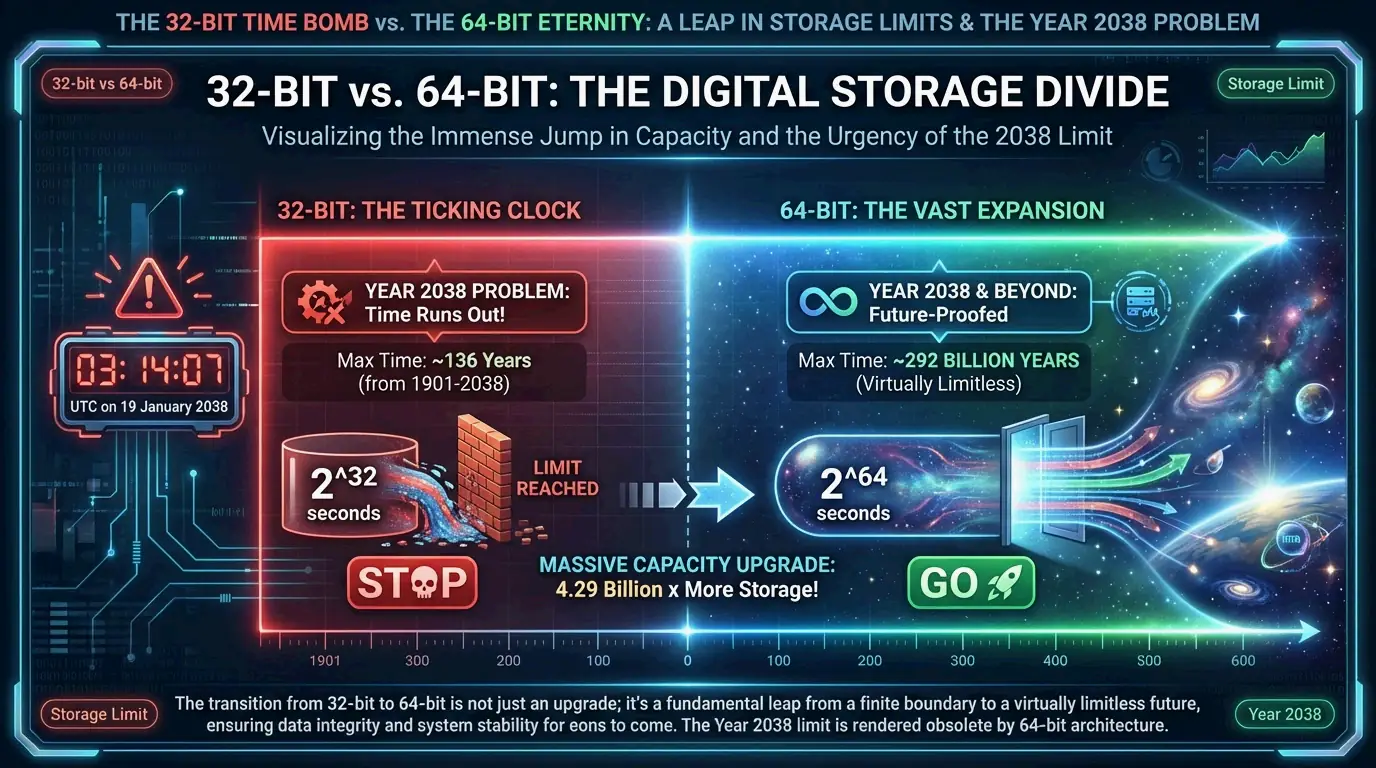
    How these numbers are stored depends on the system’s architecture, specifically whether it uses 32-bit or 64-bit integers. A 32-bit signed integer can cover a range of about 136 years. However, relying on 32-bit integers has caused serious software headaches. A recent example is the Y2K22 Microsoft Exchange bug, where a 32-bit overflow caused malware-scanning updates to fail on January 1, 2022, because the date format became a number larger than 2,147,483,647.

    One technical detail of Unix time is how it handles Leap Seconds. Unlike UTC, which adds leap seconds to keep up with the Earth’s slowing rotation, Unix time assumes every day has exactly 86,400 seconds. According to Wikipedia, this creates a tiny “jump” or repeat in the timestamp during a leap second event to keep the system aligned with UTC.

    2026 Update: Is the ‘Year 2038 Problem’ Still a Threat?

    As of April 2026, the move from 32-bit to 64-bit time storage is almost finished in mainstream tech, but some risks remain. The “Year 2038 Problem” happens because signed 32-bit integers have a limit of 2,147,483,648. On January 19, 2038, at 03:14:07 UTC, these systems will hit their limit and wrap around to a negative number, effectively making the date jump back to 1901.

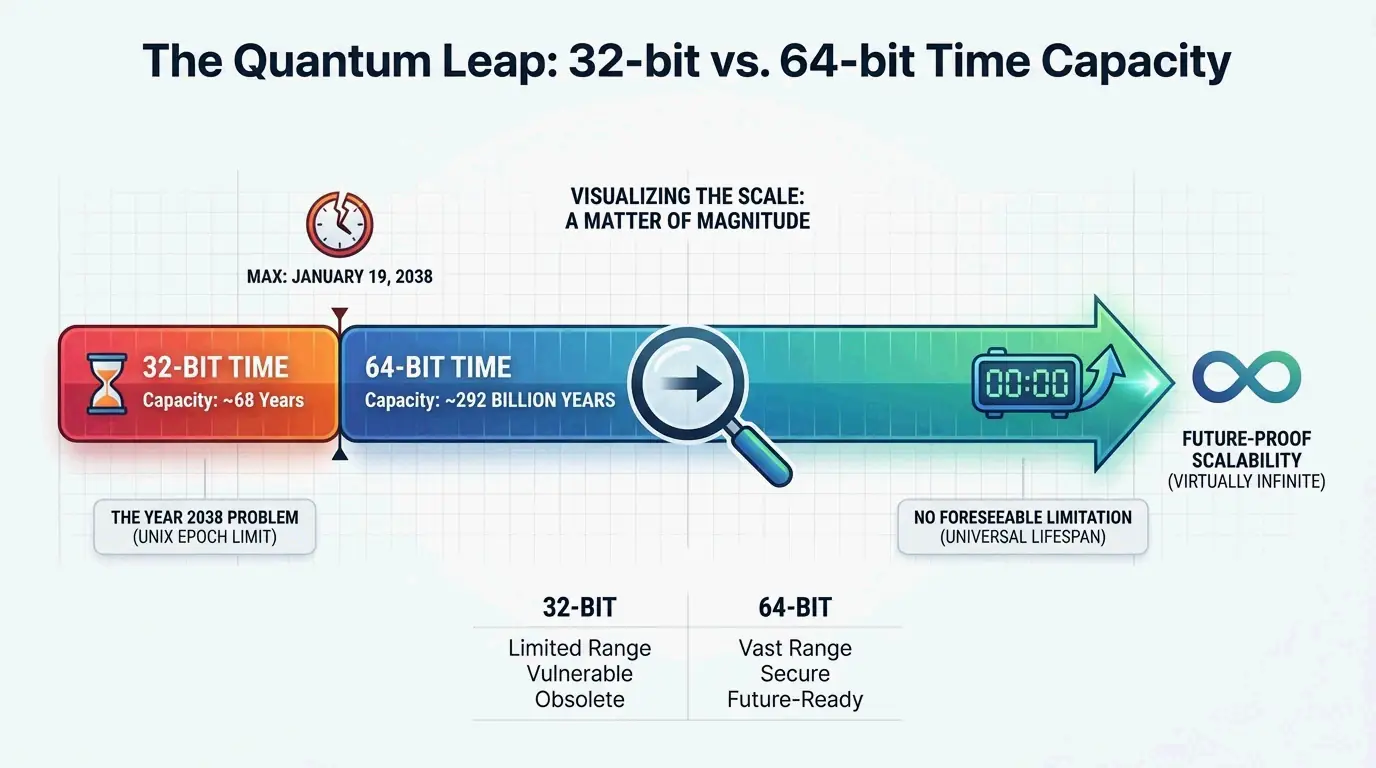
    32位与64位时间存储容量的极端对比

    Current status of the transition:

    • Linux and Windows: Most modern versions have already switched to a 64-bit time_t structure.
    • The Shift in Capacity: Moving to 64-bit integers extends the range to 292 billion years—which is actually longer than the age of the universe.
    • Legacy Systems: According to Wikipedia, the threat is still real for embedded systems, older IoT devices, and databases that use 32-bit fields for old or future records.

    ISO 8601: Making Timestamps Human-Readable

    Computers love integers, but humans need a structured string to make sense of time. ISO 8601 is the international standard for sharing date and time data. According to Wikipedia, it uses a YYYY-MM-DDTHH:MM:SSZ format. The “T” separates the date from the time, and the “Z” (short for Zulu time) shows that it is set to UTC with zero offset.

    This standard is a favorite for cloud computing and APIs because it is “lexicographically sortable.” Since the biggest unit (the year) is on the left, databases can sort these strings in order of time without needing to do complex math.

    Code Snippet: Converting Timestamps in 2026

    In 2026, most developers use standard libraries to turn Unix numbers into ISO 8601 strings. In JavaScript, for example, new Date().toISOString() instantly turns the current Unix timestamp (in milliseconds) into a readable string like 2026-04-22T14:30:00.000Z. According to NIXX/DEV, these tools are vital for checking API responses and reading server logs that store raw epoch values.

    Blockchain and Security: Why Timestamps Can’t Be Faked

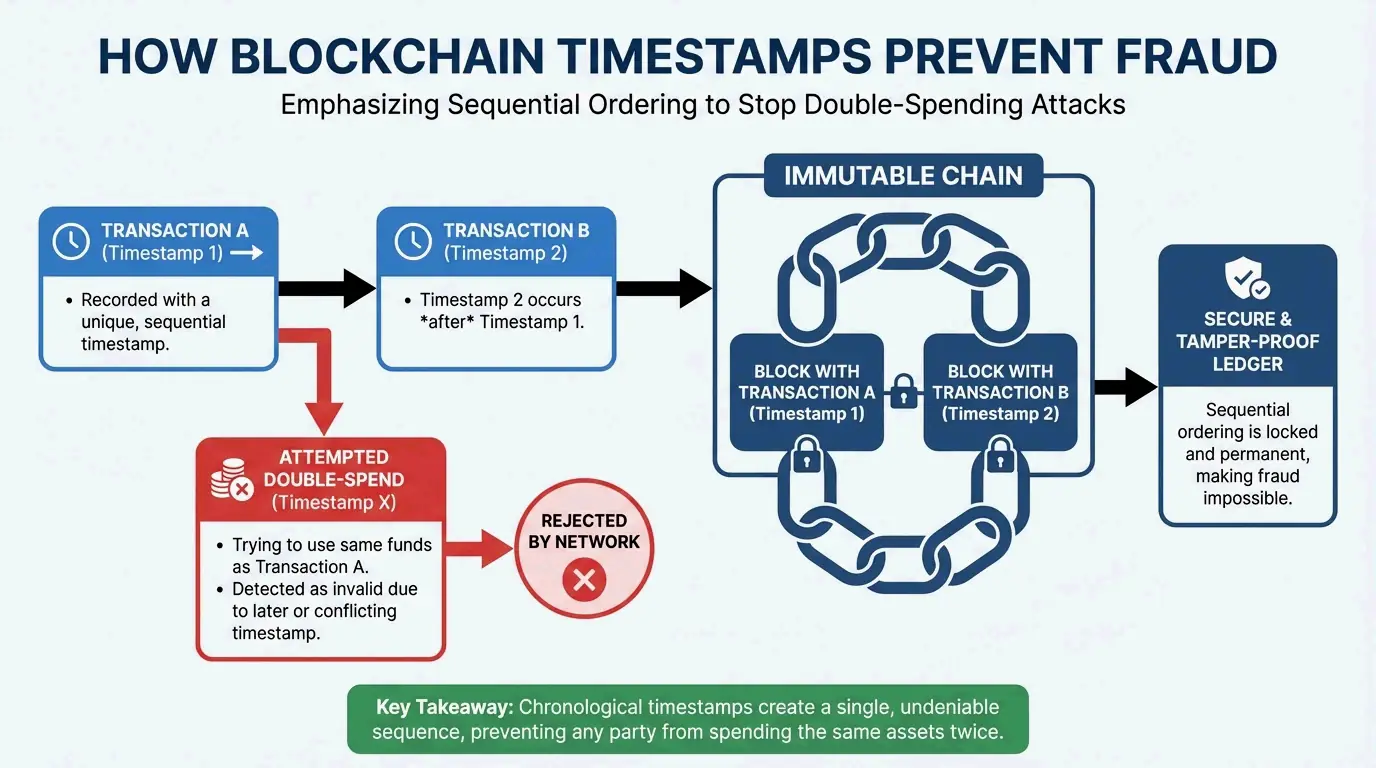
    In decentralized systems like blockchain, timestamps are a primary defense against fraud. As Finst explains, they ensure all transactions are recorded in the right order, creating a history that anyone can verify but no one can change.

    Satoshi Nakamoto’s design relied on this chronological order to solve the “double-spending” problem. As noted by Finst, “Satoshi Nakamoto… described that timestamps are essential for preventing problems like double spending and for establishing a reliable order of transactions.” In Bitcoin, every new block must have a timestamp later than the median of the previous 11 blocks. This keeps the blockchain moving forward and proves which transaction happened first, preventing users from spending the same digital asset twice.

    时间戳防范双重支付的极简逻辑

    Conclusion

    Digital timestamps are the invisible glue of our modern world. They translate raw numbers into a synchronized reality using standards like the Unix Epoch and ISO 8601. By counting seconds from a fixed starting point, our systems maintain the precise, clear records needed for everything from global stock markets to secure blockchains.

    As we get closer to 2038, finishing the transition to 64-bit integers is a top priority for keeping our infrastructure stable. Developers should check that legacy 32-bit systems are updated soon to avoid overflow errors, and use ISO 8601 strings for API data to ensure different platforms can always talk to each other clearly.

    FAQ

    … (Remaining text)

  • Epoch Time: Unlocking the Computer Revolution

    Epoch Time: Unlocking the Computer Revolution

    Epoch time, or Unix time, is a system that tracks time by counting the total seconds elapsed since January 1, 1970 (UTC). As of April 2026, this epoch time unlocking the computer clock revolution remains the backbone of global computing, though the industry is now finishing a major transition to 64-bit systems to fix the “Year 2038” overflow and leap second issues.

    What is Epoch Time? Defining the Computer Clock Revolution

    Unix Time, often just called Epoch Time, is a straightforward way to represent dates. Instead of using days or months, it uses a linear count of “non-leap seconds.” According to Wikipedia, this system measures how many seconds have passed since 00:00:00 UTC on Thursday, January 1, 1970—a moment known as the Unix Epoch.

    The choice of January 1, 1970, was mostly a matter of convenience. When Unix was first being developed, engineers just needed a clean starting point. Before it was officially standardized by POSIX.1, early versions of Unix actually experimented with other dates like 1971 or 1972. Settling on the 1970 start date gave the world a universal standard, allowing different computers to stay in sync using a simple, whole number.

    As author Douglas Adams famously joked, “Time is an illusion. Lunchtime, doubly so.” In the digital world, we make that illusion very concrete. By turning time into a number that just keeps going up, Unix Time removed the need for computers to do heavy calendar math for every basic task. This changed how machines track history and schedule future events.

    The Mechanics of the Digital Heartbeat

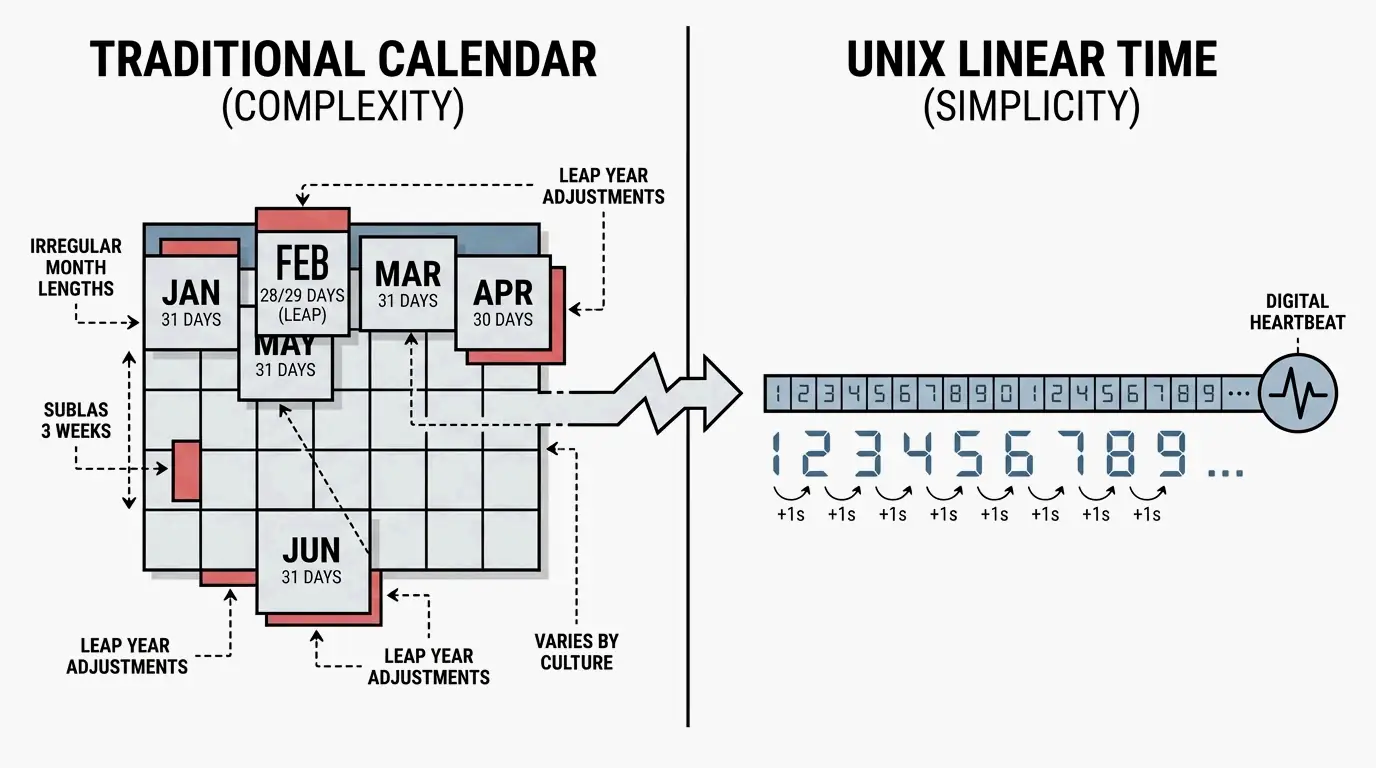
    Think of the Unix clock as a “digital heartbeat.” In this system, every day is exactly 86,400 seconds long. While our human calendars have to deal with months of different lengths and leap years, the Unix timestamp just adds “1” to its total every single second.

    Linear progression of Unix seconds vs. complex calendar cycles

    This simplicity is why programming languages like Java, Python, and JavaScript use it to handle time so efficiently. For instance, Wikipedia notes that JavaScript’s Date library tracks time in milliseconds since the epoch. Newer file systems, like APFS and ext4, go even further, using nanoseconds to keep track of when a file was last opened or saved.

    The 2026 Status Report: Solving the Year 2038 Problem

    By April 2026, the tech world is entering the home stretch of a massive upgrade to avoid the “Year 2038 problem.” This bug exists because older 32-bit systems can only count so high. The maximum number a 32-bit signed integer can hold is 2,147,483,647. According to Wikipedia, at exactly 03:14:07 UTC on January 19, 2038, these 32-bit counters will run out of room and “wrap back” to 1901, which would crash everything from bank servers to power grids.

    In 2026, the fix is largely in place. Linux kernel updates and Windows system APIs have mostly moved to 64-bit integers for time_t data types. This shift is a big deal for infrastructure; without it, any database storing dates past 2038 would simply stop working.

    Why a 64-bit Unix Timestamp is the Ultimate Fix

    Upgrading to a 64-bit integer changes the game. It expands the range of time we can track to about 292 billion years in either direction—which is twenty times longer than the universe has even existed. By making this switch, developers have essentially “future-proofed” the digital clock. While 32-bit systems were limited to a 68-year window, 64-bit systems ensure that the clock won’t run out of space for as long as human civilization is around.

    Comparison of 32-bit vs. 64-bit time capacity

    Leap Seconds and Synchronization: The Hidden Complexities

    Even though Unix time is efficient, it has a quirk: it doesn’t account for leap seconds. The POSIX standard says a Unix day must always be 86,400 seconds. However, the Earth’s rotation isn’t perfectly consistent, so Coordinated Universal Time (UTC) occasionally adds a leap second to keep up with the planet.

    When a leap second happens, Unix time hits a “discontinuity.” To stay aligned with UTC, a system might repeat the same second twice or jump back a second. This makes it different from International Atomic Time (TAI), which is a pure, uninterrupted count of seconds. To keep everything running smoothly, most modern networks use the Network Time Protocol (NTP) to sync their clocks across the globe.

    The tech community has celebrated the milestones of this invisible clock for years. Wikipedia mentions the “Unix Billennium” on September 9, 2001, when the timestamp hit 1,000,000,000. People in Copenhagen, Denmark, even held parties to mark the moment.

    Clockwork Revolutions: From Mechanical Gears to Steampunk RPGs

    The digital epoch is just the latest chapter in a long history of timekeeping. The Antikythera mechanism, an ancient Greek device from the first century BCE, is the earliest known “clockwork” computer used to track the stars. That mechanical brilliance eventually led to the geared clocks of the 1300s and the pendulum clocks of the 1600s.

    Today, this fascination with “clockwork” shows up in pop culture, specifically in the upcoming action RPG Clockwork Revolution. Developed by InXile Entertainment, the game is set in a steampunk city called Avalon where time travel is the main hook. Players use a device called the Chronometer to go back in time and change history.

    The game is massive in scope; Producer Brian Fargo noted that as of August 2025, the team had written 750,000 words of dialogue. Whether it’s through mechanical gears or digital timestamps, our obsession with “revolving” time shows how much we rely on order to make sense of our world.

    Conclusion

    Epoch Time is more than just a string of numbers; it is the universal language of the digital age. It represents our move from the physical limits of mechanical gears to the precision of global software. From its start in 1970 to the 64-bit migration of 2026, Unix time has been a remarkably steady foundation. Developers should still double-check older systems for 32-bit variables to ensure they’re ready for 2038. In the meantime, the “clockwork” themes we see in games like Clockwork Revolution remind us that timekeeping is a mix of cold engineering and human imagination.

    FAQ

    What is the difference between Unix Time and GPS or Windows FILETIME?

    Unix time counts seconds from January 1, 1970, and intentionally ignores leap seconds to maintain 86,400-second days. In contrast, GPS time is a continuous count that started in 1980 and does not ignore leap seconds. Windows FILETIME is even more granular, counting 100-nanosecond intervals that have elapsed since January 1, 1601.

    Why was January 1, 1970, chosen as the Unix Epoch?

    The date was chosen arbitrarily by Unix creators Ken Thompson and Dennis Ritchie. During the early development of Unix in the late 1960s and early 1970s, they needed a convenient, round starting point. While versions once used 1971 or 1972, January 1, 1970, eventually became the official POSIX standard for the system.

    How does a 64-bit Unix timestamp prevent the Year 2038 problem?

    The Year 2038 problem occurs because 32-bit signed integers cap at approximately 2.1 billion seconds, which will be reached in January 2038. A 64-bit integer increases this capacity exponentially, allowing for the tracking of time for over 292 billion years. This effectively ensures the clock will never overflow within the lifespan of our solar system.

  • World Time Zones: A Complete Guide to Global Time Offsets and Records

    World Time Zones: A Complete Guide to Global Time Offsets and Records

    A world time zone is a geographic region that follows a uniform standard time, primarily defined by its offset from Coordinated Universal Time (UTC). While the globe is theoretically split into 24 zones based on longitude, political boundaries and local decisions have created over 38 distinct offsets in use today.

    Understanding Coordinated Universal Time (UTC) and Global Offsets

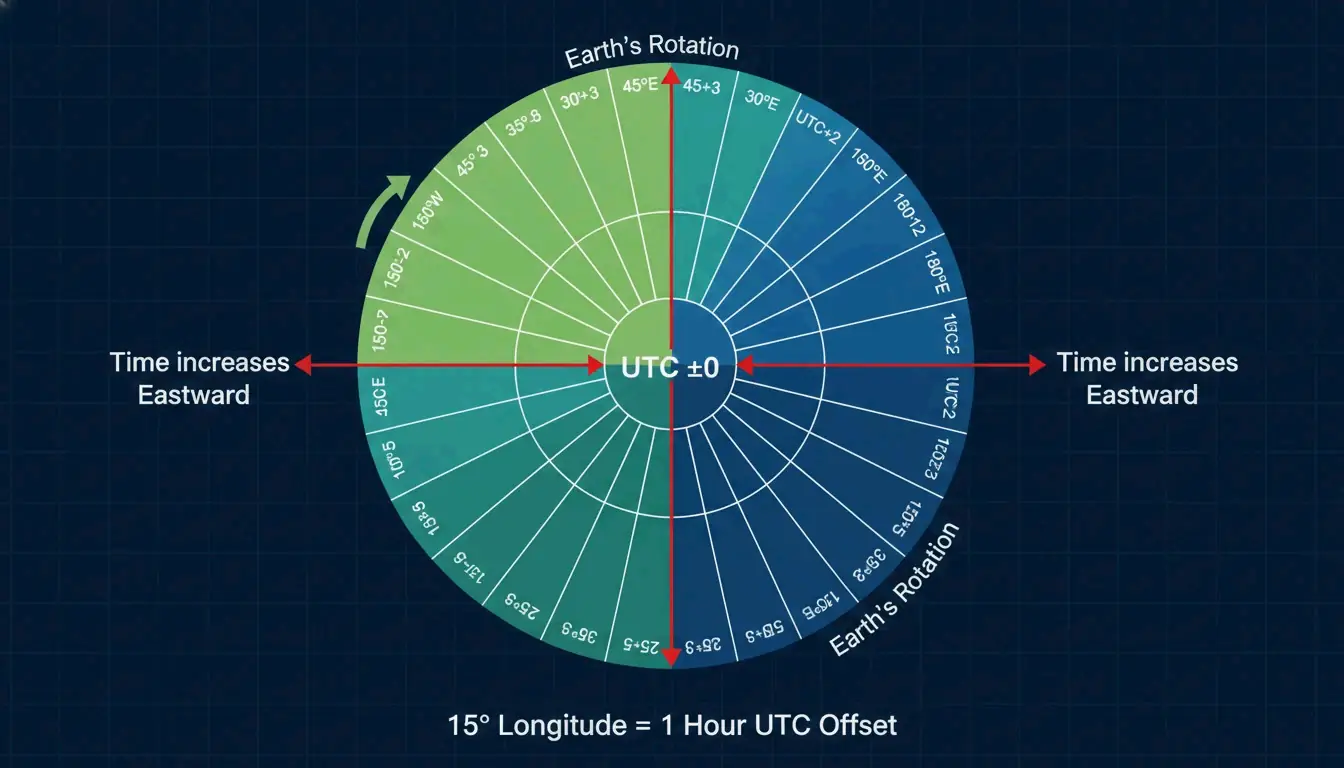
    Coordinated Universal Time (UTC) is the high-precision atomic time standard used to regulate clocks worldwide. It isn’t a time zone itself, but rather the reference point for everything else. The math is based on Earth’s rotation: since the planet turns 360° every 24 hours, each one-hour shift covers about 15° of longitude.

    According to Wikipedia, even though a day has 24 hours, the global time spread actually covers 26 hours, ranging from UTC−12:00 to UTC+14:00. This happens because some Pacific island nations, like Kiribati, moved their position relative to the International Date Line. They did this to keep their business week aligned with major partners like Australia and New Zealand, rather than being a full day behind.

    地球经度、15度间隔与UTC偏移量的关系示意图

    UTC vs. GMT: What is the Difference?

    People often use Greenwich Mean Time (GMT) and UTC as if they are the same thing, but they have different technical roots. GMT is a solar-based time zone tied to the Royal Observatory in London. UTC, however, is a stable standard maintained by atomic clocks. For your calendar or travel plans, the time is identical, but UTC is the standard used for global tech, the Internet, and aviation.

    Which Country Has the Most Time Zones? The Role of France Overseas Territories

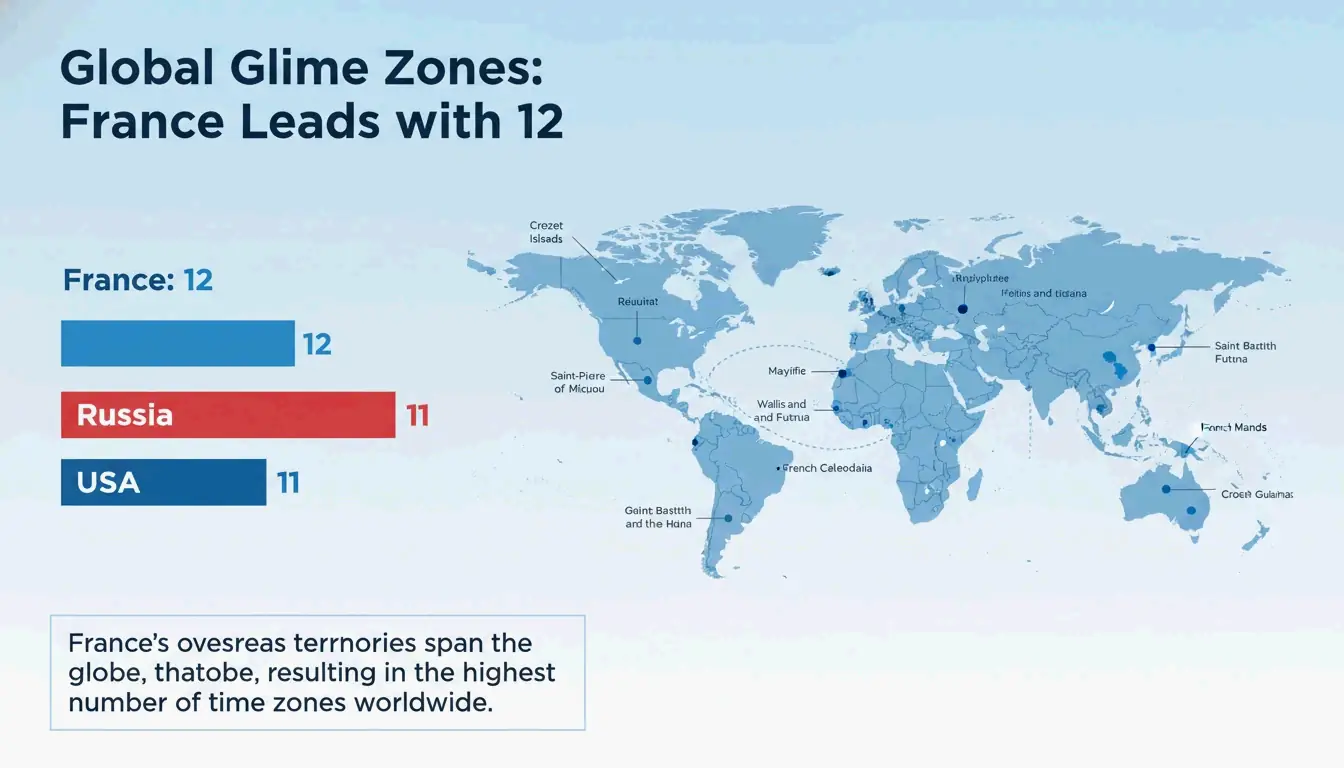
    France holds the world record for the most time zones, using 12 different standard offsets. According to World Population Review, that number hits 13 if you count France’s claim in Antarctica (Adélie Land). This isn’t because of the size of mainland France—which only uses UTC+1—but because its overseas departments are scattered across the globe.

    French territory stretches from the Caribbean (Guadeloupe at UTC-4) to the Indian Ocean (Réunion at UTC+4) and the Pacific. French Polynesia alone uses three different offsets. Russia and the United States follow with 11 zones each. While Russia’s zones are mostly connected across its landmass, the U.S. total is pushed up by territories like Guam (UTC+10) and American Samoa (UTC-11).

    各国拥有时区数量排行榜及法国海外领土分布图

    The Remote Work Survival Guide: Managing DST Transitions

    Daylight Saving Time (DST) involves moving clocks forward an hour in the summer to make use of evening light. This creates a massive headache for global teams because not every country does it, and those that do often switch on different weekends. The real “Danger Zone” happens during those 2–3 weeks in March and October/November when the U.S. and Europe are out of sync.

    Scheduling errors during these weeks can lead to missed meetings or broadcast glitches. To stay on track, use tools like World Time Buddy or the Mappr Interactive Map for real-time offsets. A pro tip is to set all international invites to UTC. Since UTC never changes for daylight saving, it removes the guesswork.

    Geographical Oddities: Non-standard Offsets and the International Date Line (IDL)

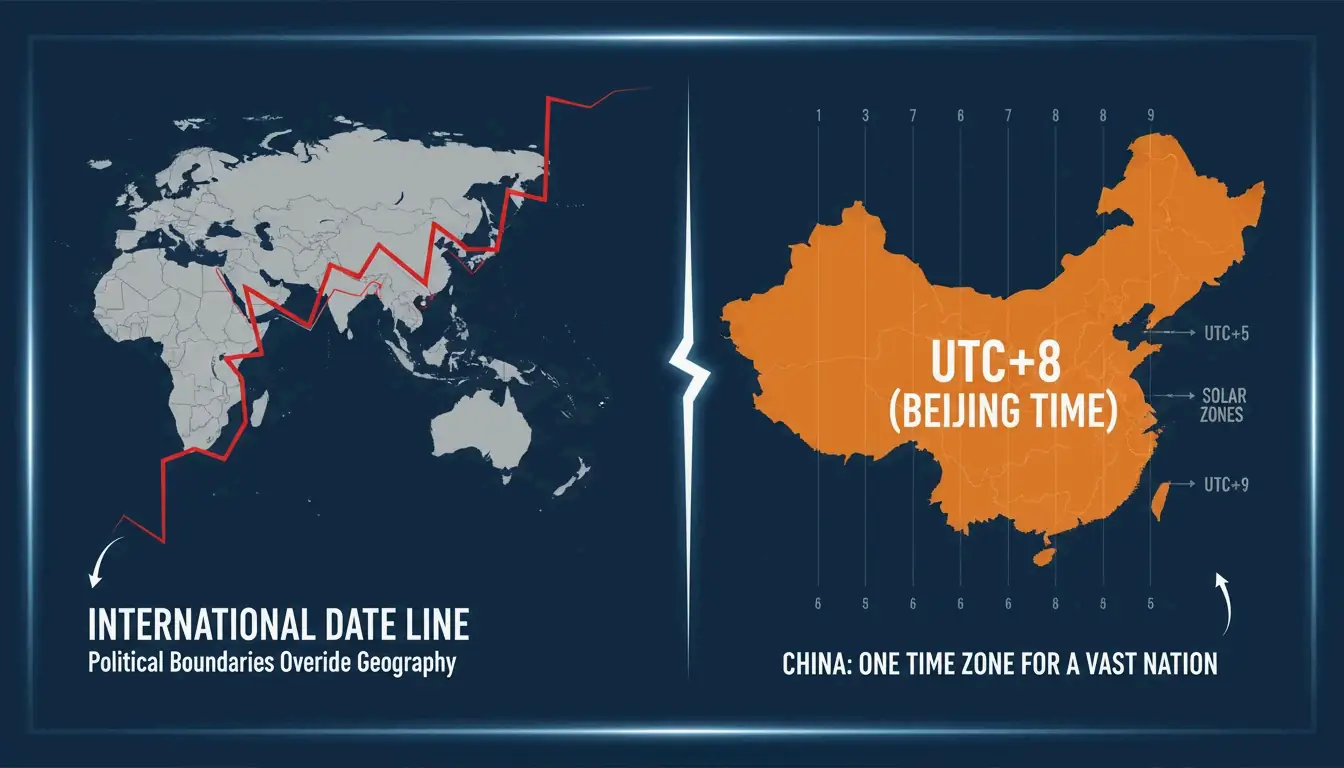
    The International Date Line (IDL) sits at roughly 180° longitude and marks where one calendar day ends and the next begins. The line is “jagged” because it zags around island groups to keep them on the same date as their neighbors. It’s more of a political boundary than a straight geographical one.

    Some countries also use non-standard offsets that include 30 or 45-minute increments. These “fractional” zones are usually chosen to align local time with “Solar Noon”—the point when the sun is highest. Politics plays a part too; China, for example, forces a single time zone (UTC+8) across the whole country to encourage national unity, even though it naturally spans five solar time zones.

    锯齿状的国际日期变更线与非标准时区(如中国、印度)的对比视觉图

    Why does India use UTC+5:30?

    India settled on Indian Standard Time (IST) at UTC+5:30 as a compromise. The country is about 30 degrees wide; by picking a point exactly halfway between the two standard hour zones, the government ensured Solar Noon happens close to 12:00 PM for both Mumbai in the west and the eastern borders. Nepal goes a step further with UTC+5:45, a 15-minute shift that helps assert its own identity separate from India.

    Technical Standards: The IANA Time Zone Database

    To keep gadgets in sync, computers use the IANA Time Zone Database (also known as the Olson database). This is a massive digital record of every time zone’s history, including every DST change and border shift since 1970. When your phone updates automatically after you land in 2026, it’s checking this database.

    At sea, ships use a system called Nautical Time. Unlike land zones that follow borders, nautical time stays strictly within 15-degree longitude blocks. Sailors adjust their clocks in one-hour steps as they cross these lines to keep ship-time aligned with the sun’s actual position.

    Conclusion

    Understanding world time zones is a must for anyone working remotely or traveling. The system is a mix of Earth’s rotation, colonial history—like the spread of France Overseas Territories—and the technical precision of the IANA Time Zone Database.

    Always double-check the “Daylight Saving Time” status in March and October, as those are the trickiest months. Stick to digital tools that use UTC-based offsets to keep your global coordination running smoothly.

    FAQ

    Which country has the most time zones in the world?

    France holds the record with 12 standard time zones. If you include its Antarctic claim (Adélie Land), the total reaches 13. This is due to its widely dispersed overseas departments and territories located in the Atlantic, Pacific, and Indian Oceans.

    What is the difference between UTC and GMT?

    GMT is a solar-based time zone historically based on the solar time at the Royal Observatory in Greenwich. UTC (Coordinated Universal Time) is a high-precision atomic time standard used to regulate global time. While they represent the same time for general use, UTC is more scientifically accurate and does not change with the seasons.

    Why do some countries like India and Nepal use 30 or 45-minute offsets?

    These offsets are often chosen to align local time more closely with “Solar Noon,” the point when the sun is highest in the sky. It can also be a political decision to maintain a single, unified time across a large country that sits between two standard longitudinal zones.

  • Mastering Precision: A Complete Guide to Setting Up Effective Timestamp Prompts for AI and Terminals

    Mastering Precision: A Complete Guide to Setting Up Effective Timestamp Prompts for AI and Terminals

    To set up effective timestamp prompts, you need to define clear time markers (like [00:02-0ir them with specific sensory details such as lighting, movement, or dialogue. Breaking longer sequences into 3-5 second blocks helps the AI maintain context and narrative flow across the entire timeline.

    Universal Principles: Why Setting Up Effective Timestamp Prompts Matters

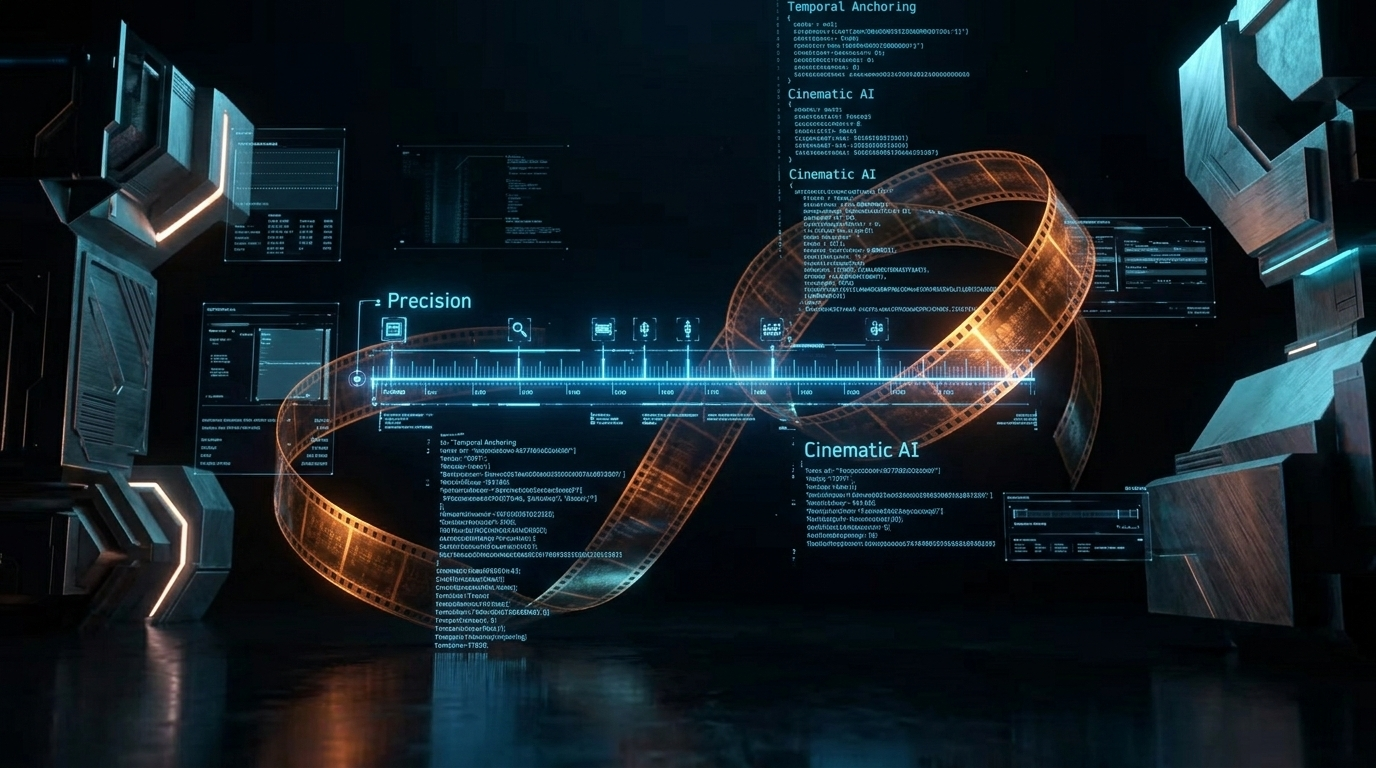
    Temporal anchoring is just a fancy way of saying you’re aligning digital instructions with a timeline. In generative AI, timestamps act as “hard constraints.” They stop the model from over-generalizing and force it to make specific changes at exact moments. This changes the creative process from writing descriptive prose to building a chronological map that the engine follows step-by-step.

    The ‘Hard Boundary’ Problem in AI Logic

    Standard text-to-video prompts often get “concept bleeding,” where an idea from the start of the prompt accidentally leaks into the end. When you set up effective timestamp prompts, you create a ‘hard boundary’ that resets the model’s focus. As Josh Edwards, a filmmaking veteran, points out: “Timestamp prompting lets you anchor AI tasks to exact moments… instead of vague instructions, you’re pointing to where something happens.” By using Time Markers and Segmenting Actions, you can separate a “nighttime transition” at so it doesn’t accidentally darken a “sunny morning” at.

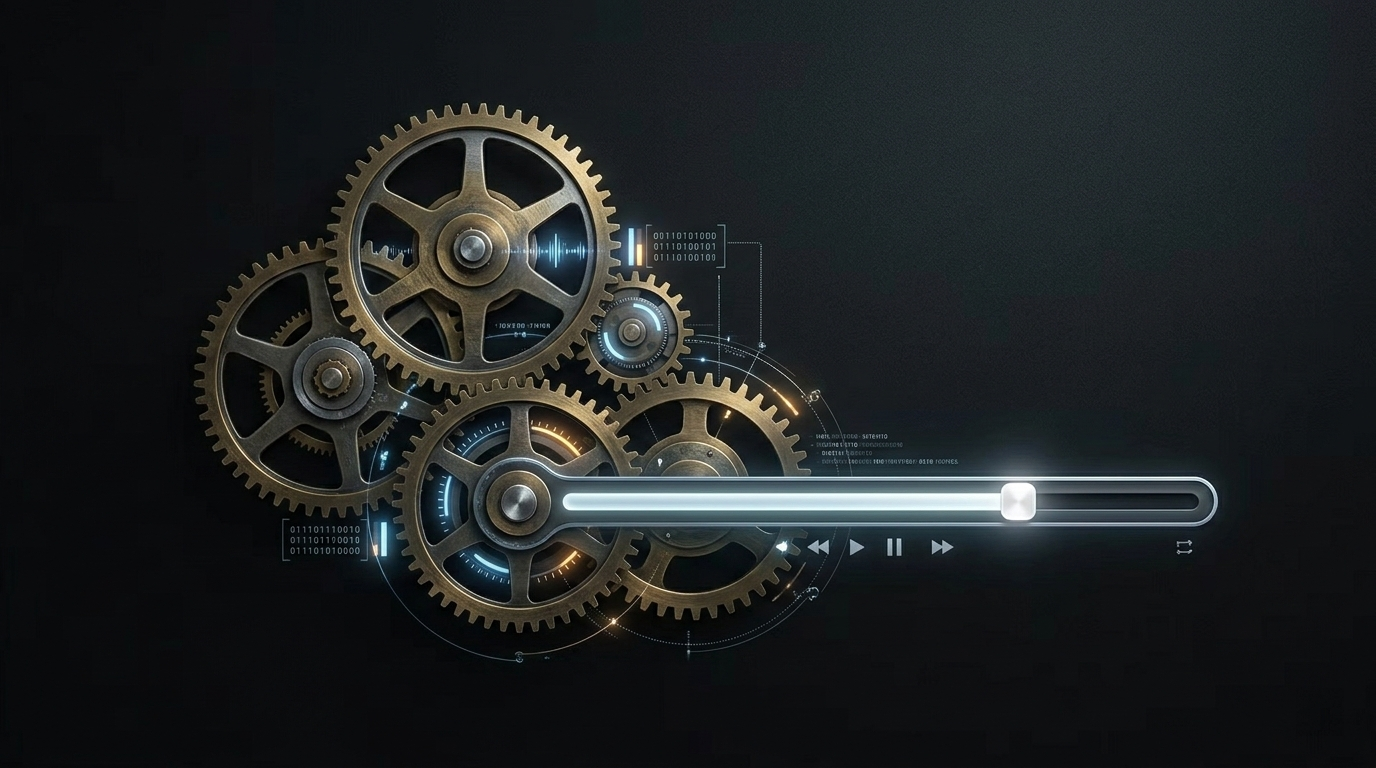
    An artistic representation of multiple clock gears perfectly interlocking with a video playback bar, symbolizing technical harmony.

    How Do Veo 3.1 & Sora 2 Pro Handle Segmenting Actions?

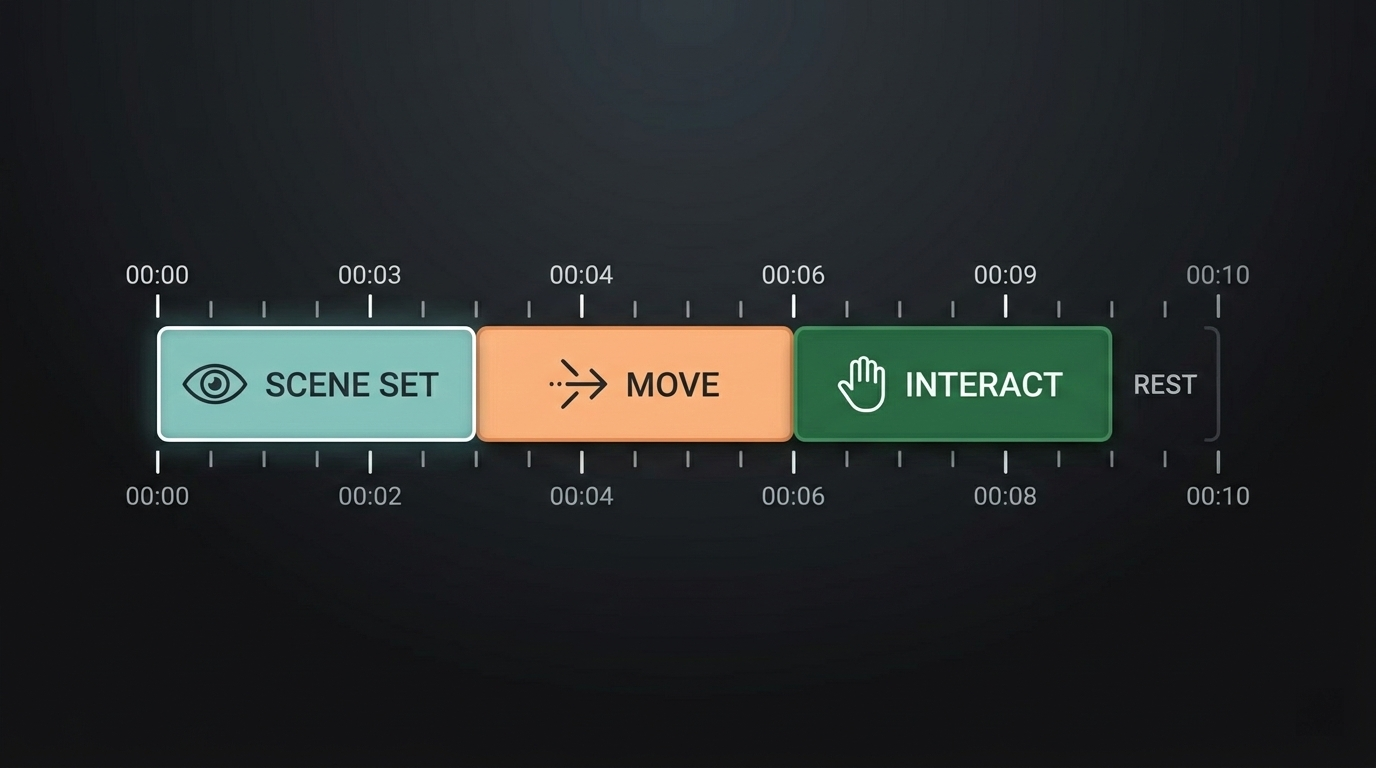
    A horizontal timeline diagram from 00:00 to 00:10, divided into 3-second colored blocks. Each block labeled with a simple action icon (e.g., Eye for scene set, Arrow for move).

    High-end video models like Veo 3.1 & Sora 2 Pro and Kling 2.5 Turbo are built to handle sequential data. For these tools, setting up effective timestamp prompts usually involves chopping a 10-second clip into 3-second Segmenting Actions blocks. For example, using [00:00-00:03] to establish the scene and [00:03-00:06] for a character’s move keeps the visual look consistent by giving the AI a very narrow window to focus on.

    According to the TPG framework (Temporal Prompt-based and Geography-aware), explicitly modeling time can lead to a 20.2% improvement in NDCG@5 for recommendation and prediction accuracy. This data from 2026 confirms that models work better when time is a primary input rather than just a secondary tag.

    Transition Library: Key Phrases for Seamless Intervals

    To keep your video from looking jumpy, use motion keywords to bridge the segments. Try pairing Time Markers with phrases like “gradual push,” “gentle camera pan from left to right,” or a “cross-fade.” For instance: [00:05-00:07] Gradual zoom on the subject's face to heighten emotion. This turns a string of separate segments into one smooth story.

    Technical Setup: Defining the PS1 Variable for Terminal Timestamps

    In a dev environment, setting up effective timestamp prompts is all about your configuration. The PS1 Variable in Linux controls how your shell prompt looks. Adding real-time timestamps helps you track how long commands take and keeps a solid audit trail in your .bashrc configuration file.

    Based on insights from the DEV Community (2026), there are four main ways to format time in Bash using the PS1 Variable:

    • \t: 24-hour time (HH:MM:SS).
    • \T: 12-hour time (HH:MM:SS).
    • \@: 12-hour time with AM/PM.
    • \A: 24-hour time (HH:MM).

    To keep these changes, open your ~/.bashrc and add: export PS1="\D{%F %T} \u@\h:\w$ ". This puts the full date and time right before every command line.

    Modern Shell Updates: Setting Up Timestamps in Zsh and Oh My Zsh

    Standard Bash guides often miss the mark for Mac users, since modern macOS defaults to Zsh. Setting up effective timestamp prompts in Zsh means you’ll be editing the .zshrc file instead of the old .bashrc configuration. Zsh actually gives you more room for customization, like right-side prompts (RPROMPT) that stay out of the way while you type.

    If you use a theme like Powerlevel10k, timestamps are usually built-in—you just need to toggle them with the p10k configure command. For a manual setup, adding PROMPT='%D{%L:%M:%S} %n@%m %~ %# ' to your .zshrc gives you a clean, timestamped interface. This ensures every command is “anchored” to a specific second, much like the precision needed for AI video.

    FAQ

    What are the best AI models for precise timestamp-based video editing?

    Veo 3.1 and Sora 2 Pro are currently the top choices for temporal accuracy, allowing for frame-accurate changes. Kling 2.5 Turbo is also great if you need high-fidelity motion control. While open-source models like Stable Video Diffusion are powerful, they usually need extra tools or “FramePack” extensions to get the same level of timestamp precision.

    How do I fix synchronization issues between my prompt timestamps and AI-generated visuals?

    The quickest fix is to make your segments shorter. Blocks of 2-3 seconds are much more accurate than longer ones. Also, use “anchor descriptors” at the start of every new timestamp to refocus the model on the subject. Keep an eye out for conflicting motion keywords that might overlap across different Time Markers.

    Can I use timestamp prompting for audio-only AI generation or transcripts?

    Yes. Models like ElevenLabs and Suno use time-stamped cues like [00:05] [Whisper] or [00:10] [Laughter] to handle emotional shifts. For transcription, OpenAI’s Whisper uses timestamps to sync text with audio frames. Setting up effective timestamp prompts in audio ensures that sound effects or tone changes hit exactly when they should.

    Conclusion

    Setting up effective timestamp prompts is the bridge between random AI outputs and professional-grade results. Whether you’re building a complex video with Veo 3.1 or just cleaning up your terminal with the PS1 Variable, time markers provide the necessary structure.

    To get started, try breaking your next video prompt into 3-second intervals using clear [00:00] markers, or update your .zshrc today with the %D format to track your command history with second-by-second accuracy.

  • How Timestamp Prompting Helps Video Creators: The Pro Guide to Director-Level AI Control

    How Timestamp Prompting Helps Video Creators: The Pro Guide to Director-Level AI Control

    How timestamp prompting helps video creators by providing a precise, time-based framework for AI video generation. This technique moves production from “prompting and praying” to granular directorial control, allowing creators to dictate exact motion, lighting shifts, and multi-shot transitions at specific second marks for frame-accurate, edit-ready results.

    From Chaos to Control: How Timestamp Prompting Helps Video Creators

    Timestamp prompting is a fundamental shift in how we work with generative video. Instead of giving a model a general paragraph and crossing your fingers for a coherent 10-second result, you now anchor specific instructions to exact moments on the timeline. This “Directorial Intent” cuts down on AI hallucinations because the model isn’t guessing what happens next—it’s following a script.

    The real win here is frame-accurate visuals. In professional production, a transition that’s even half a second off can kill the rhythm of a scene. By using time markers, you make sure actions—like a character turning their head or a product reveal—hit exactly when the narrative needs them to.

    As Dicloak notes in their 2026 analysis, these frameworks allow for multi-shot sequences with cinematic pacing, turning a hit-or-miss generative process into a reliable production tool.

    Split screen: Left side shows a messy cloud of text labeled 'Standard Prompt'; Right side shows a clean, linear timeline with blocks [0-2s], [2-5s] labeled 'Timestamp Prompt'.

    The Evolution of Video AI: Why Timing is Everything in 2026

    In 2026, the barrier to entry for video creation isn’t about technical execution anymore; it’s about temporal precision. Early AI models often suffered from “motion drift,” where an action would start but never quite finish naturally. Timestamp prompting fixes this by providing a roadmap of physics and logic, ensuring every second of footage actually serves the final edit.

    Mastering the Physics of Time: Advanced Acceleration and Motion Logic

    Effective timestamp prompting relies on understanding how motion feels. You can now command acceleration and deceleration just by segmenting your prompt. For instance, try assigning a “rapid camera push” to [0-2s] and a “slow settle” to [6-8s]. This creates a dynamic range that looks like it was shot by a high-end cinematographer.

    Data from Wyzowl shows that 73% of consumers prefer short-form videos under 2 minutes. To keep people watching, use timestamps to define lighting profiles that evolve—like shifting from a cold morning blue to a warm sunset glow—to show time passing within a single shot.

    A flow diagram: [AI Prompt Timestamps] -> [NLE Timeline Markers] -> [YouTube Chapters] -> [Google Search Result Snippets].

    By defining these motion components at specific intervals, the AI keeps the subject consistent while handling complex physical interactions. This “physics-aware” prompting applies force and resistance to objects at specific moments, making the movement feel heavy and real rather than floaty.

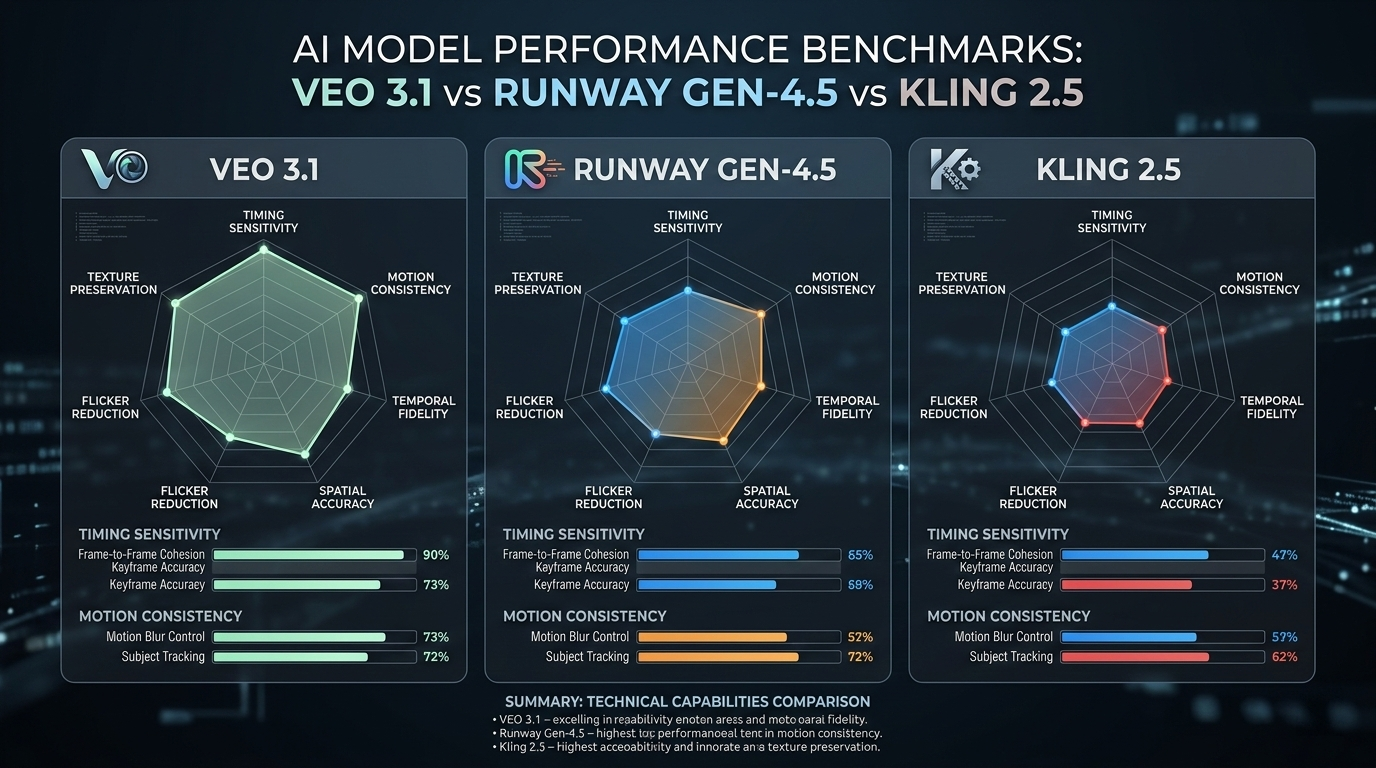
    Top Models for Temporal Precision: Veo 3.1 vs. Runway Gen-4.5

    Choosing the right model is the first step toward frame-accurate control. Currently, Google Veo 3.1 leads the pack for native timestamp integration. It lets you write prompts that read like a storyboard where every action is tied to a time block.

    Model Primary Strength for Timing Sensitivity Level
    Google Veo 3.1 Native timestamp framework; cinematic logic 0.5s Intervals
    Runway Gen-4.5 Advanced motion brush & temporal markers 1.0s Intervals
    Kling 2.5 Turbo Segmented action prompts for high-motion 1.0s Intervals

    In a 2026 Veo 3.1 Product Reveal, Google showed off an 8-second headphone choreography. The prompt used a 0-3s silhouette reveal, a 3-6s side-light sweep, and a 6-8s close-up focus. This case study proves that Veo 3.1 follows a chronological progression instead of trying to mash every instruction into one messy frame. Runway Gen-4.5 and Gen-3 Alpha also handle sequencing well, especially when you use them with “Director-level” tools like seed-based consistency.

    A series of progress bars or radar charts comparing Veo 3.1, Runway Gen-4.5, and Kling 2.5 on 'Timing Sensitivity' and 'Motion Consistency'.

    The Full-Cycle Workflow: Converting AI Timestamps to YouTube SEO

    The benefits of timestamp prompting go beyond just making the video; they help with distribution too. By using these AI-generated timestamps during production, you can bridge the gap between your prompt and your Non-Linear Editor (NLE) timeline much faster.

    You can also repurpose these prompts into YouTube “Key Moments” to help your SEO. According to Cisco and Wyzowl, video content is expected to make up 82% of all internet traffic by the end of 2026. If your AI timestamps match your YouTube chapters, Google Search can highlight specific segments of your video directly in the search results.

    This approach makes your content much easier to find. When someone searches for a specific step in a tutorial, Google can drop them right at the timestamp you directed with AI, which usually leads to better click-through rates and longer watch times.

    A flow diagram: [AI Prompt Timestamps] -> [NLE Timeline Markers] -> [YouTube Chapters] -> [Google Search Result Snippets].

    Pro Tactics: Negative Timestamps and Seedance Animation

    Advanced creators are now experimenting with “Negative Timestamps.” This involves using Negative Prompting for specific windows to stop artifacts before they happen. For example, you might prompt [4-6s] NO flickering or color distortion to keep a complex transition clean.

    Seedance 1.0 Pro is another heavy hitter in this space. It specializes in animating stills based on audio timing. By pairing Seedance 1.0 Pro with timestamp markers, you can sync the movement of a still image to the specific beats of a voiceover. It gets rid of that “floaty” AI look and ensures every movement has a clear, timed reason for happening.

    FAQ

    What is the difference between standard prompting and timestamp prompting?

    Standard prompting describes the whole scene at once, which often makes the AI try to do everything simultaneously. Timestamp prompting anchors specific actions to exact seconds (e.g., [0-2s] zoom, [2-4s] pan). It gives you “Director-level” control over the sequence and pacing of the shot.

    Which AI video models are best for frame-accurate timestamp control?

    Google Veo 3.1 is the current gold standard for native timestamping. Runway Gen-4.5 and Kling 2.5 Turbo are also great for segmented actions. Newer 2026 models like Sora 2 Pro are catching up fast, offering high accuracy for complex storytelling.

    How many timestamps should a single AI video prompt include?

    For a 10-second clip, stick to 3-5 major time blocks so you don’t overwhelm the model. Try not to let actions overlap in the same sub-second window, and use 1-2 second “buffer” zones between big transitions to keep the visuals consistent.

    Conclusion

    Timestamp prompting is the bridge between generative AI and real cinematography. It lets you dictate when an action happens just as clearly as what happens, turning an unpredictable “black box” into a reliable tool. By using this framework, you stop making generic clips and start producing edit-ready, high-fidelity footage.

    To get started, try breaking your next 8-second hero shot into three blocks—[0-3s], [3-6s], and [6-8s]—using Veo 3.1. You’ll notice immediately how much more responsive the AI becomes when it’s working on your schedule.

  • Timestamp or Time Stamp? Definition, Formats, and Digital Importance

    Timestamp or Time Stamp? Definition, Formats, and Digital Importance

    A timestamp (commonly written as one word) is a digital or printed record identifying when a specific event occurred. It typically includes the date and time, often synchronized to a universal standard like UTC, to ensure data integrity, traceability, and legal authenticity in electronic transactions.

    What is a Timestamp? One Word or Two?

    In modern technical communication, timestamp is the standard. While the two-word variation “time stamp” remains linguistically correct in general contexts—referring literally to the ink-and-rubber tools used on paper documents—industry standards and major dictionaries now favor the closed form for all digital applications.

    A timestamp is a sequence of characters or encoded information that identifies when a certain event happened. In computing, it functions as Digital Record/Metadata attached to a file or communication. This provides a chronological anchor that doesn’t always have to be based on an absolute notion of time; it can be relative to a system’s power-on time or an arbitrary epoch.

    How Digital Metadata Tracks File History

    Digital metadata uses timestamps to provide a transparent audit trail of a file’s lifecycle. Every time you create, open, or modify a document, the operating system updates specific metadata fields. This helps administrators distinguish between the original version of a file and later iterations, which is vital for version control and forensic data recovery.

    Universal Standards: ISO 8601 and Global Synchronization

    The standard for representing dates and times in digital systems is ISO 8601. This international standard eliminates ambiguity by using a big-endian format (YYYY-MM-DD), which makes alphanumeric sorting easier and prevents the “month-day” confusion common between U.S. and European conventions.

    A standard ISO 8601 string follows the format: YYYY-MM-DDThh:mm:ssZ. The “T” separates the date from the time, while the “Z” indicates “Zulu” time or UTC (Coordinated Universal Time). According to Sumo Logic, automated collectors assume timestamps stay within a specific synchronization window. For instance, log messages are typically expected to fall within a window of -1 year to +2 days compared to the current system time in 2026 to maintain data integrity.

    How do Unix Epoch Timestamps Work in Modern Computing?

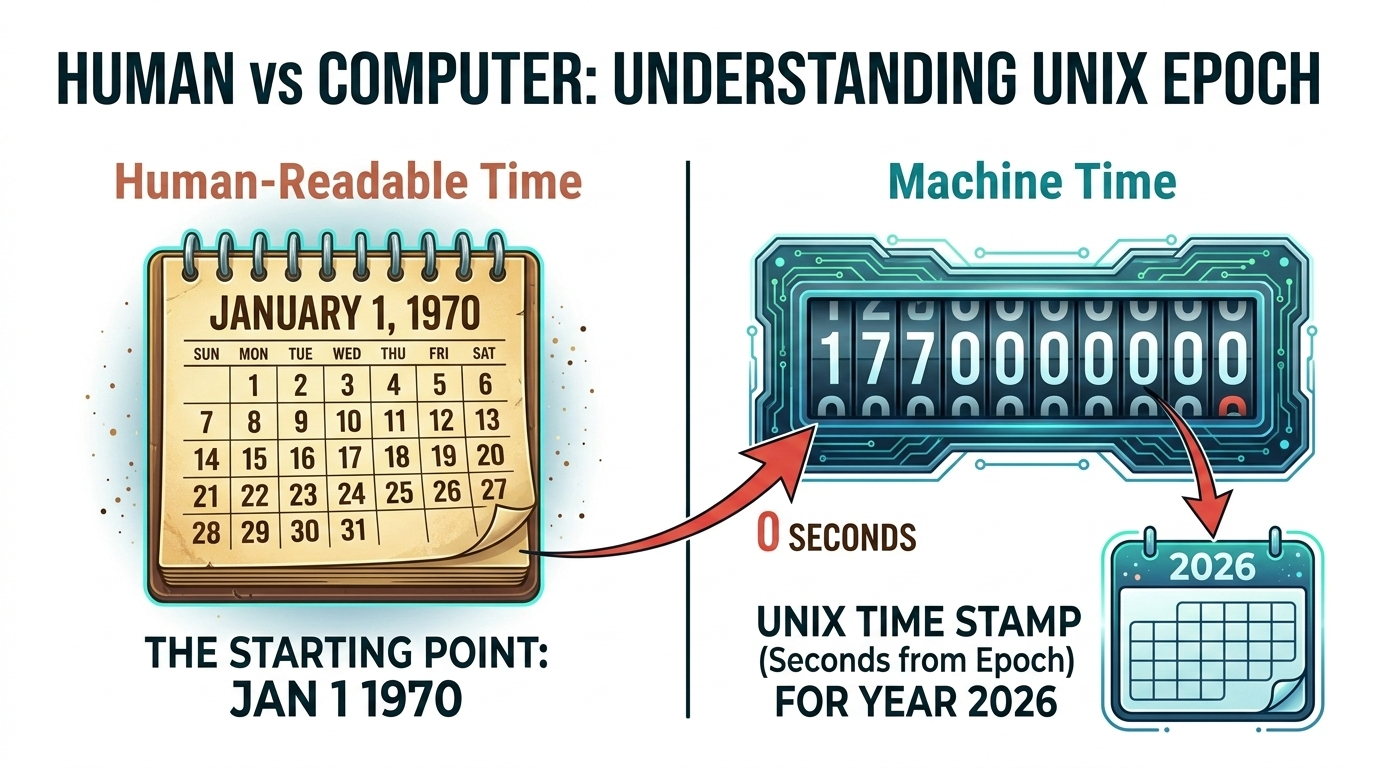
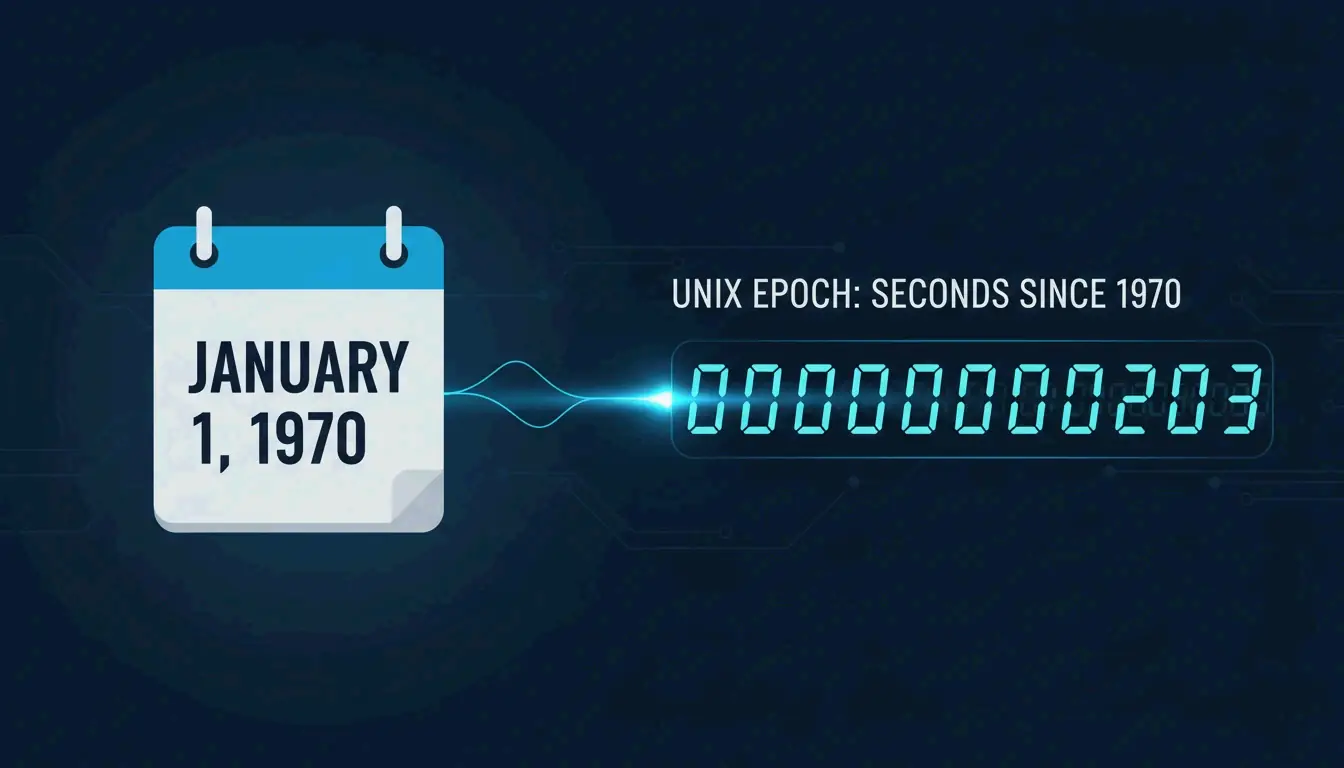
    Unix Epoch Time describes points in time as the total number of seconds that have elapsed since 00:00:00 UTC on January 1, 1970. Unlike human-readable formats, which require complex parsing of months and leap years, Unix timestamps are simple integers (e.g., 1772458593), making them efficient for machine-to-machine communication and mathematical calculations.

    Explains the non-human-readable Unix format by showing its relationship to a standard calendar date.

    In 2026, these timestamps remain the backbone of databases and high-frequency trading platforms. While a human sees “March 2, 2026,” a computer processes the integer value to determine the exact millisecond an order was placed. This ensures that thousands of transactions per second are logged in the precise order they were received.

    Timestamp vs. Time Stamping: The Legal and Technical Distinction

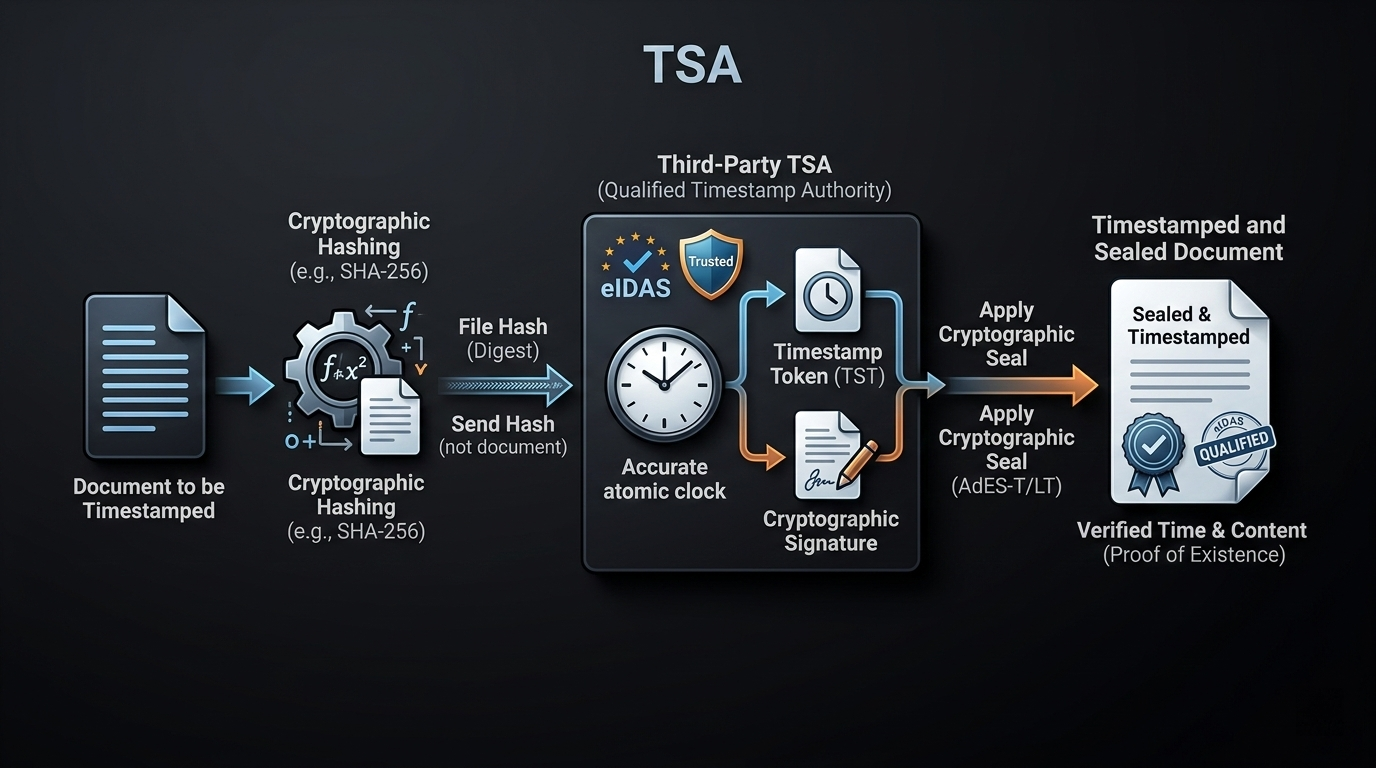
    It is important to distinguish between a “timestamp” (the data) and “time stamping” (the process). A timestamp is simply the recorded metadata, whereas time stamping is the cryptographic mechanism of binding that time to data through a trusted third party.

    Feature Timestamp Time Stamping
    Nature Data/Metadata Cryptographic Process
    Authority Local System Timestamping Authority (TSA)
    Standard ISO 8601 / Unix RFC 3161
    Security Easily Editable Immutable / Cryptographic

    For high-stakes legal and financial documents, the industry relies on RFC 3161 protocols. According to Tecalis, professional time-stamping services use a 256-bit hash algorithm to ensure immutability. This creates a digital seal proving a document existed in a specific state at a specific time.

    Electronic Signatures and the eIDAS Regulation

    In the European Union and many international jurisdictions, the eIDAS Regulation provides the legal framework for trust services. An Electronic Signature alone may prove who signed a document, but a “Qualified” timestamp is required to prove when the signature was applied.

    Under eIDAS, a Qualified Timestamp must be issued by a certified TSA, guaranteeing that the time source is accurate and synchronized with UTC. Increasingly, Blockchain technology is being explored as a decentralized alternative for immutable logging, offering a transparent ledger where timestamps cannot be retroactively altered by any single entity.

    Illustrates the multi-step technical process of acquiring a qualified timestamp from a third-party TSA.

    Best Practices: Fixing ‘Dirty Data’ and Managing Time Zones

    “Dirty data” occurs when timestamps are out of sync due to misconfigured system clocks or incorrect time zone offsets. In complex data pipelines, developers must normalize all records to UTC before storage. This prevents “clock drift” from ruining the sequence of events in distributed systems.

    Managing POSIX System Calls

    When handling file-level metadata, developers must understand the POSIX Stat System Call (atime, mtime, ctime). According to Wikipedia, these represent:

    • atime: Time of last access (e.g., when a file was read).
    • mtime: Time of last modification (when content was changed).
    • ctime: Time of last status change (when metadata like permissions changed).

    Managing these attributes is essential for backup software and security auditing tools to accurately reflect a system’s history in 2026.

    FAQ

    Is ‘timestamp’ written as one word or two words?

    In technical, computing, and data science contexts, timestamp (one word) is the industry standard. While “time stamp” (two words) is traditionally used for physical rubber stamps, modern style guides and dictionaries now prefer the compound form for all digital records and metadata.

    What is the difference between a simple timestamp and a qualified timestamp?

    A simple timestamp is a local record, such as the “date modified” field on a Windows file, which can be easily altered. A qualified timestamp is issued by a verified Timestamping Authority (TSA) under strict regulations like eIDAS, providing legal proof of non-repudiation and cryptographic immutability.

    Why are timestamps critical for blockchain and electronic signatures?

    Timestamps provide the chronological “DNA” for data blocks in a blockchain, preventing double-spending and ensuring the sequence of the ledger. For electronic signatures, they provide irrefutable proof of when a contract was executed, preventing users from backdating or tampering with the document after the fact.

    Conclusion

    Timestamps are the backbone of digital integrity, evolving from simple file markers to complex cryptographic proofs regulated by standards like ISO 8601 and eIDAS. They ensure that our digital world remains orderly, traceable, and legally sound by providing a universal “when” to every “what.”

    For developers and businesses in 2026, the best practice is to always normalize records to UTC and use a Trusted Timestamping Authority (TSA) when legal non-repudiation is required for electronic signatures. Implementing these standards now will prevent data synchronization failures and legal challenges later.

    Provides a visual 'breather' and summarizes the global impact of synchronized time before the final call to action.

  • Understanding How a Time Stamp Indicates the Date and Time in Digital Systems

    TL;DR: A time stamp indicates the date and time (often to fractions of a second) when a specific event occurred. It ensures data integrity, enables event synchronization, and provides a chronological audit trail for files, transactions, and communications across computer systems and blockchains.

    Why a Time Stamp Indicates the Date and Time: Core Functions

    In digital environments, a timestamp acts as a temporal anchor, pinning a specific event to a unique point in history. Beyond simply telling the time, it provides Data Integrity & Verification. By attaching a persistent temporal record to a file or a packet of data, systems can prove exactly when information was created, modified, or exchanged. This is necessary for legal compliance and technical troubleshooting.

    [Image of a digital timestamp structure showing date, time, and milliseconds]

    According to Sumo Logic, log management systems rely on these markers for the “integrity of the data in your account.” Their collectors assume that log messages from a specific source will have timestamps within a window of -1 year to +2 days compared to the current time—in this case, 2026—to ensure the timeline remains accurate and queryable.

    The Role of UTC in Global Synchronization

    Coordinated Universal Time (UTC) is the primary time standard used to regulate clocks worldwide. In globalized computing, local time creates headaches due to daylight saving changes and shifting time zones. By defaulting to UTC, developers ensure that a timestamp generated in New York sequences perfectly with one from Tokyo without needing manual offsets.

    What is the Unix Epoch and How Does It Track Time?

    Most modern operating systems don’t store time as “March 2nd, 2026.” Instead, they use Unix Epoch / Unix Time, which counts the seconds that have passed since the “Epoch” at 00:00:00 UTC on January 1, 1970. This integer-based system allows computers to handle chronological calculations by simply subtracting one number from another.

    While Unix is the industry standard, different systems have used different starting points throughout history:

    • Unix/Linux/macOS: January 1, 1970.
    • Windows: January 1, 1601.
    • Legacy Macintosh: January 1, 1904.

    As data moves from machine-readable integers (like 1772458528) to human-readable strings (like 2026-03-02 05:41:30), the timestamp bridges raw logic and human understanding.

    Developer’s Cheat Sheet: Generating Timestamps in Modern Languages

    Software engineers generate and manipulate timestamps to log errors or record user actions. Here are the standard ways to capture the current moment:

    • Python: The datetime module is the go-to. datetime.now(timezone.utc) provides a timezone-aware object.
    • JavaScript: Date.now() gives you the milliseconds elapsed since the Unix Epoch.
    • Java: System.currentTimeMillis() is preferred for high-performance logging.

    For Infrastructure-as-Code (IaC), the Terraform timestamp() function is a standard tool. According to TechTarget, developers use this to capture the date and time during a terraform apply. This allows resources to be tagged with their creation time, making lifecycle management much easier.

    When storing these values, SQL systems typically use TIMESTAMP or DATETIME types. NoSQL databases like MongoDB often use BSON Date objects, which allow for efficient range-based queries—like finding all logs between 2 PM and 4 PM.

    ISO 8601: The International Standard for Global Consistency

    To avoid confusion in cross-border transactions, we use the ISO 8601 standard. It follows a big-endian format: YYYY-MM-DDThh:mm:ssZ. The “Z” stands for “Zulu time,” which is the same as UTC. This format is the standard choice because it is lexicographically sortable; an alphabetical sort will also result in a chronological sort.

    [Image of ISO 8601 format breakdown]

    Staying consistent requires the Network Time Protocol (NTP). As noted by TechTarget, NTP lets computers calibrate their internal clocks to tiny fractions of a second. This ensures that even if a server’s hardware clock drifts, it stays synced with global atomic clocks, preventing “dirty timestamps” from ruining your data analysis.

    Blockchain & Cryptocurrency: Securing the Ledger with Timestamps

    In Blockchain & Cryptocurrency, timestamps act as a defense against fraud. They provide the order needed to prevent “double-spending,” where someone tries to send the same digital coin to two people at once. By timestamping each block, the network verifies which transaction actually happened first.

    Bitcoin uses a security protocol called the Median Past Time (MPT) Rule. According to Bitcoin’s protocol rules, a new block’s timestamp must be greater than the median of the previous 11 blocks. This stops miners from trying to game the system by manipulating time to adjust mining difficulty.

    Do You Need a Time Stamping Authority (TSA)?

    For most apps, the system clock is enough. However, for legal digital contracts (like DocuSign), you need a Time Stamping Authority (TSA). A TSA is a trusted third party that provides a cryptographically secure timestamp, proving a document existed at a specific time and hasn’t been touched since.

    TSAs use Public Key Infrastructure (PKI) to sign the record. This is vital for preventing “Dirty Timestamps”—records that were manually changed or corrupted. In big data, a TSA-verified timestamp provides an immutable audit trail that holds up in court.

    FAQ

    What is the difference between a datestamp and a timestamp?

    A datestamp only records the calendar date (e.g., 2026-03-02), whereas a timestamp includes both the date and the specific time of day, often extending to milliseconds or nanoseconds. While a datestamp tells you what day something happened, a timestamp tells you exactly when it occurred within that day.

    Why is the Unix epoch date set to January 1, 1970?

    The date was chosen as an arbitrary “point zero” by the original creators of Unix. It provided a convenient reference point for 32-bit systems to count seconds. Although arbitrary, it has since become the universal standard for programming, allowing different languages and systems to share time data without complex conversions.

    How do blockchain timestamps prevent ‘double spending’ in cryptocurrency?

    Timestamps create a definitive chronological order for every transaction added to the ledger. When a user tries to spend the same funds twice, the network checks the timestamps. The transaction with the earlier, verified timestamp is accepted, while the subsequent attempt is rejected as invalid, ensuring the integrity of the digital currency.

    Can a computer timestamp be manipulated or ‘dirty’?

    Yes. Local system clocks can be manually changed by users or drift due to hardware battery failure. These are often called “dirty timestamps.” To combat this, professional environments use the Network Time Protocol (NTP) for synchronization and Time Stamping Authorities (TSAs) for legal-grade verification that cannot be altered.

    How do I convert a Unix timestamp to a human-readable format in Excel?

    You can use the formula: =((A1/86400)+25569). In this formula, 86400 represents the total seconds in a day, and 25569 is the specific offset required to align the Unix epoch (1970) with Excel’s internal calendar system (which begins in 1900). After applying the formula, format the cell as a “Date” or “Time.”

    Conclusion

    A timestamp is more than a clock reading; it’s a building block of digital trust. By understanding how a time stamp indicates the date and time, you can protect data integrity, sync global networks, and secure financial ledgers. Whether you’re a developer using Terraform timestamp() or an executive signing a contract, these markers are what keep the digital world in sync.

    When building your next system, stick to UTC and ISO 8601. It’s the best way to keep your data verifiable, API-compatible, and safe from “dirty” data errors.

  • Excel Convert Epoch to Datetime: The Exact Formula & Timezone Guide

    Excel Convert Epoch to Datetime: The Exact Formula & Timezone Guide

    To make excel convert epoch to datetime, divide the timestamp by 86,400 (the number of seconds in a day) and add Excel’s base date offset. The exact formula is =(A1/86400)+DATE(1970,1,1). After entering the formula, apply Custom Cell Formatting using mm/dd/yyyy hh:mm:ss to view the human-readable calendar date and time.

    The Core Formula: Dividing by 86400 and Adding DATE(1970,1,1)

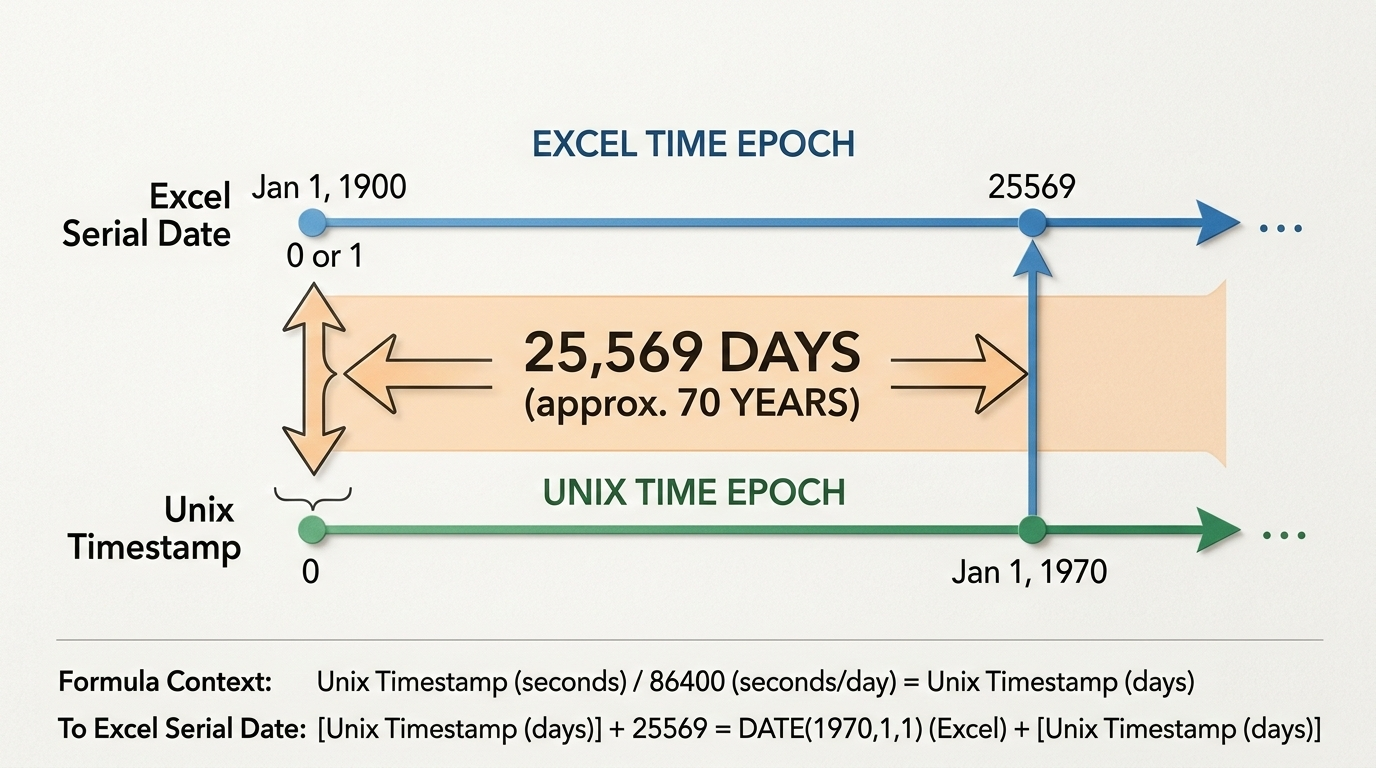
    Excel and Unix systems track time differently. Excel counts continuous days starting from January 1, 1900, while the Unix epoch counts continuous seconds starting from January 1, 1970. Based on data from Exceljet, a standard 24-hour day contains exactly 86,400 seconds.

    To translate between the two systems, you divide the Unix timestamp by 86,400 to turn those seconds into days. Then, you account for the gap between the two starting years. As noted by Microsoft Q&A, this gap is exactly 25,569 days. You can write this offset in your formula as either the raw number 25569 or the DATE(1970,1,1) function.

    Put your epoch timestamp in cell A1 and enter =(A1/86400)+DATE(1970,1,1) in cell B1 to calculate the raw decimal value.

    双时间轴对比图:上方为Excel时间轴(起点1900年1月1日),下方为Unix时间轴(起点1970年1月1日),中间用箭头标出25,569天的差距。

    How to Apply Custom Cell Formatting

    Your formula will initially return a decimal number like 44538.66. To make this readable, select the cell, press Ctrl + 1 to open the Format Cells dialog box, and click the “Custom” category. Type mm/dd/yyyy hh:mm:ss into the “Type” field and hit OK to reveal the actual date and time string.

    The Digit Count Guide: Handling 13-Digit Millisecond Timestamps

    Standard Unix timestamps are 10 digits long and measure seconds. However, lots of API exports and telemetry logs use 13-digit millisecond timestamps for higher precision. If you use the standard formula on these, you’ll end up with an incorrect date thousands of years in the future.

    According to Excel Insider, you need to adjust your divisor to 86,400,000 for 13-digit data. This divides the milliseconds into seconds and the seconds into days all in one mathematical step.

    Timestamp Type Digit Count Required Formula
    Standard Seconds 10-digit =(A1/86400)+DATE(1970,1,1)
    Milliseconds 13-digit =(A1/86400000)+DATE(1970,1,1)

    How Do I Apply Timezone Adjustments to Converted Epoch Dates?

    Unix epoch time is always recorded in Coordinated Universal Time (UTC). Your converted formula will output the UTC datetime by default.

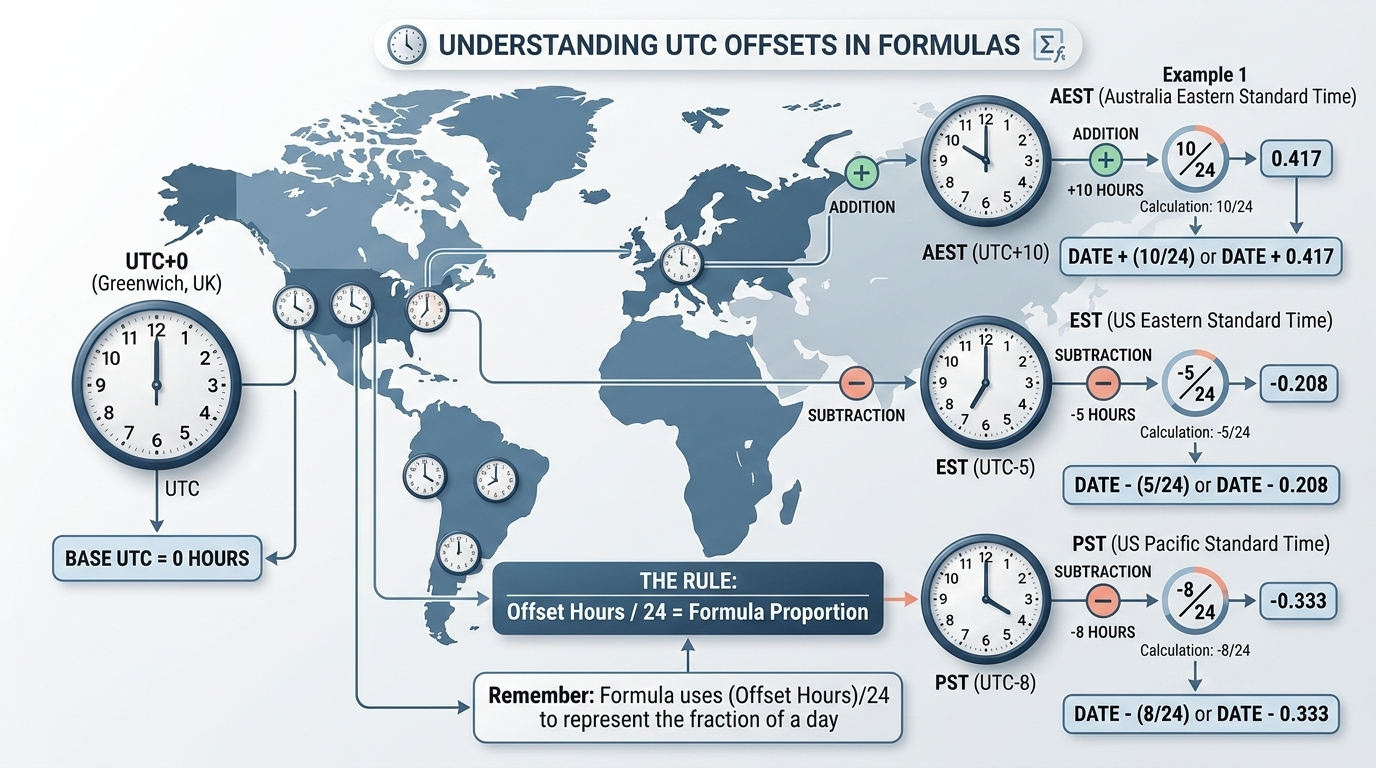
    To get your local time, add or subtract the hour difference as a fraction of a 24-hour day directly in your formula. Just attach +(hours/24) or -(hours/24) to the end of the core conversion math.

    Quick Reference Cheat Sheet for Major Time Zones

    Here are the static adjustments for common global time zones. Keep in mind you’ll need to manually update these formulas when Daylight Saving Time (DST) shifts occur.

    Time Zone UTC Offset Excel Formula Adjustment
    Eastern Standard Time (EST) UTC-5 =(A1/86400)+DATE(1970,1,1)-(5/24)
    Pacific Standard Time (PST) UTC-8 =(A1/86400)+DATE(1970,1,1)-(8/24)
    Greenwich Mean Time (GMT) UTC+0 =(A1/86400)+DATE(1970,1,1)
    Australian Eastern Standard (AEST) UTC+10 =(A1/86400)+DATE(1970,1,1)+(10/24)

    带有世界地图或全球时钟分布的图表,直观显示UTC+0到常见时区(如EST、PST、AEST)的加减偏移计算逻辑。

    Extracting the Calendar Date Only Using INT and TEXT Functions

    If you only need to group metrics by the calendar date—not track the exact hour and minute—wrap your formula in the INT function. The formula =INT(A1/86400)+DATE(1970,1,1) strips away the time decimals, leaving you with a clean whole number representing midnight of that date.

    If you’re exporting this data to a CSV or combining it with other text cells, use the TEXT function instead. The formula =TEXT((A1/86400)+DATE(1970,1,1), "mm/dd/yyyy") converts the math straight into a static text string that won’t break if someone accidentally changes the spreadsheet formatting.

    Bulk Processing Millions of Rows with Power Query

    Applying standard cell formulas to massive datasets will severely lag your spreadsheet. For millions of rows, handle the conversion in Power Query during the data ingestion phase instead.

    Open the Power Query Editor and add a Custom Column. Use the M code snippet #datetime(1970, 1, 1, 0, 0, 0) + #duration(0, 0, 0, [EpochColumn]) for 10-digit timestamps. This does the math efficiently in the background without bloating your file size, giving you a clean datetime column ready for PivotTable analysis.

    流程图:原始海量数据源 → 进入Power Query Editor → 应用M代码转换 → 输出干净的Datetime列用于数据透视表。

    Troubleshooting the Negative Dates Error (####)

    Seeing a row of hash symbols (####) filling your cells usually means one of two things. First, try double-clicking the boundary of the column header to widen it—the full mm/dd/yyyy hh:mm:ss format requires a lot of horizontal space.

    If the cell still shows hash symbols after widening, your formula is generating a negative date. Excel’s date system cannot display dates before January 1, 1900. Check your source data: make sure you aren’t using the 10-digit formula on a 13-digit timestamp, and verify that your timezone subtraction didn’t push an early-1970 date backward into 1899.

    FAQ

    Why does my Excel cell show ####### after applying the epoch conversion formula?

    Usually, your column is simply too narrow for the full ‘mm/dd/yyyy hh:mm:ss’ format. Try widening it. If it still shows hashes, your formula resulted in a negative number, meaning the date falls before Excel’s minimum cutoff of January 1, 1900.

    How do I convert a 13-digit millisecond epoch timestamp to a date in Excel?

    Because 13-digit timestamps track milliseconds, you need to increase your formula’s divisor by a factor of 1,000. Use the updated formula =(A1/86400000)+DATE(1970,1,1) to handle both the millisecond-to-second and second-to-day conversions accurately.

    How can I adjust my converted Excel datetime for my specific local timezone (e.g., EST, AEST)?

    Since epoch time is measured in UTC, you adjust it by adding or subtracting the hour difference as a fraction of a 24-hour day. To switch to EST (UTC-5), just add -(5/24) to the very end of your conversion formula.

    What is the difference between Excel’s date system and the Unix epoch?

    Excel counts continuous days starting from January 1, 1900. The Unix Epoch counts continuous seconds starting from January 1, 1970. The number 25,569 bridges this gap, representing the exact number of days between those two starting points.

    Conclusion

    Getting readable dates from epoch timestamps comes down to matching Unix seconds to Excel’s daily clock using the 86400 divisor and the DATE(1970,1,1) offset. Just remember to check whether your data is in 10-digit seconds or 13-digit milliseconds before you apply the formula to ensure the math lines up.

    Start by pasting =(A1/86400)+DATE(1970,1,1) into your worksheet, tweak it for your local timezone, and apply custom formatting to actually see the date.

    Would you like me to help you write a custom VBA macro to automate this conversion across multiple workbooks?

  • How to Perform a Timestamp Difference Calculate: A Cross-Platform Guide

    How to Perform a Timestamp Difference Calculate: A Cross-Platform Guide

    To perform a timestamp difference calculate, use environment-specific functions. For SQL databases, use TIMESTAMPDIFF() (MySQL) or EXTRACT(EPOCH). In JavaScript, simply subtract two Date objects. Always align your timestamps to the same timezone—preferably UTC—before running the math to dodge daylight saving time bugs.

    (Note: Use our interactive JavaScript calculator below to instantly verify your logic before pushing code to production.)

    The Danger of DST: Why You Must Understand the UNIX Epoch

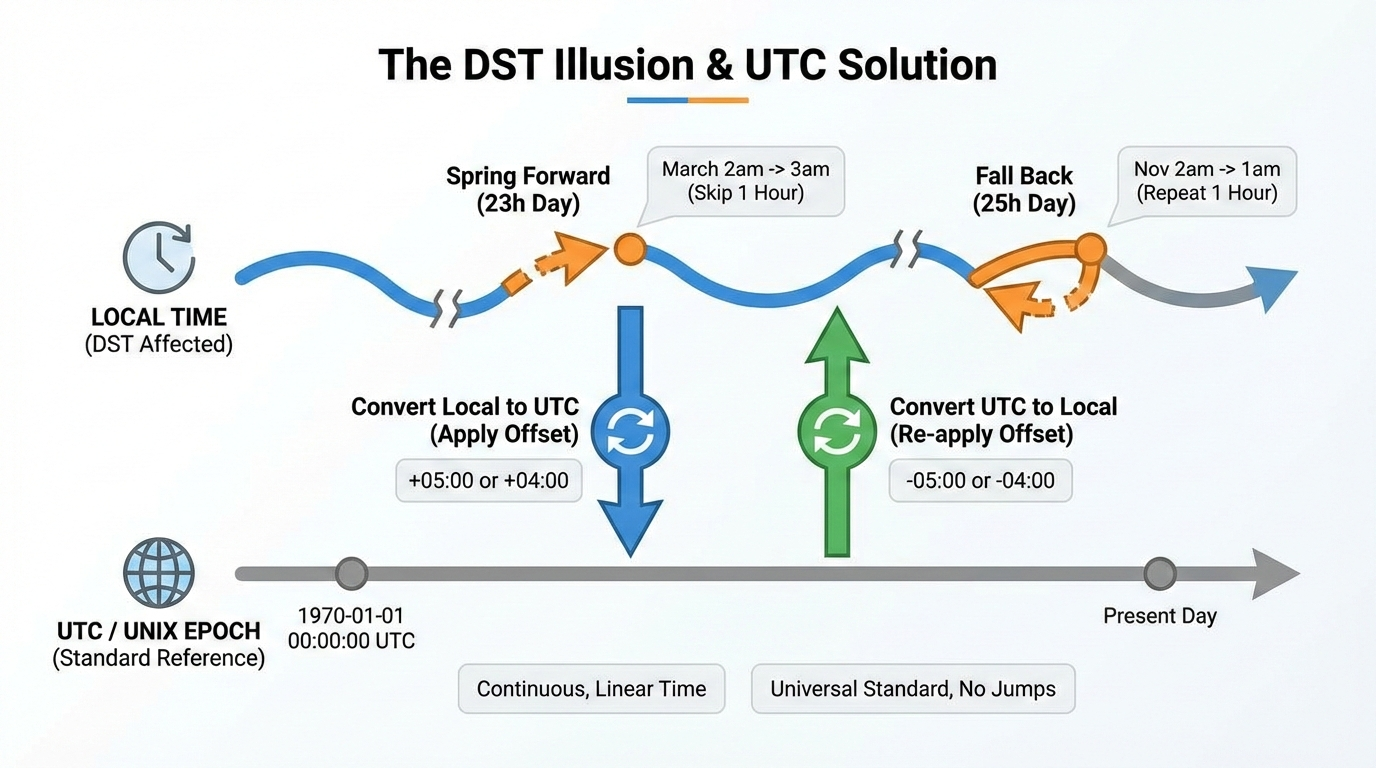
    解释夏令时(DST)带来的23小时/25小时错觉,并展示使用UTC作为标准参照物解决问题的流程,这是文章中最需要抽象思维的部分。

    Relying on local timezones for math is a recipe for bad data. Thanks to Daylight Saving Time (DST), a standard day might actually be 23 or 25 hours long. If you subtract local timestamps across a DST boundary, your tracking will break.

    The safest fix is the UNIX Epoch (January 1, 1970, at 00:00:00 UTC). A UNIX timestamp counts the exact seconds since that moment, ignoring geography and DST completely.

    Normalize your local times to UTC seconds first. When you measure everything in exactly 86,400-second days, you immune your app from local timezone quirks.

    How Do You Handle PostgreSQL and MySQL Queries?

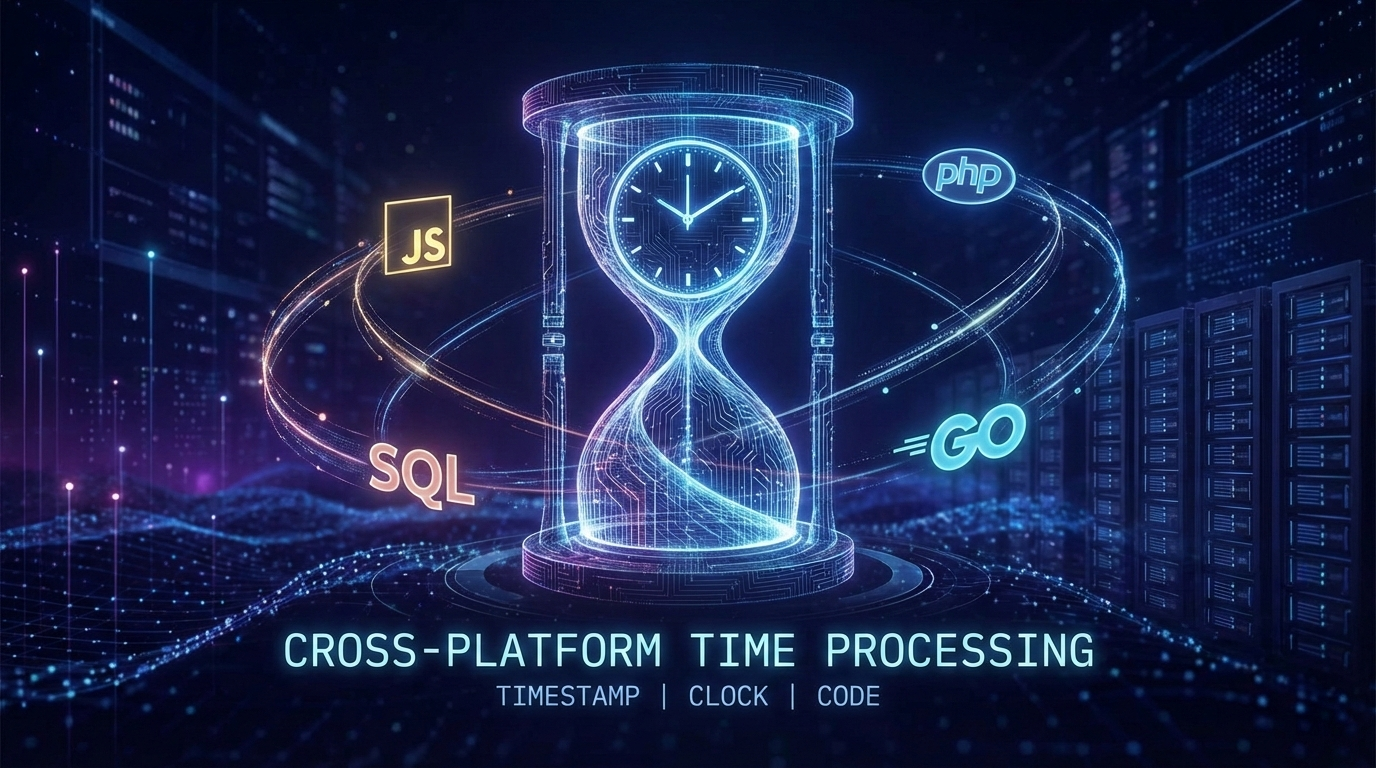
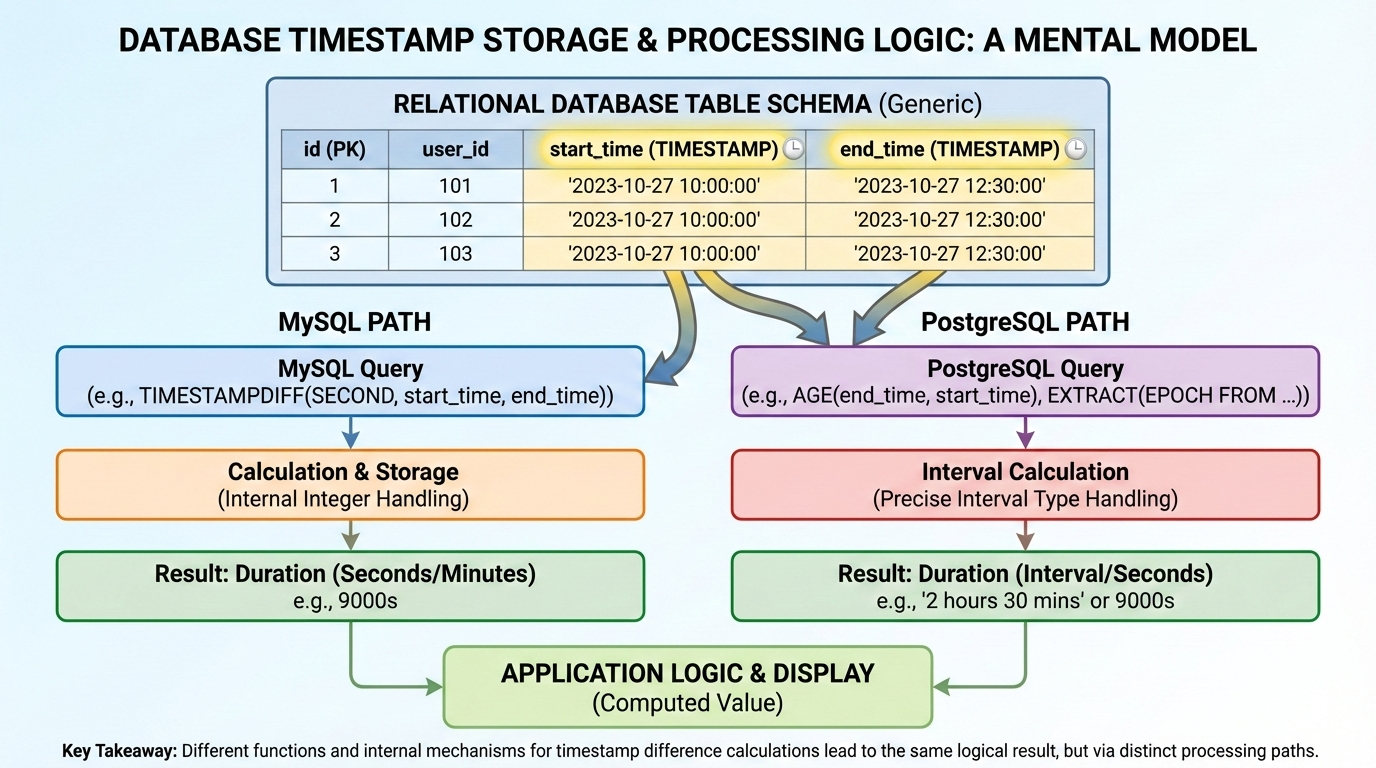
    在进入具体的数据库函数解释前,提供一个关于数据库时间戳存储和处理逻辑的视觉心理模型。

    Running calculations directly in your SQL query is usually much faster than pulling raw timestamps into your app and processing them later. While database engines handle date math natively, MySQL and PostgreSQL take entirely different approaches.

    MySQL: TIMESTAMPDIFF Explained

    For MySQL, TIMESTAMPDIFF() is the go-to function. You just pass it three arguments: the time unit you want back (like SECOND, MINUTE, HOUR, or DAY), the start timestamp, and the end timestamp.

    If you only care about raw seconds, UNIX_TIMESTAMP() is another solid option. Converting both dates first lets you do a simple subtraction: UNIX_TIMESTAMP(end_date) - UNIX_TIMESTAMP(start_date). This works great when exporting data to an external app that expects standard integers instead of formatted date strings.

    PostgreSQL: Extracting Epoch and Age

    PostgreSQL has the AGE() function, which gives you human-readable outputs like “1 mon 15 days”. It looks great on a dashboard, but it’s a headache to parse programmatically. For strict math, stick to EXTRACT(EPOCH FROM (date1 - date2)), which safely converts the interval into raw seconds.

    For example, if you need to flag overdue equipment, a database admin might use something like: extract(day from age(now(), rental.rental_date)) > 90. This handles the logic right at the database level, skipping the heavy backend processing entirely.

    JavaScript / Node.js: Converting Milliseconds to Seconds, Minutes, Hours, and Days

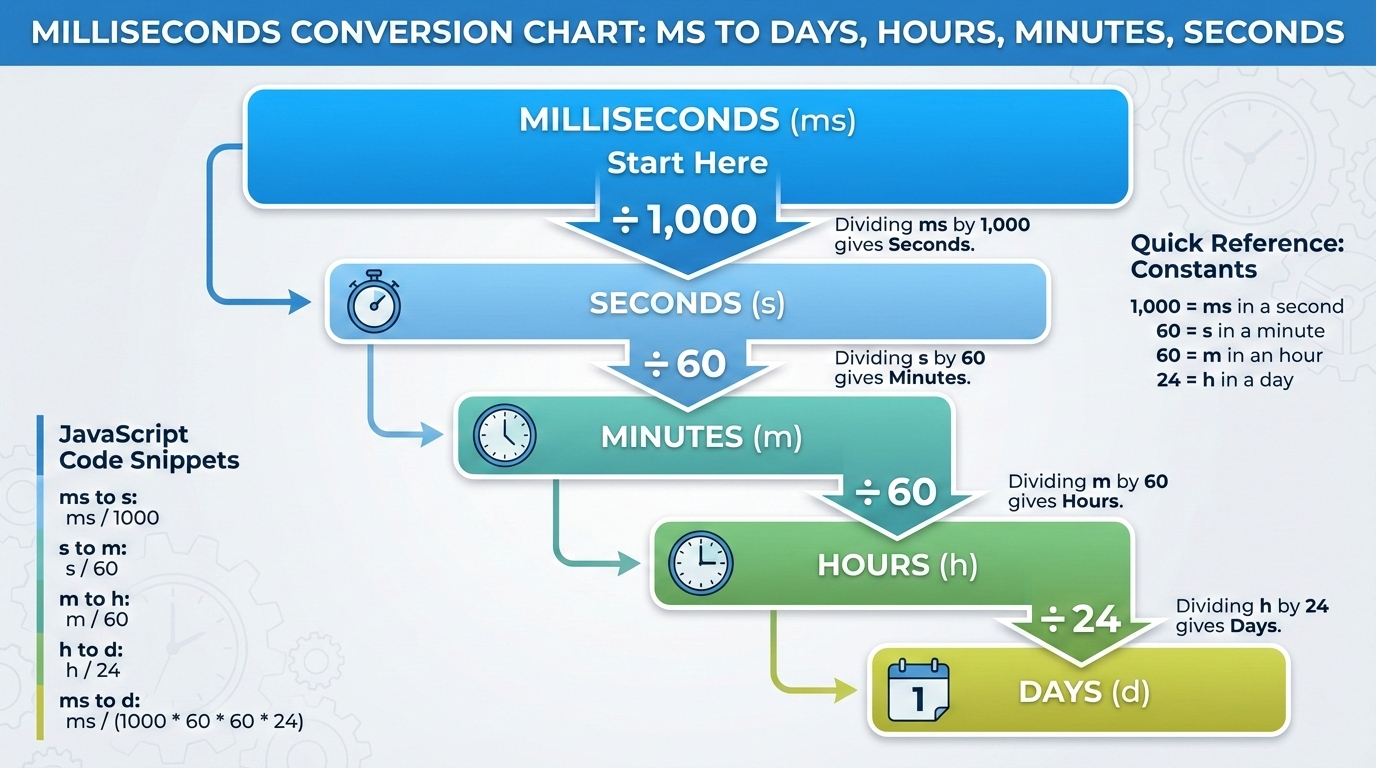
    将抽象且容易出错的数学乘除法直观化,帮助读者快速记忆毫秒到天、小时、分钟的换算比例。

    When you subtract standard Date objects in JavaScript or Node.js, you get the difference in raw milliseconds. Since JS doesn’t have a built-in duration formatter, you have to divide that integer yourself to get standard units:

    • Seconds: Divide by 1,000
    • Minutes: Divide by 1,000 * 60 (60,000)
    • Hours: Divide by 1,000 * 60 * 60 (3,600,000)
    • Days: Divide by 1,000 * 60 * 60 * 24 (86,400,000)

    Remember to wrap these in Math.floor() so floating-point decimals don’t mess up your UI.

    Other languages skip the millisecond math entirely. PHP’s strtotime() gives you seconds right away. Golang’s time.Sub() returns a typed Duration object, letting you call .Hours() or .Minutes() directly.

    FAQ

    How do you calculate the difference between two timestamps excluding weekends or break times?

    Simple subtraction won’t work here. You usually have to generate an array of dates between the two timestamps and filter out Saturdays and Sundays in your code. In enterprise setups, developers rely on specialized tools like SAP ABAP factory calendars to automatically drop non-working days.

    What happens if I subtract a future timestamp from a past timestamp?

    You get a negative integer. Just wrap your calculation in an Absolute Value (ABS) function. This forces the number to stay positive, keeping your countdowns and interval tracking systems intact.

    How do I handle timestamps that fall before the 1970 UNIX Epoch?

    Standard UNIX timestamp conversions usually fail for pre-1970 dates. As Stack Overflow expert OderWat notes, relying on functions like UNIX_TIMESTAMP() for older dates can break your code. It’s much safer to use direct date-diff functions like TIMESTAMPDIFF() that naturally support broader historical ranges.

    Why does my timestamp calculation return an inaccurate number of days when crossing timezones?

    Local timezones get hit by Daylight Saving Time (DST) shifts, which changes the total hours in a day. Always cast both timestamps to UTC before doing the math. This guarantees a uniform 24-hour day and stops DST from messing up your data.

    Conclusion

    Getting your timestamp math right comes down to using the correct native function and respecting UTC. Ignoring the UNIX Epoch or DST will eventually break your logic.

    Keep the Cross-Platform Syntax Matrix bookmarked for quick reference, and always test your timezone conversions using an interactive calculator before pushing your code to production environments.

  • What is a Unix Timestamp? The Complete Guide, Converter, and Y2038 Fix

    What is a Unix Timestamp? The Complete Guide, Converter, and Y2038 Fix

    A Unix timestamp is a simple numeric value that tracks the total number of seconds passed since January 1, 1970, at 00:00:00 UTC. Software systems use this universal, time-zone-independent standard to store dates efficiently and calculate time across different global platforms without any timezone confusion.

    Understanding the Unix Epoch and UTC

    The Unix Epoch—January 1, 1970, at 00:00:00 UTC—is the absolute starting line for Unix time. Every timestamp is just a running count of the seconds that have ticked by since that baseline moment. Servers, databases, and operating systems rely on this shared reference point to keep digital events synced around the world.

    Because it relies on UTC (Coordinated Universal Time), Unix time ignores local timezones entirely. If a server in New York and a server in Tokyo generate a timestamp at the exact same moment, they output the exact same integer. This skips the headache of dealing with daylight saving time adjustments or regional offsets.

    Computers also process raw integers much faster than text strings like “October 24, 2026, 10:00 AM EST.” Storing time as a single number speeds up database queries and keeps JSON API payloads light. When it’s time to show the date to a user, the frontend simply calculates the offset from the Epoch and applies the local browser’s timezone rules.

    Timezone-agnostic timekeeping illustration

    The Unix Epoch—January 1, 1970, at 00:00:00 UTC—is the absolute starting line for Unix time. Every timestamp is just a running count of the seconds that have ticked by since that baseline moment. Servers, databases, and operating systems rely on this shared reference point to keep digital events synced around the world.

    Because it relies on UTC (Coordinated Universal Time), Unix time ignores local timezones entirely. If a server in New York and a server in Tokyo generate a timestamp at the exact same moment, they output the exact same integer. This skips the headache of dealing with daylight saving time adjustments or regional offsets.

    Computers also process raw integers much faster than text strings like “October 24, 2026, 10:00 AM EST.” Storing time as a single number speeds up database queries and keeps JSON API payloads light. When it’s time to show the date to a user, the frontend simply calculates the offset from the Epoch and applies the local browser’s timezone rules.

    You will usually see timestamps in one of two formats: 10 digits or 13 digits.

    A 10-digit Unix timestamp counts standard seconds. This is the default format for most backend systems, relational databases, and Unix-like operating systems like Linux and macOS.

    A 13-digit Unix timestamp counts milliseconds instead of seconds. JavaScript and many modern frontend environments use this format for higher precision event tracking by adding three extra digits. Converting between the two is just basic math: multiply a 10-digit timestamp by 1,000 to get milliseconds, or divide a 13-digit timestamp by 1,000 to drop back to seconds.

    Cheat Sheet for Non-Developers

    You don’t always need a converter to figure out roughly what year a timestamp represents. An average calendar year packs in about 31,556,926 seconds.

    Adding 31.5 million to a timestamp moves it forward by roughly one year. For quick reference, a timestamp starting with 16 points to the early 2020s. If it starts with 17, you’re looking at dates spanning from late 2026 through the early 2030s. Recognizing these leading digits helps data analysts eyeball database rows and spot weird date ranges without writing custom conversion scripts.

    Cheat sheet for non-developers

    How to Use Unix Timestamps in Programming Languages

    Grabbing the current system time and formatting it correctly is a daily task in development. Here is how different Programming Languages handle their native time functions.

    In JavaScript, running Date.now() gives you the current 13-digit millisecond timestamp. If you need the 10-digit version, use Math.floor(Date.now() / 1000). To turn that raw number into a readable ISO 8601 string, you can call new Date().toISOString().

    Python relies on its time module. Running import time; time.time() returns a float of the current seconds. To convert that float into an ISO 8601 string, use datetime.datetime.utcfromtimestamp(time.time()).isoformat().

    PHP keeps things straightforward with the time() function for a 10-digit timestamp. If you need milliseconds, you use microtime(true). To format that core PHP timestamp into an ISO 8601 string, use date('c', time()).

    Relational databases have their own extraction commands. MySQL uses UNIX_TIMESTAMP(), while PostgreSQL relies on EXTRACT(EPOCH FROM NOW()). When sending these database records to an API, formatting the integers into ISO 8601 ensures mobile apps and third-party integrations can read the dates correctly.

    What is the Year 2038 Problem (Y2038)?

    The Year 2038 Problem (Y2038) is a ticking clock for older systems that store time as a 32-bit signed integer. Because of strict binary limits, a 32-bit integer maxes out at exactly 2,147,483,647.

    When the global timestamp hits that number, systems won’t smoothly roll over to the next second. Instead, the integer overflows and flips to a massive negative number (-2,147,483,648). Computers reading that negative value will suddenly think the date is December 13, 1901.

    This overflow is scheduled to happen on January 19, 2038, at 03:14:08 UTC. If they aren’t updated, legacy apps, older servers, and embedded IoT hardware using 32-bit integers will face massive logic failures, corrupted databases, and total crashes.

    32-bit integer overflow visualization

    Future-Proofing Your Database against Y2038

    The only real fix for Y2038 is upgrading to a 64-bit integer architecture. A 64-bit signed integer pushes the next overflow event out by about 292 billion years—safely making it a problem for another era.

    Database admins need to audit their tables and find any columns storing time as INT or INTEGER. Updating those columns to BIGINT immediately secures that 64-bit capacity. You will also need to check your application’s source code to ensure the backend variables can handle the larger 64-bit memory size without accidentally trimming the numbers.

    How Do Systems Handle Leap Seconds?

    Standard Unix time pretends every day has exactly 86,400 seconds. It completely ignores leap seconds to keep the math predictable. When an actual leap second is added to global clocks, a Unix timestamp handles it by simply repeating the 86,400th second twice.

    Repeating a second is dangerous for distributed systems that rely on strict chronological order. It can crash financial databases or scramble transaction tokens. To get around this, major tech companies use a workaround called “Leap Smearing.” Rather than repeating a specific second, servers using leap smearing slightly stretch out the length of every second across a 24-hour period. The extra time gets absorbed seamlessly, and the system clock keeps moving forward without a hiccup.

    FAQ

    What is the difference between Unix time and Epoch time?

    There really isn’t a practical difference; developers use the terms interchangeably. Technically, Epoch time refers to the starting baseline (January 1, 1970), while Unix time is the actual count of seconds ticking away since that moment.

    Why do some Unix timestamps have 10 digits while others have 13 digits?

    A 10-digit timestamp counts standard seconds, which is the default for most backend servers and databases. A 13-digit timestamp counts exact milliseconds. JavaScript and modern frontend frameworks use the 13-digit format to track high-precision events.

    How does Unix time handle leap seconds?

    It essentially ignores them. Unix time assumes every day has exactly 86,400 seconds. When a leap second happens, the standard timestamp just repeats the final second. To avoid issues with repeated seconds, larger enterprise systems often use “leap smearing” to gradually stretch the extra time out across a full day.

    Why did the Unix epoch start specifically on January 1, 1970?

    It was mostly an arbitrary choice. Back in the early 1970s, Unix engineers needed a recent, convenient date to start counting system time. January 1, 1970, offered a clean baseline that fit neatly into the tight memory limits of early computers.

    Can a Unix timestamp be a negative number?

    Yes, negative timestamps simply represent historical dates before the Epoch (prior to January 1, 1970, at 00:00:00 UTC). The system counts backward, letting software track past dates using the exact same logic.

    Conclusion

    A Unix timestamp acts as the backbone of timezone-independent timekeeping, steadily counting seconds since 1970. Turning complex dates into a single number makes database storage cleaner, processing faster, and cross-platform communication much more reliable.

    If you are still running legacy systems, audit your database and code to ensure they support 64-bit architectures. Upgrading those limits now is the best way to future-proof your infrastructure and avoid the system crashes coming with the Year 2038 overflow.